CreatorGuide
What Is Teachable? How It Works, What It Costs, and Who It's For (2026)
What Teachable is and how it works in 2026: what you can sell, how schools, checkout, and payouts work, current plans and fees, recent changes, and who should and should not use it.
What is Teachable? Teachable is an online platform that lets experts, creators, and businesses build and sell their own online courses, coaching, digital downloads, and memberships from a website they control, called a school. Instead of uploading a course to a marketplace that sets the price and keeps most of the revenue, you run your own storefront: Teachable hosts the content, provides the checkout, handles payments and sales tax, enrolls the buyer, and delivers the lessons on the web and in mobile apps. You pay Teachable a monthly or annual subscription, plus a transaction fee on its cheapest plan. Teachable, Inc. is based in New York and has been part of the Brazilian creator-economy company Hotmart since a 2020 acquisition, and its pricing page says more than 150,000 creators, experts, and businesses use it, with creators in 180 countries. This explainer covers how Teachable works, what you can sell, what it costs, what changed recently, and who it suits, using Teachable’s official pricing page and help center as checked on November 18, 2026. For an evaluation rather than an explanation, read our Teachable review.
How Teachable works
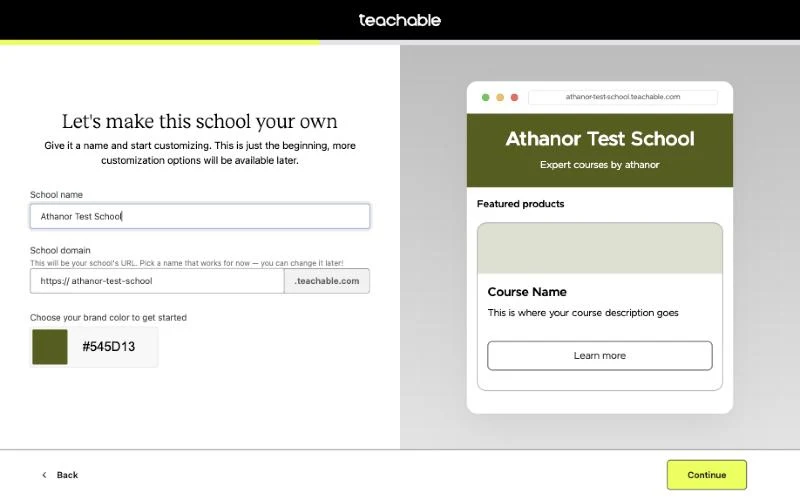
A new account starts by naming the school. In our November 18, 2026 test, the setup screen asked for a school name, a teachable.com subdomain, and a brand color, and previewed the homepage as we typed. Everything else (products, pages, payments) hangs off that school.
Teachable is built around a few simple ideas.
Your school. Each Teachable account runs a school: a branded site with your products, sales pages, checkout, and student area. You can use a Teachable subdomain or connect a custom domain, and on Growth you can remove Teachable branding.
Products. Inside the school you create products: courses, coaching products, digital downloads, memberships, and bundles. Each paid product gets one or more pricing plans: free, one-time purchase, payment plan, or subscription.
Checkout and payments. Students buy through Teachable’s checkout. Teachable Payments, which is powered by Stripe, processes the payment, and the pricing page lists U.S. sales tax, VAT, and GST handling on every plan. Teachable then pays out your earnings to your bank on a schedule; our how Teachable payouts work guide explains timing and holds.
Delivery. After purchase, the student is enrolled automatically and can learn in a browser or in Teachable’s iOS and Android apps, which Teachable says sync progress across devices and allow lessons to be downloaded for offline study.
What you can sell on Teachable
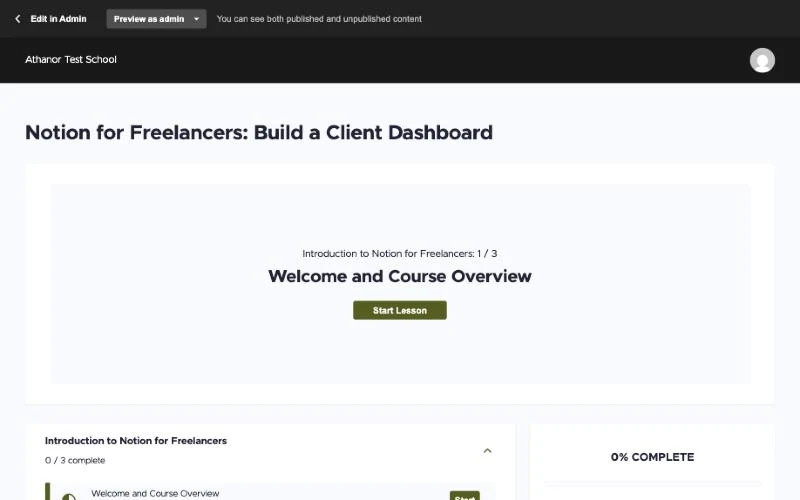
This is what a student sees when they open a course: the course title, the next lesson with a Start Lesson button, and a progress tracker. Courses, coaching, digital downloads, and memberships each appear in the admin’s Products menu.
| Product type | What it is | Typical use |
|---|---|---|
| Online courses | Sections and lessons with video, text, files, quizzes, and assessments | Self-paced or drip-released training |
| Coaching | A private client space with intake forms, approval, milestones, messages, and meeting links | 1:1 coaching programs and retainers |
| Digital downloads | Files such as templates, guides, or workbooks | Low-priced entry products |
| Memberships | Recurring access tiers across products | Ongoing libraries or communities of practice |
| Bundles | Several products sold together | Course plus coaching, or a full curriculum |
Courses support drip schedules, lesson comments, auto-graded quizzes, short-answer assessments, course compliance, and certificates on Growth. Teachable’s coaching product is explained in Teachable for coaches.
How you create a course on Teachable
Creating a course takes a few steps in the admin: create the product, then build the curriculum by generating a first draft with AI from your course description, starting from scratch, bulk uploading files (one lesson per file), or copying another course. You organize content into sections and lessons, add content blocks such as video, text, PDFs, and quizzes, set pricing and coupons, design the sales page, and publish. Our step-by-step how to create a course on Teachable tutorial covers each step.
How much Teachable costs
Teachable has no free plan. Every self-serve plan starts with a 7-day free trial and a 30-day money-back guarantee.
| Plan | Monthly | Annual (per month) | Published products | Teachable transaction fee |
|---|---|---|---|---|
| Starter | $39 | $29 | 5 | 7.5% |
| Builder | $89 | $69 | 10 | 0% |
| Growth | $189 | $139 | 50 | 0% |
| Custom | Quote | Quote | Flexible | 0% |
Beyond the subscription, every sale has payment processing, which depends on your country and the buyer’s payment method, and Teachable Payments schools choose a bundle that can add a percentage for extra features. Payment plans and subscriptions carry a 0.7% fee. Students who buy through Teachable’s checkout are unlimited, but students added another way count toward an allowance of 100 per school, above which Teachable charges $0.50 per student per month on schools created since September 3, 2026. Our Teachable pricing and Teachable fees explained guides cover the full picture.
See Teachable’s current plans and free trial
What changed at Teachable recently
- New plans in June 2025. Teachable replaced its Basic, Pro, and Pro+ plans with Starter, Builder, Growth, and Custom, and removed its own transaction fee on everything above Starter.
- Teachable Payments. A newer Stripe-powered payments experience with country-based processing rates and optional bundles.
- Community in maintenance mode. Teachable’s help center says it has paused investment in Community, and it is no longer available to new schools; existing communities keep working.
- AI tools. “Create with AI” is listed on every plan, and at its Thrive 2025 event Teachable introduced an experimental MCP Server that connects AI assistants such as Claude or ChatGPT to school data.
- A new usage-fee policy for students added outside checkout, applying to schools created on or after September 3, 2026, and to older schools from their first renewal on or after April 30, 2027.
Who Teachable is for
Teachable fits best when the course or coaching program is the core of the business, you can bring your own students through email, social media, or clients, and you value a short setup over deep customization. In those cases its focus is an advantage rather than a limitation. Typical good fits include:
- Solo experts and creators selling a focused catalog of courses, coaching, and downloads.
- Coaches who want screening, payments, and a private client space in one place.
- Creators selling internationally who want sales tax, VAT, and GST handled at checkout.
- Small education businesses that need more products, admins, and reporting on Growth or Custom.
Who should look elsewhere
- Creators with no audience yet may find a marketplace better for discovery; see Teachable vs Udemy.
- Community-led businesses need a platform with an active community feature, since Teachable’s is closed to new schools.
- Marketing-first creators who need funnels and email automation may prefer an all-in-one; see Teachable vs Systeme.io or Teachable vs Kajabi.
- Training providers that need SCORM or interactive learning should compare Teachable vs LearnWorlds.
Teachable compared with similar platforms
| Platform | Type | Entry price (monthly) | Best known for |
|---|---|---|---|
| Teachable | Course and coaching platform | $39 | Simple course commerce with built-in tax handling |
| Thinkific | Course and community platform | $109 | Unlimited courses, communities, live learning |
| Kajabi | Creator all-in-one | $179 | Courses plus email, funnels, community |
| Systeme.io | Marketing all-in-one | Free plan; $17 | Funnels, email, and courses on a budget |
| Udemy | Course marketplace | Free to publish | Built-in audience, revenue share |
For a ranked list by use case, see best Teachable alternatives, and for the closest head-to-head, Thinkific vs Teachable.
Bottom line
Teachable is a hosted platform for running your own online school: you create courses, coaching, downloads, and memberships, sell them through a checkout that handles payments and sales tax, and deliver them on the web and mobile. It costs $39 to $189 a month on self-serve plans, with a 7.5% transaction fee only on Starter. It suits course-first creators and coaches who bring their own audience, and is less suited to community-led or marketing-automation-heavy businesses. The easiest way to see whether it fits is to start a Teachable free trial and build one module.
Related Teachable guides: What the Teachable free trial includes.
FAQ
What is Teachable used for?
Teachable is used to create and sell online courses, 1:1 coaching programs, digital downloads, and memberships from your own branded school. It hosts the content, runs the checkout and payments, handles sales tax, enrolls buyers automatically, and delivers lessons to students on the web and in its iOS and Android apps.
Is Teachable free?
No. Teachable has no free plan in 2026. Plans start at $39 a month for Starter, or $29 a month billed annually, and every self-serve plan includes a 7-day free trial and a 30-day money-back guarantee. Some visitors are offered a 30-day trial on Builder through a pricing-page promotion.
Is Teachable a marketplace like Udemy?
No. Udemy is a marketplace where students browse a shared catalog and Udemy keeps a large share of organic sales. Teachable is software for running your own school: you bring the students, set your own prices, keep the customer list, and pay a subscription instead of a revenue share.
Who owns Teachable?
Teachable, Inc. is a New York–based company that was acquired by Hotmart, a creator-economy platform founded in Brazil, in March 2020. Reports at the time said Teachable would keep its own brand and operate as a standalone business within the Hotmart group.
Is Teachable good for beginners?
Yes, for beginners who already have a course idea and some way to reach students. The admin includes a setup guide, AI curriculum generation, and templates, and the checkout handles payments and tax. Beginners should model Starter’s 7.5% fee and use the free trial to build and test one real module first.