CreatorReview
Teachable Review (2026): We Tested the Builder Trial
Hands-on Teachable review: we built a course with Teachable AI on a Builder trial. What the AI got right, where it invented claims, pricing, and who it fits.
This Teachable review is for creators deciding whether the platform fits a real course business—not students reviewing a course they bought and not teams seeking a corporate learning management system by default. Teachable combines course delivery, coaching, digital downloads, memberships, checkout, payments, and sales tools in one hosted product. Its clearest appeal is reducing the number of systems a creator must assemble before selling. Its clearest constraint is that cost and control depend heavily on the plan: Starter takes a 7.5% platform fee, Builder is the first tier with the integrated affiliate program, and Growth is where team and branding controls become more useful. For this update we opened a Builder free trial on November 18, 2026 and built a real course: we generated a 24-lesson curriculum and sales page with Teachable’s AI, added an AI quiz, created a digital download, previewed everything as a student, and checked what happens when you try to set a price. Pricing and plan details were re-checked on Teachable’s public pricing page and the in-app plans page the same day. We did not process a live payment, test support response times, or measure conversion rates; where the verdict depends on those, we rely on Teachable’s documentation and say so.
Teachable review verdict
Teachable is a strong fit for a solo expert or small education business that wants to publish courses and related offers without building a WordPress stack or connecting a separate checkout. It supports more than self-paced courses: coaching, downloads, memberships, bundles, subscriptions, upsells, and a student mobile experience can live around the same school. The platform becomes particularly coherent on Builder, where the 7.5% Starter plan fee disappears and the native school-affiliate program becomes available.
It is not the automatic best choice for every creator. Starter’s fee becomes expensive after modest sales, Builder still includes only one admin-level user, and the most flexible team, import, API, branding, and reporting controls sit higher in the plan ladder. Creators who need SCORM delivery, unusually deep storefront customization, or a marketing suite that replaces a dedicated email platform should compare alternatives before migrating content.
Our practical verdict: shortlist Teachable when fast course commerce and low technical overhead matter more than maximum infrastructure control. Validate one representative product, payment path, student journey, refund, email sequence, and integration during the trial. If those work and the total fee model fits, Teachable can be a sensible long-term course-first platform.
Hands-on test: what we found in a Builder trial
We signed up for the monthly Builder trial and used one realistic product throughout: a beginner course called “Notion for Freelancers: Build a Client Dashboard”. Everything below happened inside the trial, before any payment details were added.
Setup takes minutes, and AI is the default path
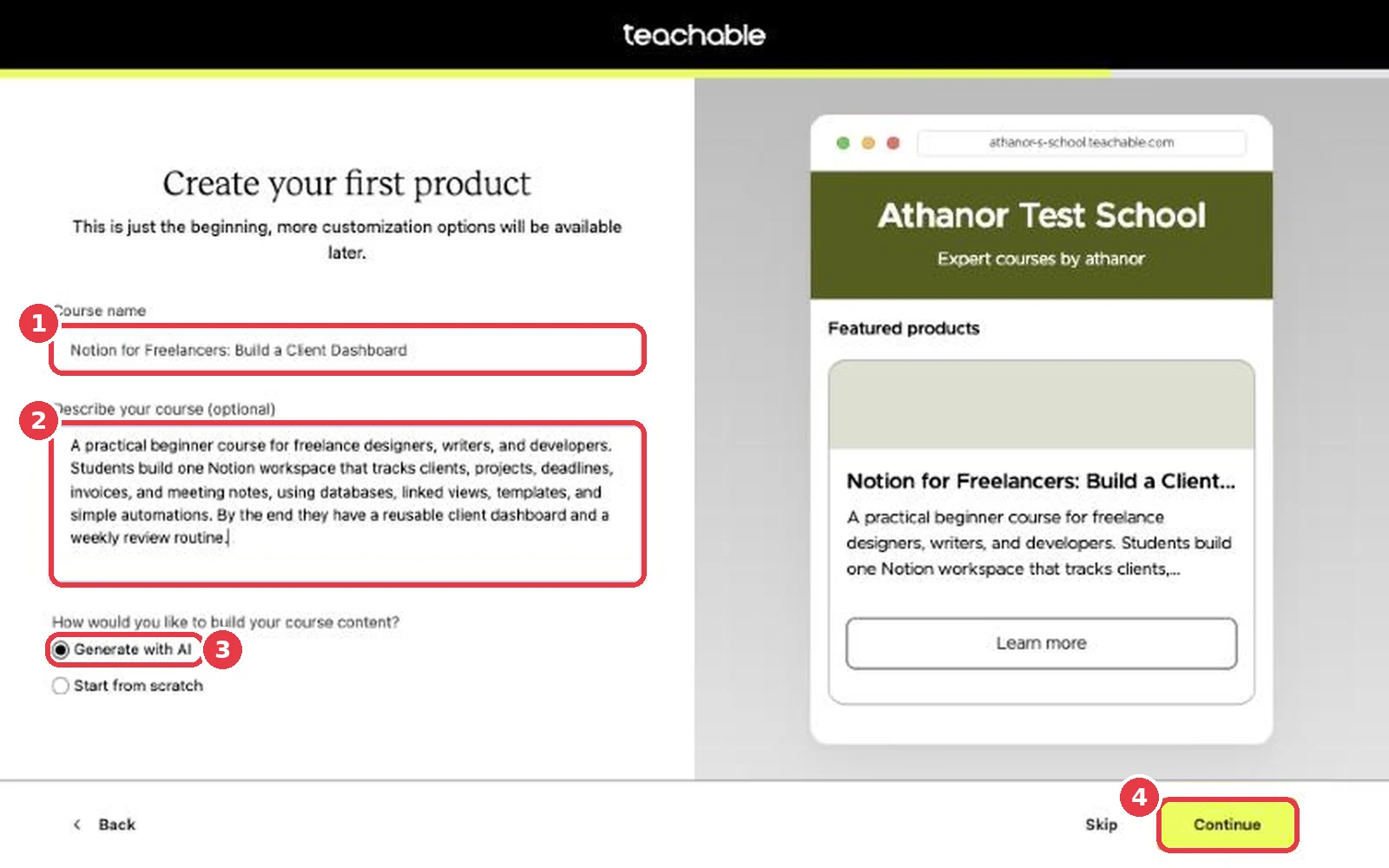
After a short onboarding survey and a screen for the school name, URL, and brand color, Teachable asks you to create your first product. “Generate with AI” is pre-selected; you only supply a course name and an optional description.
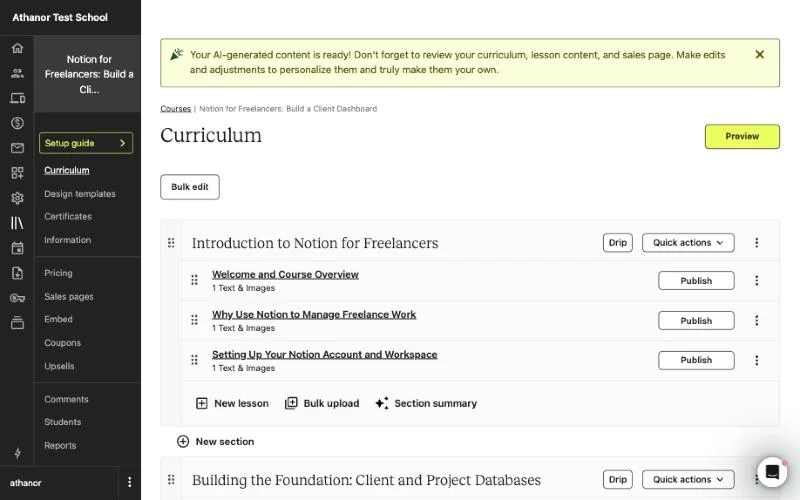
About 15 seconds later the admin opened on a setup guide with a complete draft: eight sections of three lessons each, 24 lessons in total, with a logical progression from setup to databases, deadlines, invoices, meeting notes, automations, and a final dashboard. As an outline, it was genuinely usable.
The AI lessons describe the lesson instead of teaching it
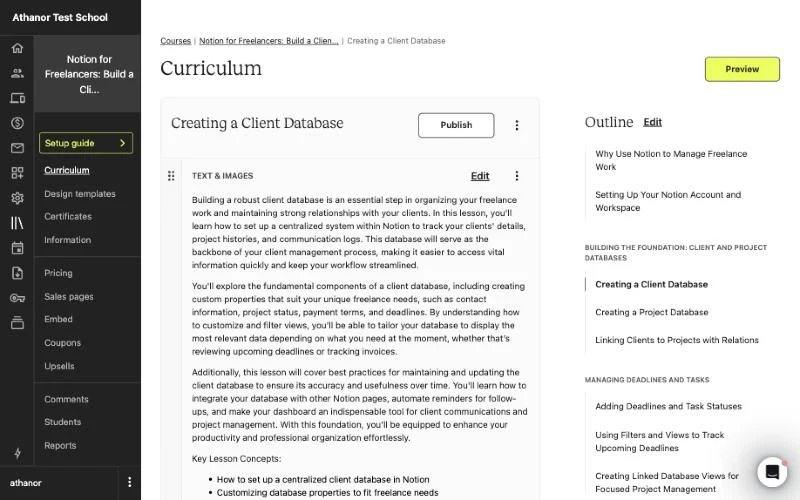
Each generated lesson contained about three paragraphs and a “Key Lesson Concepts” list. The text explains what the student will learn—“you’ll learn how to set up a centralized system within Notion”—but never gives the actual steps, property names, or examples. Every one of the 24 lessons is a placeholder you still have to write or record. Our Teachable AI tools review covers each generator in detail.
The AI sales page invents credentials and features
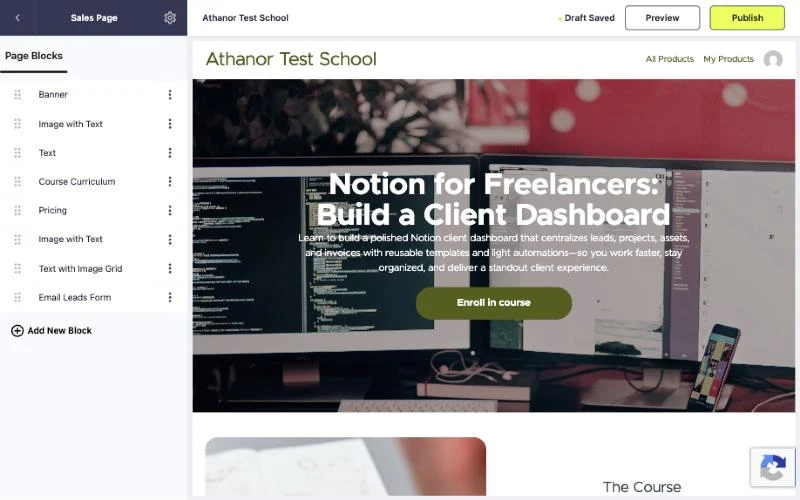
Teachable also drafted an eight-block sales page with a stock hero image, course description, curriculum block, pricing block, and an email sign-up form. The copy is where you need to be careful. It included an instructor bio we never supplied—“I’m athanor, a freelancer turned Notion systems builder who’s spent years helping independent creatives”—and promised a client portal and integrations with Google Calendar, Slack, and Zapier that appear nowhere in the 24-lesson curriculum. Publishing that page unedited would mean making claims about yourself and your course that are not true.
You cannot set a price until payments onboarding is complete
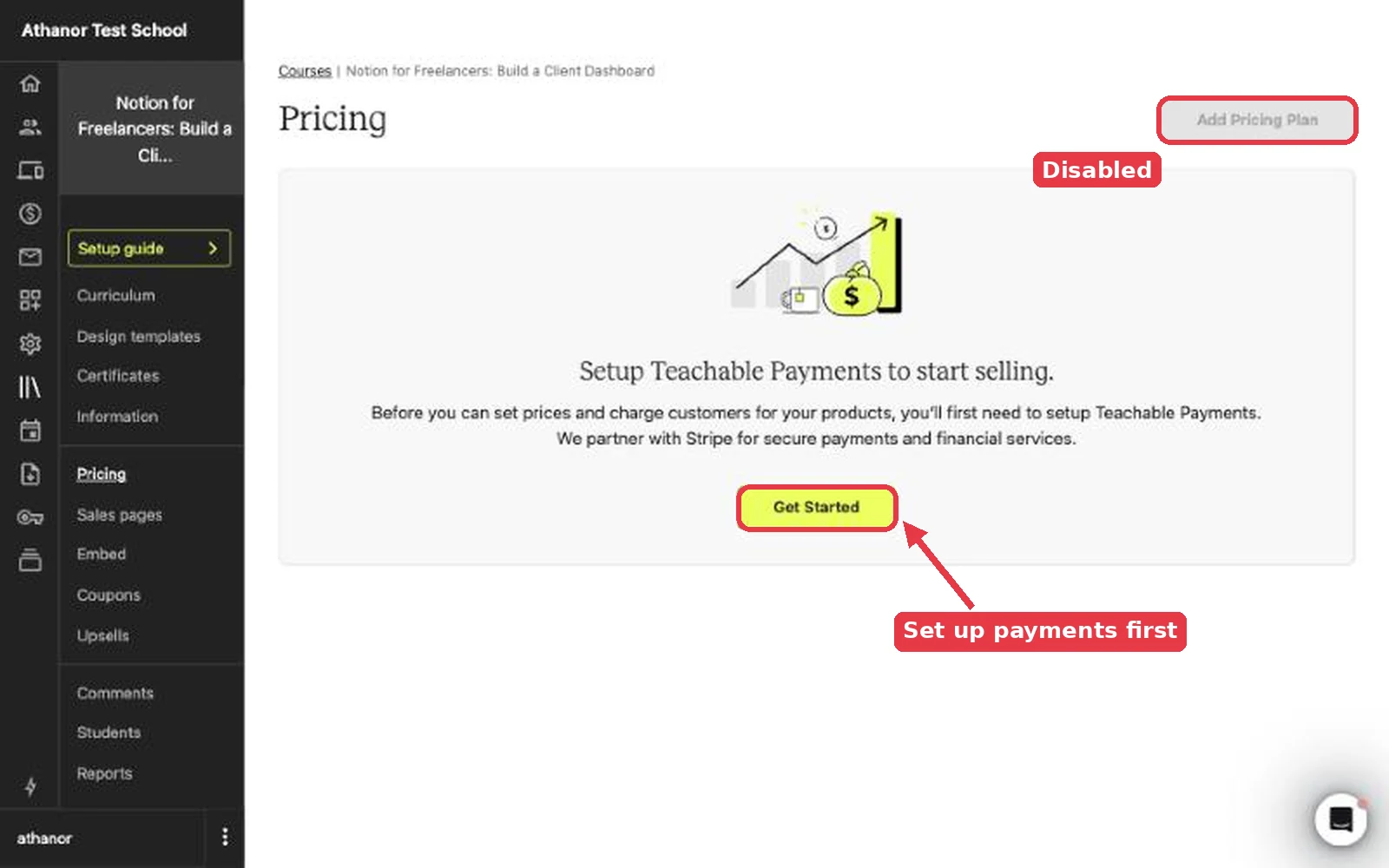
When we opened Pricing, “Add Pricing Plan” was disabled. Teachable requires you to set up Teachable Payments—Stripe onboarding that starts by choosing your business country—before you can price anything. The same gate blocked Memberships entirely, and the digital download wizard silently skipped its pricing step. Plan for this: identity and bank verification belong at the start of your trial, not the night before launch.
The student side is clean and simple
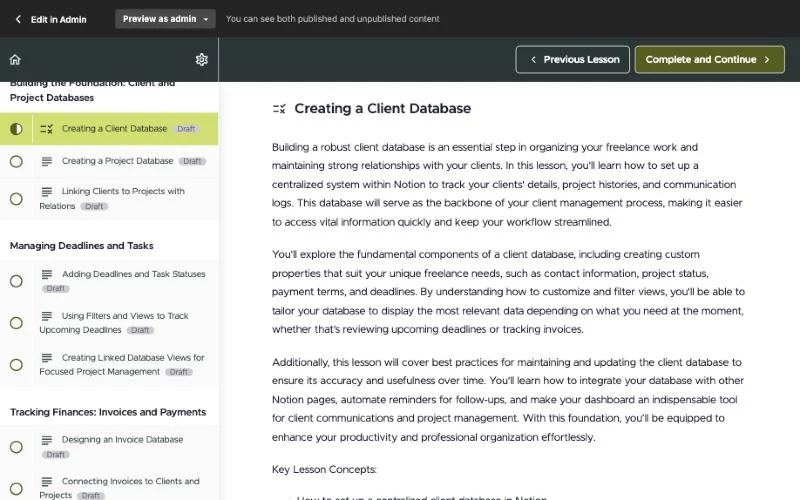
Previewing as a student showed a familiar layout: lesson list with progress circles on the left, content on the right, and a “Complete and Continue” button. The AI quiz we added appeared inline under the lesson text as a six-question, one-at-a-time quiz.
The in-app plans page shows limits the public page does not
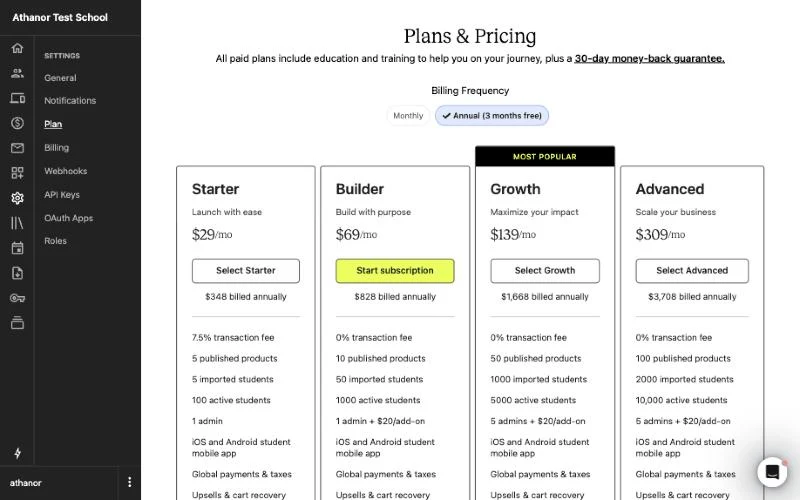
Inside the admin, Settings → Plan lists caps that the public pricing table leaves out: active students (100 on Starter, 1,000 on Builder, 5,000 on Growth), imported students, and admin seats with $20 add-ons. It also offers an Advanced plan—$309 a month billed annually, with 100 products and 10,000 active students—that does not appear on the public pricing page. The Teachable pricing guide covers these limits.
What the test changed in our verdict
The trial confirmed Teachable’s main strength: a non-technical creator can go from a course idea to a structured school, curriculum, sales page, and student experience in under an hour. It also showed where that speed misleads. The AI produces structure, not teaching, and its marketing copy needs fact-checking before it goes anywhere near a buyer. Budget your time for writing lessons and completing payments onboarding; those, not the course builder, are the real work.
Teachable or Thinkific? The short answer
Many readers arrive here while also pricing Thinkific, so here is the one-paragraph version before the detail. Teachable has the lower entry subscription, at $39 a month for Starter against $109 for Thinkific Start on monthly billing, but Starter adds a 7.5% fee on every sale and allows only five published products. Once you sell regularly, the fair comparison is Teachable Builder at $89 a month, with 0% Teachable fees, ten products, and the native affiliate program, against Thinkific Start. Pick Teachable when your offer is a focused mix of a course, coaching, and downloads sold through one simple checkout, and when international tax handling matters. Pick Thinkific when you need many courses, a built-in community, or live cohorts, because Teachable’s Community feature is closed to new schools. Our Thinkific vs Teachable comparison prices the matching plans side by side, and Thinkific pricing covers the other side’s tiers.
Features that affect the buying decision
Teachable’s documented product set covers online courses, one-to-one coaching, digital downloads, and memberships. Course content can include video, downloads, drip schedules, lesson comments, quizzes, short-answer assessments, certificates, and completion requirements. Creators can sell in multiple currencies and package offers with coupons, bundles, order bumps, upsells, subscriptions, payment plans, and abandoned-cart emails. Students can use Teachable’s iOS and Android apps rather than relying entirely on a browser.
Those features matter because they shorten the path from expertise to a sellable product. A course creator can host lessons, take payment, enroll the buyer, monitor progress, and add another offer without maintaining plugins or a custom application. A coach can sell sessions beside a course, and a creator can use a low-priced download as a lead-in to a larger program. See Teachable for coaches if live delivery is the center of the offer rather than an add-on.
The plan boundaries are just as important as the feature list. Starter allows five published products, Builder ten, and Growth fifty. Starter and Builder include one admin-level user; Growth includes five. Teachable documents one, three, and five installed app integrations respectively across those plans. The integrated affiliate program starts on Builder, while Growth adds capabilities such as custom admin roles, more substantial imports, removing Teachable branding, and higher-level reporting or support shown in the current matrix.
The platform is best understood as a hosted course-commerce system, not an unlimited marketing or enterprise-learning platform. Confirm the exact plan for any non-negotiable API, webhook, bulk import, user-role, reporting, community, or white-label requirement before purchase.
What changed at Teachable in 2025 and 2026
Several recent changes affect a buying decision made today, and older reviews often miss them.
- Community is in maintenance mode. Teachable’s help center states that it has paused investment in Community. Existing communities keep running, but Teachable is not adding features or actively fixing reported bugs, and Community is no longer available to new schools or to schools that never created one. Teachable now points creators to lesson comments or an external Discord or Slack space. Treat Teachable as a course-and-commerce platform, not a community platform.
- Teachable Payments has a layered fee model. On Teachable Payments, the plan fee (7.5% on Starter, 0% above it) is separate from processing, which varies by school country and payment method, and from the bundle you select. Teachable’s own example shows a US school on its Global bundle paying 2.9% + $0.30 plus 2.8% on a domestic card. Our Teachable fees explained guide breaks every layer down.
- AI tools are part of every plan. The pricing page lists “Create with AI” on Starter, Builder, and Growth. At its Thrive 2025 event, Teachable also introduced an experimental MCP Server that connects AI assistants such as Claude or ChatGPT to school data, offered as a beta on request, and it lists adaptive assessments and personalized pathways on its 2026 roadmap. Roadmap items are plans, not shipped features, so do not buy on them.
- The student mobile app was upgraded. Teachable says its iOS and Android app now adapts courses to small screens, syncs progress between devices, and lets students download lessons for offline study.
- Coaching is a proper product type. Coaching products now include intake forms with optional approval, per-client milestones, and Calendly scheduling. See Teachable for coaches for how it works and where it stops.
Course creation and student experience
Teachable’s core workflow is structured around products, curricula, lessons, and a hosted school. Its current pricing matrix makes learning mechanics such as drip content, lesson comments, auto-graded quizzes, short-answer assessments, certificates, progress reporting, and course compliance broadly available. That is enough for many knowledge businesses selling self-paced instruction, guided cohorts, or certification-style completion without formal SCORM requirements.
The student experience includes web access and Teachable’s shared mobile apps. Mobile availability can reduce friction for video-heavy or habit-based courses, but it is not the same as owning a fully branded app. If app-store branding, offline behavior, notifications, or device-specific interactions are critical, test them explicitly rather than inferring them from an “iOS and Android” line in a pricing table.
Course quality still depends on instructional design. Drip schedules and certificates do not prove that learners finish or get results. During the trial, create a short but representative module with the same video length, downloads, quizzes, comments, accessibility needs, and compliance settings planned for launch. Enroll test students on desktop and mobile. Then verify navigation, captions, progress behavior, completion rules, emails, and support instructions. Our Teachable course launch checklist turns that evaluation into a pre-launch sequence.
Creators delivering regulated training or imported SCORM packages should not assume Teachable is designed for that use case. A learning-platform specialist such as LearnWorlds or an enterprise plan elsewhere may fit better when standards-based content, advanced assessment, or multi-organization controls are essential.
Sales, checkout, and affiliate features
Teachable’s commercial advantage is not merely hosting video. It connects a product page and checkout to enrollment, tax and payment tools, subscriptions or payment plans, coupons, upsells, order bumps, abandoned-cart emails, student referrals, and reporting. That reduces the number of handoffs where a buyer can be lost or an automation can fail. Creators can also sell downloads, coaching, and memberships around the main course rather than operating a separate storefront for each format.
The integrated school-affiliate program begins on Builder. Official documentation says creators can add affiliates, accept applications, set commission percentages, restrict promotion to selected products, provide links or resources, and review sales. External landing pages must send buyers through the correct Teachable checkout URL for attribution. BackOffice can automate affiliate and author payouts on eligible configurations, but it adds a service fee; without it, the school owner retains more manual payout and tax-form work.
These tools are commercially useful, yet they do not replace channel strategy. An affiliate program without suitable partners, clear terms, approved creative, and payout operations will not generate demand. Likewise, built-in email and cart recovery should be evaluated against the segmentation and automation depth of a dedicated email platform. Test the actual trigger, message, attribution, refund, and commission path before inviting partners.
For a referral-led launch, Builder is the realistic starting comparison because Starter has neither 0% plan fees nor the integrated affiliate program. If course discovery depends more on brand design and community than affiliate selling, compare Thinkific vs Teachable before deciding.
Pricing and total value
Current USD pricing is $39 monthly for Starter, $89 for Builder, and $189 for Growth. When billed annually, the published monthly equivalents are $29, $69, and $139, charged as $348, $828, and $1,668 upfront. Custom requires a quote. All three self-serve plans advertise a seven-day trial and a 30-day school-plan guarantee.
Starter adds a 7.5% Teachable plan fee to every sale. Builder, Growth, and the published higher tier show 0%. Standard payment processing still applies, and a school may also pay for payment bundles or BackOffice, international methods, currency conversion, chargebacks, refunds, extra administrators, or usage beyond documented thresholds. “0% transaction fee” therefore means no plan-level percentage, not free payment acceptance.
The simple annual-rate break-even between Starter and Builder is about $533 in monthly sales: Builder costs $40 more per month, and $40 divided by 7.5% is $533. On monthly billing, the threshold is roughly $667. Builder can be justified earlier if the affiliate program or larger catalog is required. Growth should be justified by capacity and operations, not fee savings, because Builder already has a 0% plan fee.
Value depends on what Teachable replaces. A creator who would otherwise pay for hosting, checkout, tax tooling, student access, course software, and affiliate management may find the subscription efficient. Someone who already has a mature site, checkout, email automation, community, and reporting stack could be paying for overlap. Use our full Teachable pricing guide and Teachable fees breakdown to model your own order mix.
See current Teachable pricing and plan limits
Pros and cons
Teachable’s strengths come from focus. It packages the core jobs of a knowledge-product business into a single hosted environment and exposes a clear growth path from a solo validation plan to a larger catalog and team. Its limitations mostly appear when a creator needs deeper control or when several fee layers are mistaken for one.
Pros
- Courses, coaching, downloads, and memberships can share one school and checkout system.
- Core learning tools include drip content, quizzes, certificates, comments, progress reporting, and mobile student access.
- Native sales tools cover coupons, subscriptions, payment plans, bundles, order bumps, upsells, and cart recovery.
- Builder and above remove Teachable’s plan transaction fee and add the integrated school-affiliate program.
- Teachable’s native payment experience can reduce tax, payout, and enrollment administration for eligible schools.
- The current product limits and feature matrix are public enough to build a realistic pre-purchase checklist.
Cons
- Starter’s 7.5% plan fee can make the entry plan more expensive than Builder after modest sales.
- Payment processing, optional commerce services, usage, refunds, and exception charges complicate the real cost.
- Builder still includes one admin-level user; useful team and custom-role controls sit on Growth or above.
- Integration, API, import, reporting, and branding flexibility expand by tier, so entry pricing can understate the plan a mature business needs.
- Teachable’s student app is not the same as a creator-owned, fully branded mobile app.
- Course-first consolidation may not replace advanced email automation, highly customized storefronts, or standards-based LMS requirements.
None of these cons proves poor reliability, support, or conversion. Those are experience claims that official feature research cannot establish. Use the trial and a documented test plan to evaluate them in the context of your own school.
Who should choose Teachable
Teachable is most persuasive when the creator’s bottleneck is operational setup rather than audience demand. It lets an expert concentrate on packaging and selling knowledge while the platform handles much of the hosted delivery and commerce flow.
- First-time course sellers should shortlist it when they want one hosted system and can launch within the short trial. Starter can validate demand, but model its fee before staying on it after sales begin.
- Solo creators with a proven flagship course are often best aligned with Builder because 0% plan fees and affiliate tools can matter more than the lowest subscription.
- Creators selling mixed formats benefit when courses, downloads, coaching, and memberships should share customer access and checkout.
- Affiliate-led education businesses should evaluate Builder or above and test link attribution, commission handling, refunds, and payout operations end to end.
- Small teams with larger catalogs should price Growth when multiple admins, custom permissions, imports, branding removal, or more products are operational requirements.
Choose based on the next twelve months, not an imagined future enterprise. Paying for Growth before a team or catalog exists can consume launch budget without improving the offer. Conversely, choosing Starter for an established high-ticket program can make variable fees exceed the price of the appropriate plan almost immediately.
Who should look elsewhere
Teachable is a weaker fit when the learning product is only one component of a broader marketing machine or when training standards and organizational controls dominate the requirement. A platform migration is costly, so identify these mismatches before importing students.
- Choose Thinkific for the shortlist when deeper site customization, communities, broader course catalog capacity, or a 30-day trial is more important. See our Thinkific vs Teachable comparison.
- Choose Kajabi for the shortlist when replacing a separate email, funnel, website, and community stack is the core objective, and the higher subscription is supportable. Read Teachable vs Kajabi.
- Consider Podia when a simpler creator storefront for downloads, community, email, and courses is more important than Teachable’s specific course-commerce workflow. See Podia vs Teachable.
- Consider LearnWorlds or an enterprise LMS when SCORM, interactive training, client groups, advanced assessment, or white-label academy controls are mandatory.
- Do not buy any platform yet when the offer, audience, or acquisition channel is unvalidated. Software will not fix weak positioning, and annual billing can turn an untested idea into sunk cost.
Our best Teachable alternatives ranks distinct options by the problem they solve rather than by feature count.
How to test Teachable before paying annually
The seven-day trial is short, so prepare assets before starting it. Use one representative course rather than an empty demo. The goal is to test the highest-risk workflow, not to browse every menu.
- Create one product with real video, text, a download, a quiz, captions, and the planned drip or completion rule.
- Build the sales page and checkout with the intended currency, coupon, payment plan, tax treatment, and refund language.
- Enroll at least two test students and inspect desktop and mobile journeys, emails, progress, comments, and certificate behavior.
- Connect the most important external app and verify data at both ends.
- If affiliates matter, use an eligible plan context to test a link from landing page through checkout, refund, and commission record.
- Export the available transaction, student, and progress reports to confirm the fields needed for operations.
- Ask support to classify imported students, usage fees, gateway availability, and any ambiguous requirement in writing.
- Compare the result with the same representative workflow on the closest alternative.
Only then choose monthly or annual billing. A visually attractive course page is not enough if payment, attribution, student access, or reporting fails the real workflow.
Bottom line
Teachable remains a credible course-first platform for creators who value a hosted path from product creation to payment and enrollment. Builder is the most balanced plan for many revenue-generating solo businesses because it removes the 7.5% Starter plan fee and unlocks the integrated affiliate program. Growth is better justified by team, catalog, import, role, branding, and reporting needs than by sales volume alone. The platform is less convincing for advanced marketing automation, standards-heavy training, or maximum storefront control. If the documented fit matches your business, start with Teachable’s official trial and validate a complete sale-to-learning workflow before committing for a year.
Related Teachable guides: Our hands-on walkthrough of creating a course on Teachable.
FAQ
Can Teachable’s AI create a whole course?
In our test it created a complete 24-lesson outline, draft lesson text, a quiz, and a sales page in under a minute. The outline was useful, but each lesson only summarized what it would teach, and the sales page invented an instructor biography and features. Treat the output as a structure to fill in, not a finished course.
Is Teachable good for beginners?
Yes, for beginners who already have a course idea and want hosted creation, checkout, enrollment, and delivery in one system. The main caution is economic: Starter’s low subscription includes a 7.5% plan fee. Beginners should test the complete workflow quickly and move to Builder when real sales or affiliate requirements justify it.
Does Teachable have a free plan in 2026?
No. Teachable’s current pricing page says there is no ongoing free plan. Starter is the lowest paid tier, and the self-serve plans include a seven-day free trial plus a published 30-day school-plan guarantee. Older reviews that recommend a Free, Basic, Pro, or Pro+ plan are using a previous lineup. When we canceled our trial, the account dropped to an unlisted “Free” plan with 0 published products and publishing paused, so it is a holding state, not a way to sell for free. See our Teachable free trial guide for trial lengths and what to test.
Is Teachable worth it for one course?
It can be, especially when one flagship course needs hosted video, checkout, payment plans, tax support, student access, and mobile delivery without a custom stack. Count expected sales and fees first. A low-volume test may fit Starter, while a proven course can make Builder cheaper because Starter takes 7.5% of sales.
Can Teachable replace an email marketing platform?
Teachable documents built-in email and sales tools, but replacement depends on the segmentation, automation, deliverability, templates, and reporting your business requires. Test the exact nurture, launch, cart-recovery, and student sequences you use. Many creators may still prefer a dedicated email platform connected to Teachable.
What is the biggest Teachable drawback?
For a new seller, it is the gap between headline price and total cost: Starter’s plan fee sits on top of payment processing, and other services or usage can add charges. For a mature business, the bigger constraint may be plan-gated team, integration, import, branding, or reporting control. The decisive drawback depends on the workflow.