CreatorReview
Teachable AI Review (2026): We Tested the Course Generator
We tested Teachable AI on a Builder trial: a 24-lesson outline in 15 seconds, a 6-question quiz, and a sales page that invented claims. What to use and what to rewrite.
This Teachable AI review is based on one afternoon of real use, not a feature list. On November 18, 2026 we opened a Builder free trial and asked Teachable’s AI to build a beginner course called “Notion for Freelancers: Build a Client Dashboard”. We then inspected everything it produced: the curriculum, the lesson text, an AI-generated quiz, and the sales page it wrote automatically. The short version is that Teachable’s AI is excellent at structure and weak at substance. It turned a two-sentence description into a sensible 24-lesson outline in about 15 seconds, and it built a usable quiz from a lesson in about 10 seconds. But every lesson it wrote only described what the lesson would cover, and the sales page invented an instructor biography and course features we never asked for. Below we show each tool with screenshots, explain what it is good for, and list exactly what you will still have to write yourself.
Teachable AI at a glance
| Tool we tested | Where it lives | What it produced | Verdict |
|---|---|---|---|
| Course generator | Create your first product → Generate with AI | 8 sections, 24 draft lessons, course description | Use it for the outline |
| Lesson text | Text & Images block (AI-marked) | ~250 words per lesson describing the topic | Rewrite every lesson |
| Quiz generator | Quiz block → Generate questions | 6 multiple-choice questions from one lesson | Keep, then improve the distractors |
| Sales page copy | Created automatically with the course | 8-block page with hero, bio, benefits, email form | Fact-check before publishing |
Teachable’s public pricing page lists “Create with AI” on every self-serve plan—Starter, Builder, and Growth—so these tools are not a premium add-on. Growth additionally lists free subtitles and translations, which we did not test.
The Teachable AI features we tested
1. The AI course generator
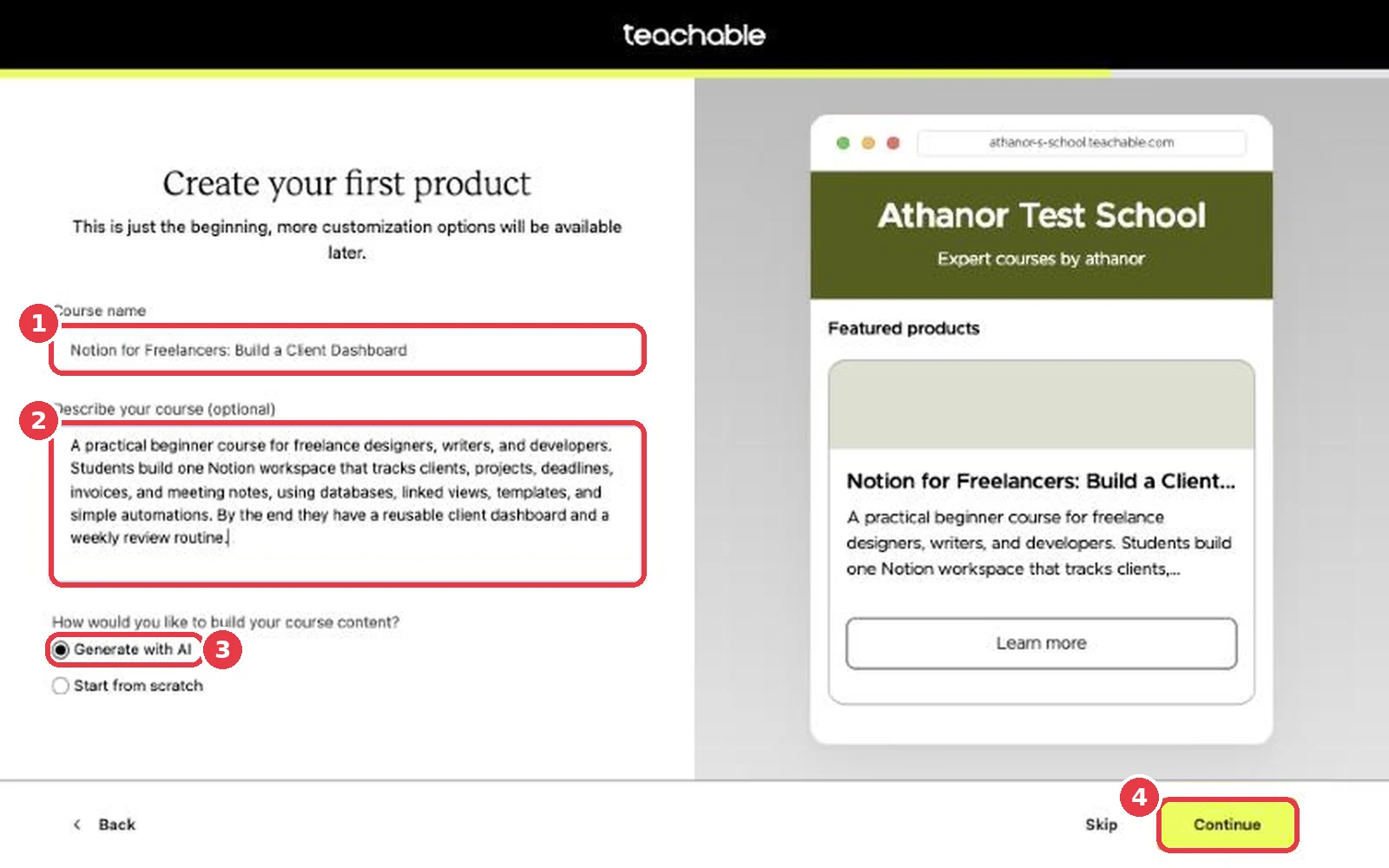
When you create your first product, Teachable asks for a course name and an optional description, and “Generate with AI” is already selected. We entered a title and a four-sentence description naming the audience (freelance designers, writers, and developers), the outcome (one Notion workspace for clients, projects, deadlines, invoices, and meeting notes), and the techniques (databases, linked views, templates, simple automations).
About 15 seconds after pressing Continue, the admin opened on a setup guide with the curriculum already built and a banner reminding us to review and personalize the AI-generated content.
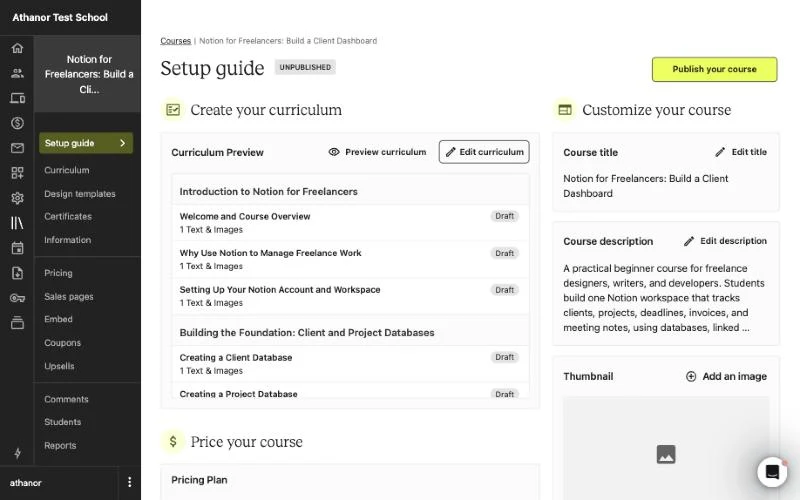
The structure was the best part of the whole test. The AI created eight sections of exactly three lessons each: an introduction, client and project databases, deadlines and tasks, invoices and payments, meeting notes, automations and templates, the final dashboard, and a wrap-up. Every topic in our description had a home, the order made sense for a beginner, and nothing obviously irrelevant was added. If you struggle to turn expertise into a course outline, this alone can save an evening.
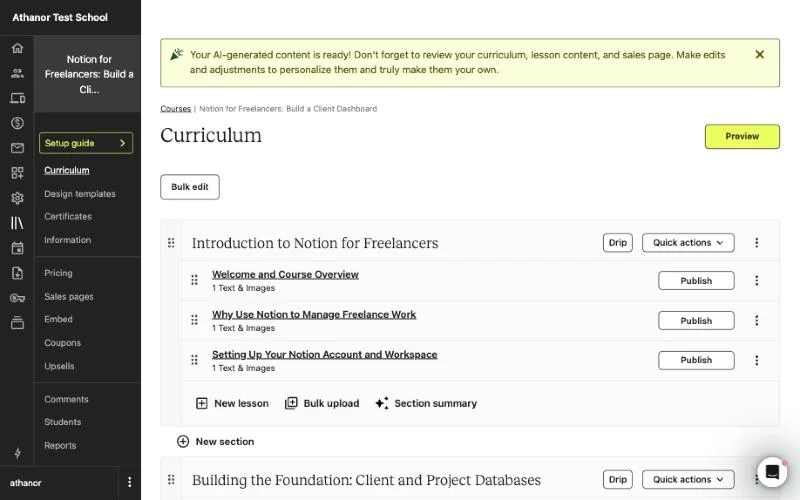
The rigid three-lessons-per-section pattern is worth noticing, though. Real courses rarely divide that evenly; some topics need one short lesson and others need five. Expect to merge, split, and delete lessons once you start recording.
2. AI-generated lesson text
Every generated lesson contained one Text & Images block. We opened “Creating a Client Database” as a representative example. It had three paragraphs of roughly 250 words and a five-item “Key Lesson Concepts” list.
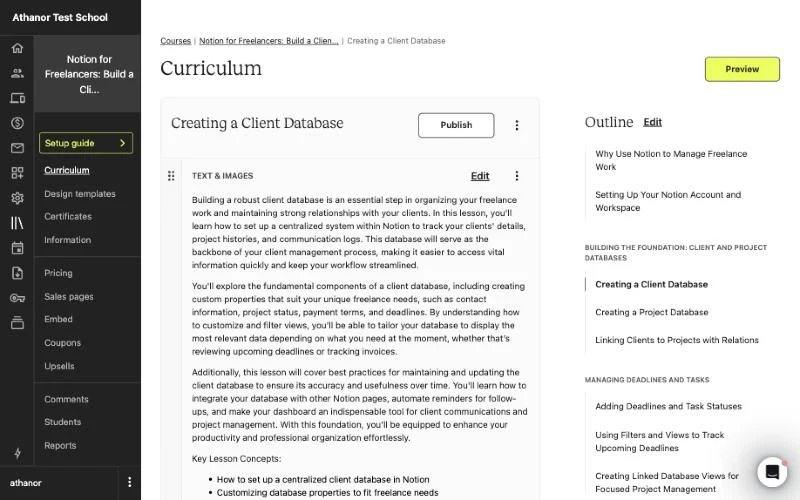
The problem is what the text actually says. It is written entirely in the future tense—“In this lesson, you’ll learn how to set up a centralized system”—and never teaches anything. There are no property names, no click paths, no example rows, no screenshots, and no exercise. A student who bought the course and read this lesson would know what the lesson was supposed to cover and nothing more. That is true for all 24 lessons, so the AI does not reduce the core work of creating a course: you still have to write or record every lesson yourself.
Used deliberately, the generated text still has value. It works as a lesson brief: a statement of scope and learning objectives you can keep at the top of the lesson, or use as a recording outline before deleting it.
3. The AI quiz generator
Inside a lesson, “Add content” opens a menu of blocks. Text & Images and Quiz are marked with an AI sparkle; the menu also offers video, PDF viewer, audio, resources, code examples, embeds, open-ended questions, and in-lesson upsell and referral blocks.
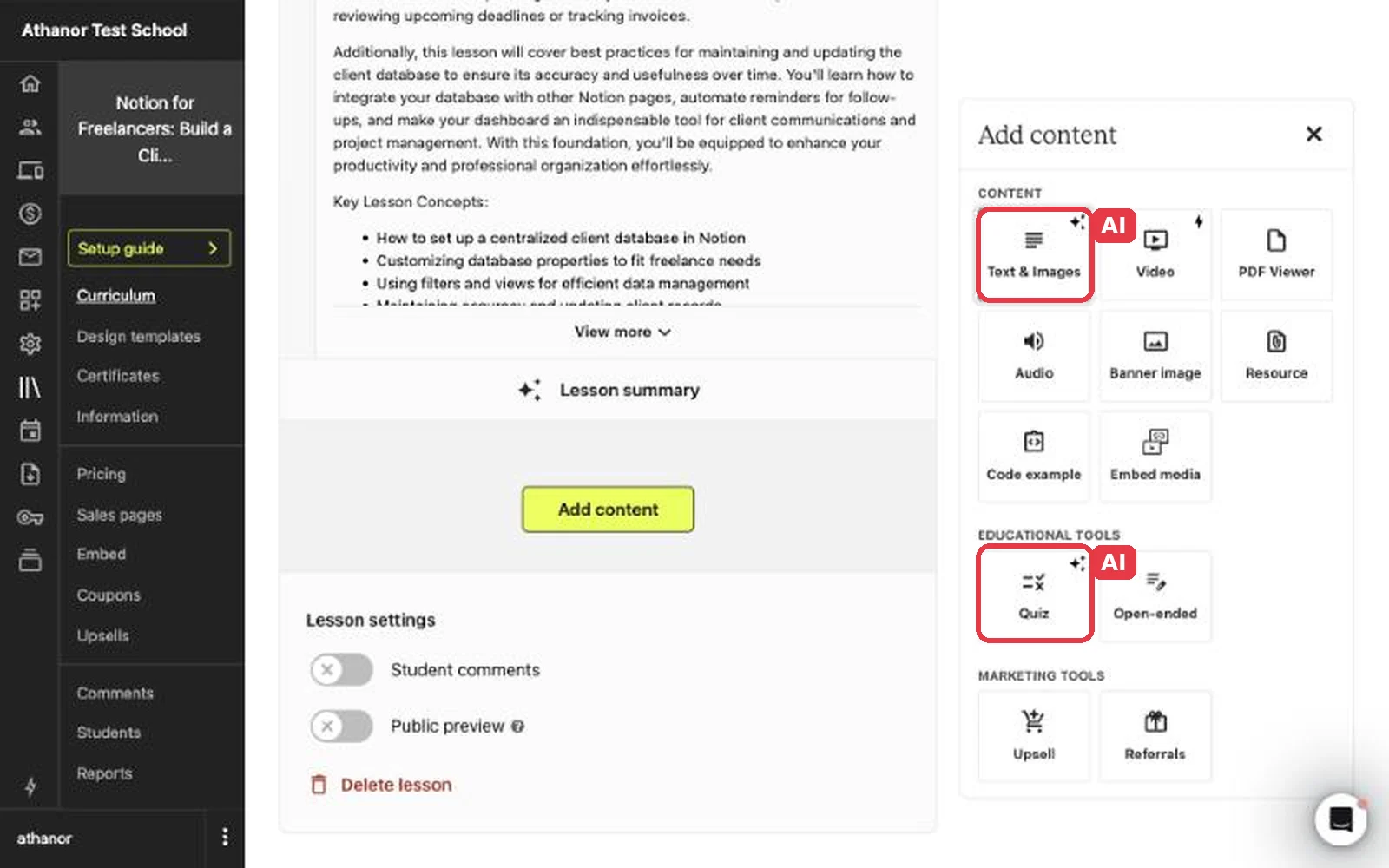
The quiz generator asks you to choose a course section and one or more lessons. Its own description says it can work from videos with subtitles, PDFs, and text lessons, and it warns that AI content may contain inaccuracies. We selected the client-database lesson and pressed Generate questions. About ten seconds later it returned six multiple-choice questions, each with the correct answer already marked.
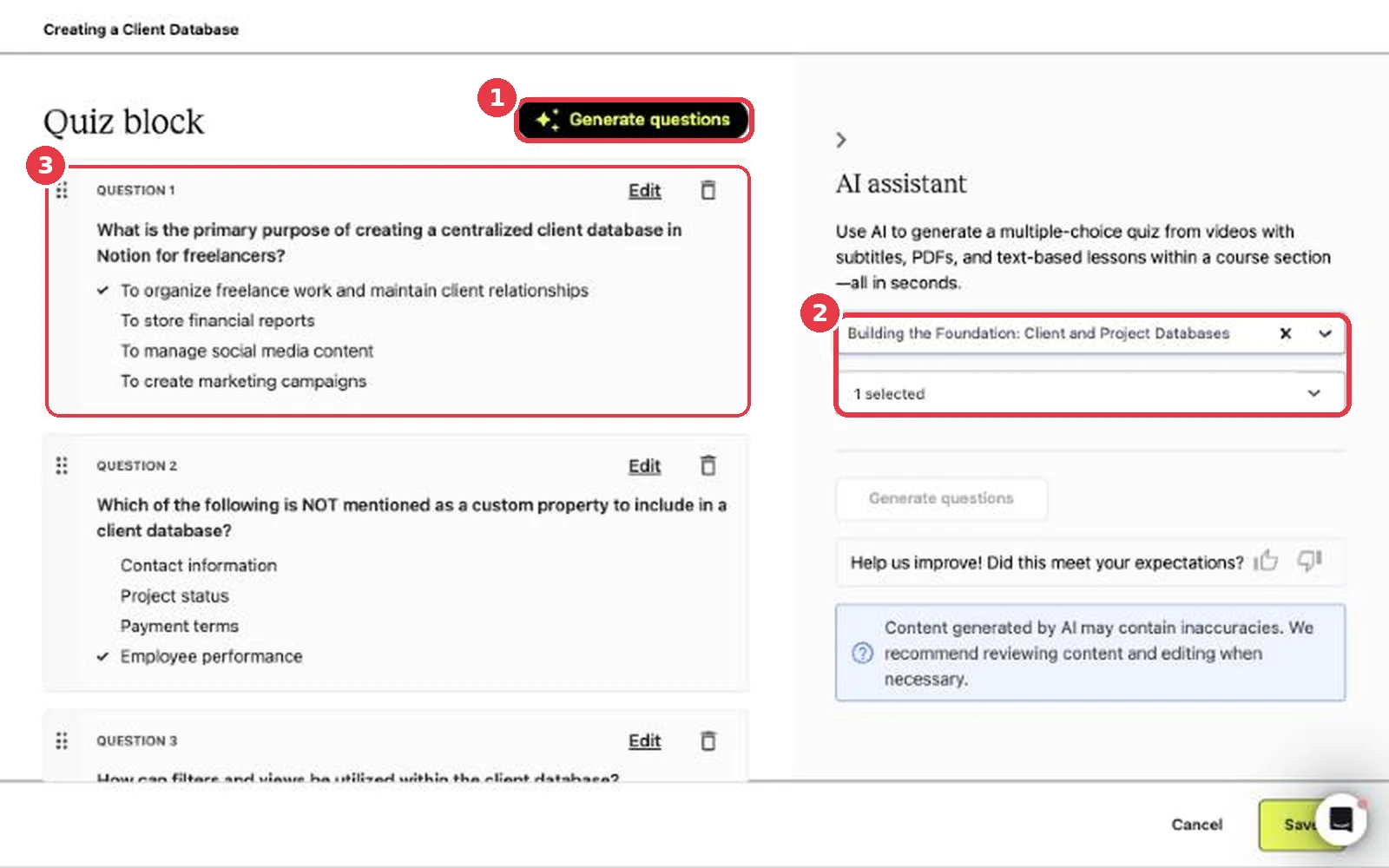
The questions matched the lesson text closely, which is both the strength and the weakness. Because the lesson only described concepts, the questions test whether a student read the description rather than whether they can build a database. The wrong answers were also too easy: options such as “To manage social media content” or “By reducing the number of clients” can be eliminated without knowing anything about Notion. Once your real lesson content is in place, regenerate the quiz from that content and rewrite the distractors so they reflect mistakes a learner might actually make.
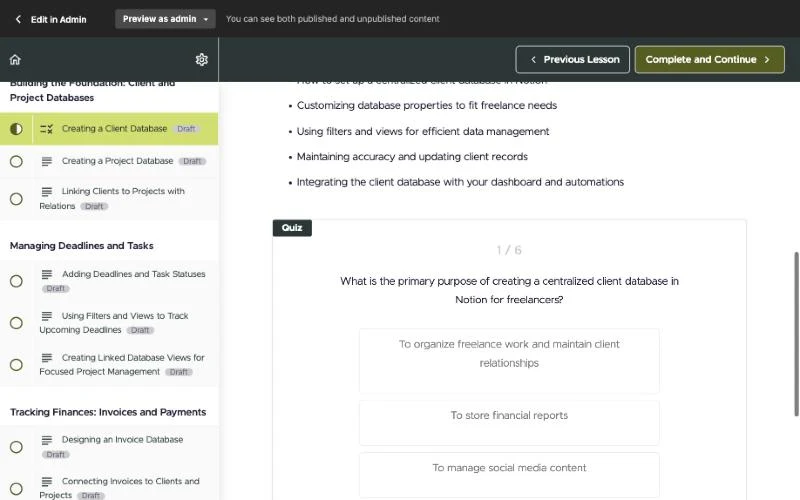
On the student side, the quiz appeared under the lesson text and presented one question at a time with a “1 / 6” counter.
4. The AI-generated sales page
We did not ask for a sales page, but Teachable created one with the course: an eight-block page with a stock photo hero, an “Enroll in course” button, a course description, a “What you will learn” section, a dynamic curriculum block, a pricing block, an instructor section, three benefit tiles, and an email sign-up form.
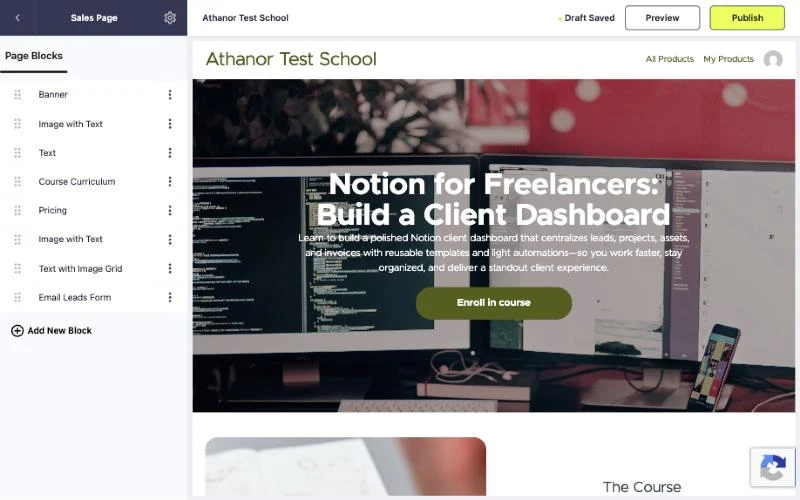
This is the output that needs the most care, because it goes in front of buyers. Three problems stood out when we read the copy:
- An invented biography. The instructor section said “I’m athanor, a freelancer turned Notion systems builder who’s spent years helping independent creatives and small teams tame their client work.” We supplied no biography at all.
- Invented experience. The “What you will learn” text claimed the steps were “carefully crafted from real freelance workflows” and that the course shares “the exact frameworks and templates I use in real client setups.”
- Features the course does not contain. The description promised a client portal with permissions, rollups and formulas, and connections to Google Calendar, Slack, and Zapier. None of these appear in the 24-lesson curriculum the AI itself generated.
Publishing this page unedited would mean making false statements about yourself and your product. Rewrite the bio from scratch, delete any claim about experience you do not have, and check every promised feature against your actual lessons.
What Teachable AI is good for, and what it is not
Good for:
- Turning a rough idea into a clean, ordered outline in seconds.
- Drafting lesson scopes and learning objectives you can record against.
- Producing a first-pass quiz you can edit instead of starting from a blank form.
- Giving a new school a complete sales-page layout to customize.
Not good for:
- Writing the lessons themselves. Every generated lesson in our test was a summary, not instruction.
- Writing truthful marketing copy. The sales page fabricated credentials and features.
- Creating challenging assessments. The quiz distractors were obviously wrong.
Teachable AI pricing: which plans include it
The AI tools are included in Teachable’s self-serve plans rather than sold separately; the public pricing page lists “Create with AI” for Starter ($39 per month, or $29 per month billed annually), Builder ($89, or $69 annually), and Growth ($189, or $139 annually), with a 7-day free trial and a 30-day money-back guarantee. We tested on a Builder trial. Starter carries a 7.5% transaction fee, while Builder and Growth list 0%. The Teachable pricing guide explains the fee break-even point and the plan limits.
One practical warning from the same trial: you cannot price a course until Teachable Payments onboarding is complete. Generating a course with AI takes seconds, but selling it requires Stripe identity and bank verification, which you should start on day one of a seven-day trial.
Pros and cons of Teachable AI
Pros
- Fast: a full 24-lesson outline in about 15 seconds and a six-question quiz in about 10.
- Included on every self-serve plan, not an extra charge.
- Sensible, beginner-friendly course structure that covered every topic we listed.
- Quiz generator can work from lesson text, PDFs, and subtitled videos within a section.
Cons
- Lesson text describes topics instead of teaching them.
- Sales-page copy invents biographies, experience, and features.
- Quiz distractors are too easy to be a real test.
- Rigid three-lessons-per-section structure needs manual reshaping.
Who should use Teachable AI?
Teachable AI is most useful for experts who know their subject but stall at organizing it. If you can record a great lesson once you know what the lesson is, the generator removes the blank-page problem quickly. It also helps creators who want a school and sales page up during the short trial so they can judge the platform on a realistic example.
It is least useful for creators hoping AI will produce the course for them. In our test it did not write a single lesson a student could learn from. If you need AI to draft actual instructional content, use a general-purpose writing assistant with your own notes and paste the result in, then review it as carefully as you would review the sales page.
If you are still deciding on a platform, our hands-on Teachable review covers the rest of the trial, and the step-by-step course tutorial shows the full build process.
Try Teachable AI free for 7 days
Bottom line
Teachable’s AI is a fast and genuinely helpful outlining tool bolted to a draft generator that needs heavy editing. Use the course generator for structure, keep the quiz generator for a first pass, and treat the lesson text as a brief. Never publish the AI sales page without rewriting the instructor section and checking every promised feature against your curriculum. Judged that way, the AI shortens the first hour of course creation; it does not replace the hours of teaching that make the course worth buying.
Related Teachable guides: What the Teachable free trial includes and every Teachable fee explained.
FAQ
Is Teachable AI free?
The AI tools are included in Teachable’s paid self-serve plans; the public pricing page lists “Create with AI” on Starter, Builder, and Growth. There is no permanent free plan, but you can use the AI during the 7-day free trial, which is how we tested it. Some visitors are shown a longer trial offer.
Can Teachable AI write my whole course?
No. In our test it wrote a complete outline and a short text block for every lesson, but each block only summarized what the lesson would cover. You still need to write or record the actual instruction, examples, and exercises for every lesson before students can learn from it.
Can Teachable generate quizzes automatically?
Yes. The quiz block’s “Generate questions” button builds multiple-choice questions from lessons you select within a section, and its description says it can use subtitled videos, PDFs, and text lessons. Ours produced six questions in about ten seconds, but the wrong answers were too obvious and needed rewriting.
Is the AI-generated sales page safe to publish?
Not without editing. Our generated page included an instructor biography and professional experience we never provided, plus promised integrations and features that were not in the course. Rewrite the bio, remove unverifiable claims, and compare every promise with your real curriculum before publishing.
Does Teachable AI work in other languages?
We tested only in English. Teachable’s pricing page lists free subtitles and translations on the Growth plan, which is a separate feature from the course generator. If you teach in another language, test the generator with your own description during the trial before relying on it.