CreatorGuide
Teachable for Coaches (2026): Coaching Products, Intake Forms, and Fit
How Teachable's coaching product works for coaches: intake forms with approval, milestones, Calendly scheduling, payment plans, plan limits, fees, and when another platform fits better.

Teachable for coaches is no longer only a question of whether you can bolt a few calls onto a course. Teachable has a dedicated coaching product type: you can screen clients with an intake form, approve them before checkout, deliver the engagement as a series of milestones, attach calendar links and meeting URLs, and exchange messages and files inside a private coaching space. That makes it a realistic home for 1:1 programs and for hybrid offers that combine a course with personal sessions. It is not a complete coaching business system, though. There is no built-in video room, scheduling depends on Calendly or another calendar link, and Teachable’s own Community feature is closed to new schools. This guide explains what the coaching product actually does, how plan limits and fees affect a coach, and when a different platform is the better choice. It is based on Teachable’s official pricing page and help-center documentation checked on November 18, 2026, not on hands-on testing. For the wider product picture, read our Teachable review for course creators.
How Teachable’s coaching product works
A coaching product is one of the product types you can create in a Teachable school, alongside courses, digital downloads, and bundles. Teachable describes it as a way to manage one-on-one coaching relationships by scheduling time, scheduling video calls, and sharing assignments with clients. You create one from the Coaching tab, name it, choose how new clients are accepted, add a pricing plan, and set up the first milestone.
Milestones are the backbone of the product. Each milestone can hold a title, a description, a due date, a calendar link for booking, a meeting URL for a call, and a running thread of messages and file attachments. The first milestone is shared: every client who enrolls sees the same welcome step. After that, milestones are created for each client individually, which lets you shape a different path for each person instead of forcing everyone through a fixed curriculum. You can save a milestone as a template and reuse it across the school’s coaching products, which keeps repeated steps such as “kick-off call” or “week 4 review” consistent.
Client intake: screen before you sell
The intake flow is the feature most worth evaluating if you sell higher-ticket or application-based coaching. When creating the product, Teachable offers three options:
| Intake option | What happens | Good fit |
|---|---|---|
| No intake form | Clients go straight to checkout | Low-ticket or standardized sessions |
| Intake form | Clients answer questions, then continue to checkout | Programs where you want context before the first call |
| Intake form with approval | Clients apply and wait for your approval before checkout | High-touch or limited-capacity programs |
Submissions appear in a Prospective tab with the email address, intake date, payment status, and answers. With approval enabled, you approve or deny each applicant, and approved clients receive an email link to a post-intake page that holds the pricing options. That flow replaces the common workaround of a separate application form, a manual review, and an emailed payment link. The form itself is limited, however: Teachable documents customizable headings, button text, and two labeled input fields alongside the required email address. Coaches who need long qualification questionnaires may still prefer an external form and send approved clients to the checkout.
Scheduling and live sessions
Teachable does not run its own booking calendar or video room. Instead, you add a calendar link or a meeting URL to a milestone. Teachable integrates natively with Calendly: once you paste a Calendly Personal Access Token into the product’s advanced settings, clients pick a time in a pop-up on the milestone page and a new milestone is created automatically for the booked slot. Teachable notes that this automatic integration requires a Professional Calendly account. Other calendar services work through a shareable link, but the client is sent to a new browser tab and you create the follow-up milestone yourself.
For the session itself, you paste a Zoom, Google Meet, or similar link into the milestone. Clients see a Join Meeting button, and meeting times adjust to the client’s time zone. Recording, transcription, and the call experience therefore stay in your video tool. Budget for that tool and, if you want automatic milestone creation, for a paid Calendly tier.
Payment options for coaching offers
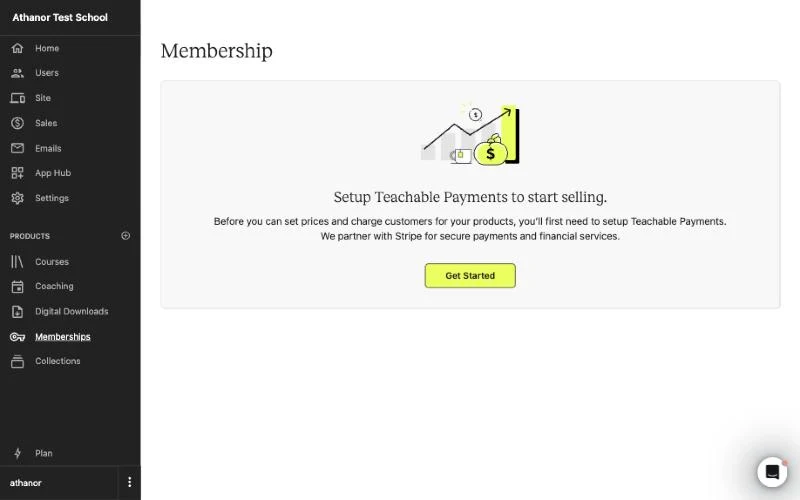
In the admin, Coaching sits next to Courses, Digital Downloads, and Memberships in the Products menu. As with courses, selling requires Teachable Payments first: in our November 18, 2026 test, the Membership page showed Setup Teachable Payments to start selling until payments were connected.
Teachable’s help center lists four pricing plan types for products: free, one-time purchase, payment plan, and subscription. For coaches, those map neatly to common offers:
- One-time purchase for a fixed package, such as six sessions over three months.
- Payment plan for a higher-priced program paid in installments.
- Subscription for ongoing retainers or monthly accountability coaching.
- Free for a complimentary discovery or onboarding product.
You can create more than one pricing plan for the same product, but Teachable does not let you edit an existing plan’s price, currency, or plan type; you archive it and create a new one. Plan that before launch so early clients are not left on a pricing option you later need to replace. Note also that unenrolling a client from a coaching product automatically cancels that client’s active subscription, which is useful when an engagement ends but worth knowing before you remove anyone.
Plans, limits, and fees for coaches
Every Teachable plan can sell coaching, but the product limit matters. Teachable counts each published course, coaching offering, or digital download as one product, while memberships and bundles do not count. Verified on November 18, 2026, the self-serve plans are:
| Plan | Monthly billing | Annual billing (per month) | Published products | Teachable transaction fee | Affiliate program |
|---|---|---|---|---|---|
| Starter | $39 | $29 | 5 | 7.5% | Not listed |
| Builder | $89 | $69 | 10 | 0% | Included |
| Growth | $189 | $139 | 50 | 0% | Included |
| Custom | Quote | Quote | Flexible | 0% | Included |
A coach with one signature program, one coaching package, and a couple of mini-courses fits inside Starter’s five products, but Starter’s 7.5% fee applies to every sale. On a $3,000 coaching package that is $225 before payment processing. Builder costs $50 more per month on monthly billing, so for most coaches who sell even one mid-ticket package a month, Builder is cheaper overall. Processing fees still apply on every plan and vary by country, payment method, and the Teachable Payments bundle you choose; our Teachable fees explained guide breaks those layers down, and Teachable pricing works through the Starter-to-Builder break-even.
Compare Teachable’s current plans for coaching products
What Teachable does not cover for coaches
The gaps are as important as the features, because each one becomes another subscription or a manual task:
- Community. Teachable has put its Community feature into maintenance mode. Existing communities keep working, but Community is no longer available to new schools or schools that never created one. Teachable recommends lesson comments for discussion or linking out to Discord or Slack.
- Enrollment automation. Teachable states that coaching clients can only be enrolled manually by the school owner through bulk import, and coaching enrollment is not available through third-party integrations. If you sell coaching through another checkout or a CRM pipeline, expect manual work.
- Live video. Calls run in an external tool, so there is no unified recording library inside the coaching space.
- CRM and pipeline. Intake answers and messages live inside Teachable, but there is no sales pipeline, lead scoring, or call-booking funnel of the kind a coaching CRM provides.
None of these are unusual for a course-first platform, but they decide whether Teachable reduces your tool count or simply moves it around.
Program models that fit Teachable
Course plus coaching. Sell a self-paced course and offer a coaching product as an upsell. Students learn the framework on their own, and the coaching space holds the personal review calls and homework feedback. This model uses Teachable’s strongest piece, course delivery, and adds coaching where it matters.
Application-only 1:1 program. Use the intake form with approval, a payment plan, and a reusable set of saved milestones for the standard arc of the engagement. This works well when you cap the number of clients and want a written record of every session and file in one place.
Retainer coaching. A subscription-priced coaching product with monthly milestones suits ongoing advisory work. Because unenrolling cancels the subscription, ending an engagement is clean.
Cohort programs are a weaker fit. Without Community for new schools and with milestones managed per client, group programs usually run better as a course with drip content plus an external chat space and group call link.
When coaches should choose another platform
Consider an alternative if most of your value is delivered live in groups, if community is central to the offer, or if you need a sales pipeline and booking funnel in the same system. Kajabi bundles coaching, community, email, and funnels at a higher subscription; see Teachable vs Kajabi. Thinkific puts more weight on communities and live cohorts; see Thinkific for coaches and Thinkific vs Teachable. If you want a lower-cost funnel and email system around a simple offer, our best Teachable alternatives guide compares those options by the constraint they solve.
How to test Teachable as a coach
Use the free trial to run one complete client journey instead of browsing features. Create a coaching product with an intake form that requires approval, submit an application from a test email, approve it, and buy through the post-intake page. Then confirm that the first milestone appears, that your calendar link and meeting URL work from the client’s view, that file uploads and messages send email notifications, and that the sale and fees show up in your transaction report. Finally, check how many products your full offer needs against the plan limits above. If that journey matches how you coach, Teachable is a sound base; if you keep reaching for workarounds, an all-in-one coaching platform will likely save time.
Bottom line
Teachable is a good fit for coaches whose business centers on a course or a structured program and who want 1:1 coaching, client screening, and payments in the same place as their learning content. The intake-with-approval flow, per-client milestones, and payment plans cover the core of a professional coaching engagement. It is a weaker fit for community-led or group-first coaching, and you will still pay for a video tool and possibly a Calendly plan. For coaches who sell regularly, Builder usually beats Starter once the 7.5% fee is counted. If the model above matches yours, start Teachable’s free trial and run one test client through the coaching flow before committing to an annual plan.
Related Teachable guides: Our hands-on walkthrough of creating a course on Teachable and what the Teachable free trial includes.
FAQ
Does Teachable have a coaching feature?
Yes. Teachable offers a coaching product type with intake forms, optional approval before checkout, per-client milestones, calendar and meeting links, and private messaging with file uploads up to 2 GB. Live calls happen in your own video tool, and booking uses Calendly or another calendar link.
Can I take coaching calls inside Teachable?
No. You add a meeting URL from Zoom, Google Meet, or a similar service to a milestone, and clients join through a button that opens the call in a new tab. Teachable adjusts the displayed meeting time to the client’s time zone, but recordings and call features stay in the external tool.
Do coaching products count toward my plan’s product limit?
Yes. Teachable counts each published course, coaching offering, or digital download as one product toward the limit of 5 on Starter, 10 on Builder, and 50 on Growth. Memberships, bundles, and unpublished drafts do not count, so you can package several coaching products into a bundle without using an extra slot.
Can clients pay for coaching in installments?
Teachable supports payment plans as one of four pricing plan types, alongside free, one-time, and subscription pricing. You cannot edit a plan’s price or type after creating it, so set up installment terms carefully and archive and replace a plan if the terms need to change later.
Is Teachable good for group coaching programs?
It can work, but it is not the strongest fit. Coaching milestones are managed per client, and Teachable’s Community feature is closed to new schools. Most group programs on Teachable run as a course with drip content, an external group call, and a Discord or Slack space linked from the school.