CreatorHow-to
Teachable Course Launch Checklist: 30 Days From Setup to First Sales
A practical Teachable launch checklist: choose the right plan before launch week, set up payments and tax forms early, build the course and sales page, configure pricing and coupons, plan launch emails, and review results after launch.

Most course launches that disappoint do not fail because of the course. They fail because of avoidable setup problems discovered in launch week: payments not verified, tax forms missing, a checkout nobody tested, or a plan whose transaction fee quietly takes a large share of launch revenue. This checklist works backwards from launch day over 30 days, so the technical work is finished early and the final two weeks go into marketing. It assumes you are launching on Teachable and already have a course idea and some audience, even a small one. Plan prices and fees come from Teachable’s official pricing and fee pages, verified October 16, 2026. If you are still choosing a platform, compare Teachable vs Kajabi and Thinkific vs Teachable first.
The launch timeline at a glance
| When | Focus | Done when |
|---|---|---|
| Day −30 to −25 | Plan, payments, tax forms | Payments verified, tax info submitted, plan chosen |
| Day −24 to −15 | Build the course and product | Lessons uploaded, pricing and coupons set |
| Day −14 to −8 | Sales page and checkout | Full test purchase completed |
| Day −7 to −1 | Pre-launch emails and content | Waitlist warmed, launch emails scheduled |
| Day 0 to +7 | Launch window | Cart open, daily emails, support answered |
| Day +8 to +30 | Review and evergreen | Numbers reviewed, evergreen funnel set |
Days −30 to −25: decisions that are expensive to change later
Choose your plan with launch revenue in mind
Teachable’s current self-serve plans are Starter, Builder, and Growth, plus Custom:
| Plan | Monthly billing | Annual (per month) | Plan fee on sales | Published products |
|---|---|---|---|---|
| Starter | $39 | $29 | 7.5% | 5 |
| Builder | $89 | $69 | 0% | 10 |
| Growth | $189 | $139 | 0% | 50 |
The launch-specific trap is Starter’s 7.5% plan fee. A launch that brings in $5,000 costs $375 in plan fees on Starter, more than four months of Builder at the monthly rate. Teachable’s numbers put the break-even at roughly $533 of monthly sales on annual billing and $667 on monthly billing. If you expect launch revenue above that, start the launch on Builder. Our Teachable pricing guide explains the math. If you have not built the course yet, our how to create a course on Teachable tutorial covers each setup step before this checklist begins.
- Plan chosen based on expected launch revenue, not only the subscription price
- Number of products you will publish (course, bundle, upsell) fits the plan’s product limit
Set up payments and tax forms now
Two Teachable rules can delay launch revenue by weeks:
-
First payouts for new Teachable Payments accounts can take up to four to six weeks while Stripe verifies the account.
-
Payouts are held once earnings exceed $500 if required tax forms have not been submitted.
-
Payment account set up and verification documents submitted
-
Bank account in the verified name connected
-
Tax form (W-9 or W-8) submitted
-
Payout schedule chosen (daily or weekly gives the best launch cash flow)
Details in how Teachable payouts work.
Brand and domain
- School name, logo, and colors set
- Custom domain connected (allow time for DNS to propagate)
- Support email address that someone checks daily during launch
Days −24 to −15: build the course and the product
Course content
- Curriculum outlined as sections and lessons, each lesson with one clear outcome
- Videos uploaded and processed; downloadable worksheets attached
- First lesson previewable for free (a strong preview lesson often sells better than the sales page)
- Drip schedule decided: all at once, or released over time for cohort-style launches
- Quizzes or completion requirements added where they help learning (check which features your plan includes)
Do not wait for the whole course to be perfect. Many successful launches open with the first modules complete and the rest released on a published schedule.
Pricing options
- One-time price set
- Payment plan considered (for example, three monthly payments); it lowers the barrier for higher-priced courses
- Launch coupon or early-bird price created with an expiry date
- Bundle or upsell product created if you plan one
Remember the per-order processing fee (2.9% + $0.30 for US cards on US schools). It is a small share of a $200 course, but a large share of a $9 add-on.
Days −14 to −8: sales page and checkout
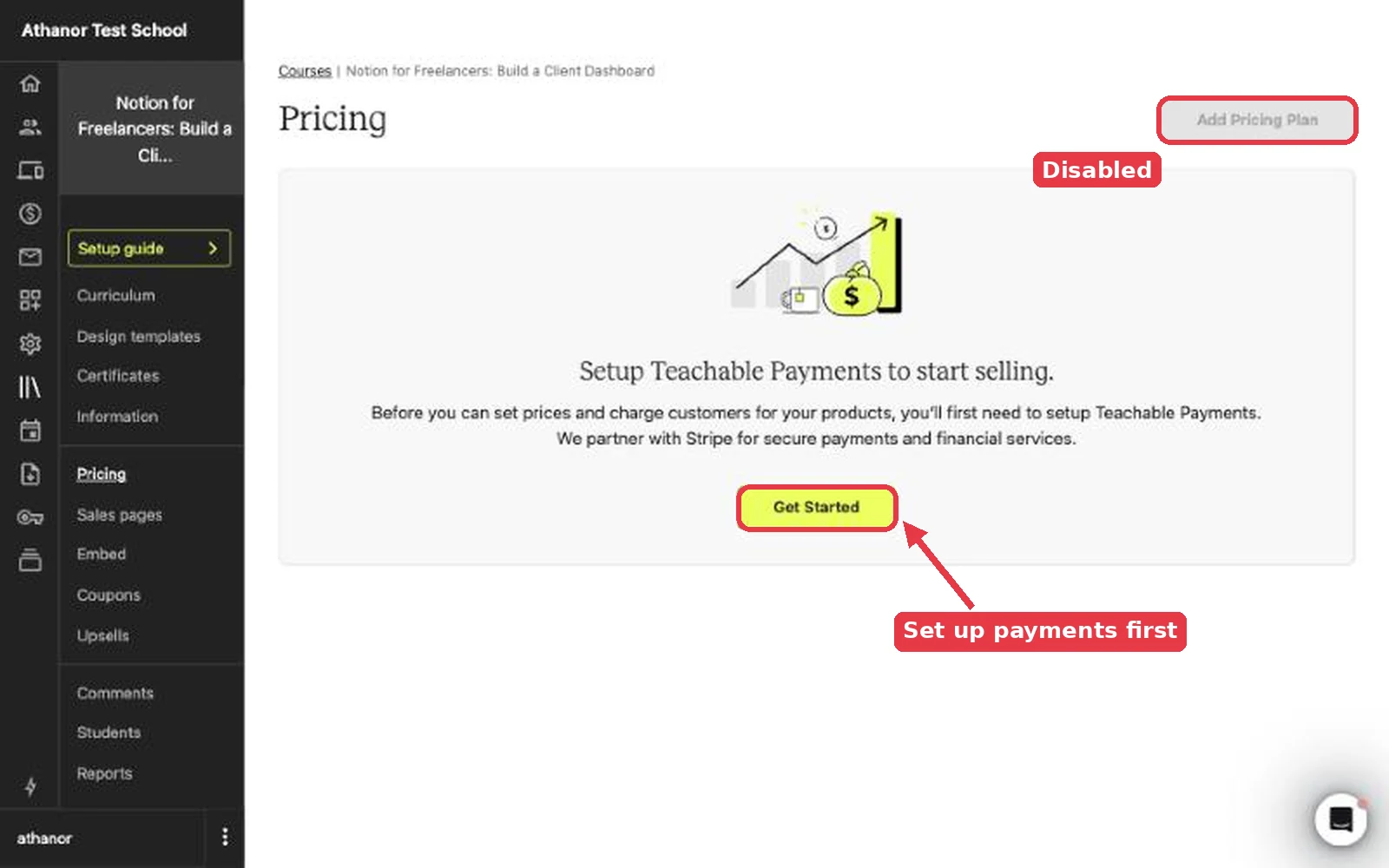
Do the payments step early in this window. In our test, Teachable would not let us add a price to a course until Teachable Payments was set up, and payment onboarding starts by asking for your business country before handing off to Stripe, so have your business details ready.
Sales page
A sales page for a course needs, in order: the problem in your student’s words, the result the course delivers, who it is and is not for, the curriculum, proof (results, testimonials, or your own credibility), the price and what is included, a guarantee, an FAQ, and a repeated button. Keep the first screen focused on the result, not on you.
- Sales page written and published (hidden or password-protected until launch if you prefer)
- Every button links to the correct checkout
- Refund policy stated clearly (it reduces chargebacks later)
- Page checked on a phone
Test the full purchase
- Test purchase completed from the live sales page using a real card or test mode
- Confirmation email received; course access works immediately
- Coupon applied correctly and expires on the right date
- Refund issued on the test purchase to confirm the process
This single test catches most launch-day problems.
Days −7 to −1: warm up your audience
Your launch will only be as strong as your list. Teachable can email enrolled students, but most creators run pre-launch emails from a dedicated email tool such as Kit or MailerLite and link to the Teachable sales page.
- Waitlist or interest list built (even 100 engaged people is a real launch)
- Three pre-launch emails: the problem, a free lesson or insight, and the course announcement with date
- Launch emails written and scheduled: open cart, social proof, FAQ, last 24 hours, cart closing
- Social posts or a short live session planned for the opening day
Day 0 to +7: the launch window
- Cart opens at the announced time; first email sent
- Questions answered within a few hours (questions are buying signals)
- Early testimonials or first-lesson wins shared with the list
- Final 24-hour reminder and cart-close email sent
- Early-bird coupon expires as promised (do not extend it; it trains your audience to wait)
Most launch sales arrive on the first day and in the final 24 hours. Plan your energy accordingly.
Days +8 to +30: review and keep selling
- Sales, conversion rate (buyers ÷ sales page visitors), and refunds recorded
- Teachable fees and processing reviewed in the transaction report
- Plan reconsidered: if launch revenue exceeded the break-even, move to Builder before the next sales push
- Students surveyed after their first week; answers fed into the sales page
- Evergreen funnel set up: a lead magnet and email sequence that sells the course year-round. See how to launch an online course and evergreen course strategy.
The five mistakes that cost the most
- Launching on Starter with a large list. The 7.5% fee on launch revenue often exceeds the cost of upgrading.
- Setting up payments in launch week. Verification and first-payout delays can take weeks.
- Forgetting tax forms. Payouts stop once earnings pass $500 without them.
- No test purchase. Broken checkouts on day one cost the most motivated buyers.
- No email list. A course with no audience does not launch; it just becomes available.
Check current Teachable plans and start the 30-day countdown with payments and tax forms, so launch week is only about selling.
Related Teachable guides: What the Teachable free trial includes, our Teachable review for course creators and every Teachable fee explained.
FAQ
How long does it take to launch a course on Teachable?
The technical setup can be done in a few days, but plan at least 30 days end to end. Payment verification and first payouts can take several weeks, and a launch needs one to two weeks of audience warm-up to sell well.
Which Teachable plan should I use for a launch?
If you expect monthly sales above roughly $533 on annual billing or $667 on monthly billing, Builder is usually cheaper than Starter because it removes the 7.5% plan fee. Starter suits a small test launch where revenue is uncertain.
Do I need an email tool besides Teachable?
For a launch, usually yes. Teachable handles students once they enroll, while a dedicated email platform is better for building a waitlist, sending pre-launch sequences, and segmenting buyers from non-buyers. Many creators connect the two so buyers are tagged automatically.
Should I launch before the course is finished?
Many creators do. Opening with the first modules ready and a published release schedule for the rest lets you validate demand and use early student feedback. Be explicit on the sales page about what is available now and when the rest arrives.
What should I do if the launch sells poorly?
Look at the numbers before the course. If few people visited the sales page, the problem is audience size or promotion. If many visited but few bought, the issue is the offer, price, or sales page. Fix one variable and run a smaller second launch to your list.