CreatorGuide
Teachable Fees Explained (2026): Every Cost per Sale
Teachable fees explained by layer: plan transaction fees, payment processing, bundles or BackOffice, usage charges, refunds, and examples.

Teachable fees are not one percentage. A creator can pay a school subscription, a plan-level transaction fee, payment-processing charges, an optional commerce-service fee, and usage or exception charges on the same account. That is why two schools with the same plan and gross sales can receive different net payouts. The decisive variables are plan, school country, buyer country, payment method, gateway, tax and currency handling, refunds, imported students, and optional services. This guide separates those layers using Teachable’s official documentation verified on October 16, 2026. It is a budgeting guide, not an account quote; confirm the fee settings shown inside your own school before a launch. For subscription prices and plan selection, use our Teachable pricing guide. For payout timing, read how Teachable payouts work.
The five layers of Teachable fees
Start with a fee stack rather than a single percentage. The labels matter because upgrading can remove one layer while leaving the others unchanged.
| Fee layer | What triggers it | Can a plan upgrade remove it? |
|---|---|---|
| School subscription | Keeping the Teachable school active | No; amount changes by plan |
| Teachable plan fee | Sales on Starter | Yes; Builder and above publish 0% |
| Payment processing | A card, PayPal, wallet, BNPL, or other payment is processed | No; rates vary by method and country |
| Commerce service | Optional BackOffice or a Teachable Payments bundle, depending on gateway/account | Sometimes; depends on configuration, not only plan |
| Usage and exceptions | Limits, imported users, extra admins, chargebacks, conversion, or refunds | Sometimes; depends on cause |
Affiliate commissions and author revenue shares are also deductions from earnings, but they are business distribution choices rather than Teachable platform charges. Taxes collected from a buyer are not revenue you should treat as yours. When reconciling a payout, use the transaction-level report instead of multiplying gross sales by one remembered rate.
Teachable plan transaction fees
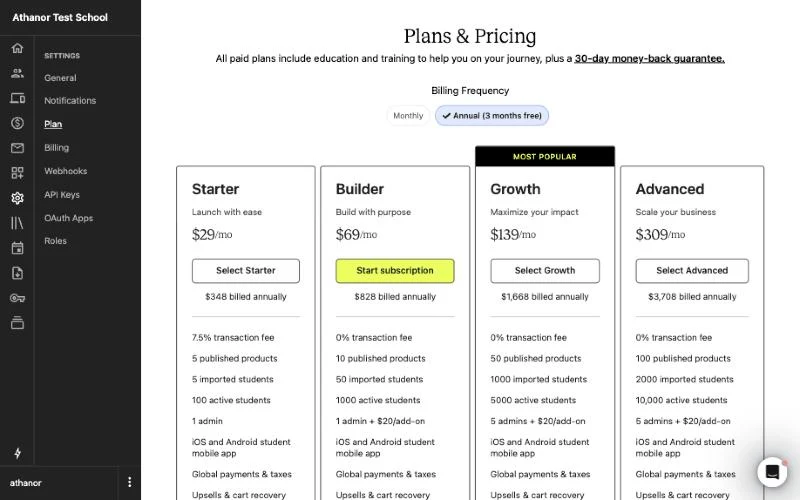
Inside a Teachable account on November 18, 2026, the Plans & Pricing page showed the same split: 7.5% transaction fee under Starter and 0% under Builder, Growth, and Advanced. The in-app page listed a self-serve Advanced tier at $309/month on annual billing ($3,708 a year), alongside the published Starter, Builder, and Growth prices.
Teachable’s current plans are Starter, Builder, Growth, and Custom. The official fee table lists a 7.5% plan fee on every Starter sale and 0% on Builder, Growth, and Advanced/Custom-level plans. This fee is separate from payment processing. A Builder creator still pays the processor even though Teachable’s plan fee is zero. The Starter fee weighs most on low-priced products; our guide to selling digital downloads on Teachable works through the math for a $15 template.
Starter can make sense while demand is unproven because it reduces the fixed subscription. It becomes expensive quickly after sales begin. Comparing current annual monthly equivalents, Builder costs $40 more per month than Starter. The simplified break-even is $40 ÷ 7.5%, or about $533 in monthly sales. Comparing month-to-month subscriptions, the $50 difference produces a break-even near $667. Those estimates hold payment processing constant and exclude every other fee layer.
Teachable says the Starter fee applies on all sales. Its newer help documentation describes the plan fee as applying across Teachable Payments and custom payment gateways, so connecting an outside gateway should not be assumed to bypass it. See the full plan math in Teachable pricing before choosing a lower subscription simply to reduce fixed cost.
Payment-processing fees
Payment processing pays for moving money through cards, PayPal, wallets, or alternative methods. Rates vary by school country, buyer location, currency, and method. For US schools on the native gateways, Teachable’s published table currently lists the following base rates:
| Payment method | Published US-school rate |
|---|---|
| US credit or debit card | 2.9% + $0.30 |
| International credit or debit card | 3.9% + $0.30 |
| US PayPal | 3.49% + $0.49 |
| International PayPal | 4.99% + $0.49 |
| Buy now, pay later | 6.99% + $0.30 |
These figures are not a universal global price list. Teachable also documents separate treatment for some international schools, currency conversion, recurring payments, local methods, and gateway configurations. Domestic versus international treatment follows the payment-account and buyer locations, not the language of the course.
The fixed component makes low-priced products proportionally expensive. At a 2.9% + $0.30 base rate, the fixed $0.30 is 3% of a $10 sale but only 0.3% of a $100 sale. Bundling several small downloads can therefore reduce processing cost as a share of order value, although conversion and customer value should still drive packaging. Check the official Teachable fee page for your region immediately before forecasting.
Teachable Payments bundles and BackOffice
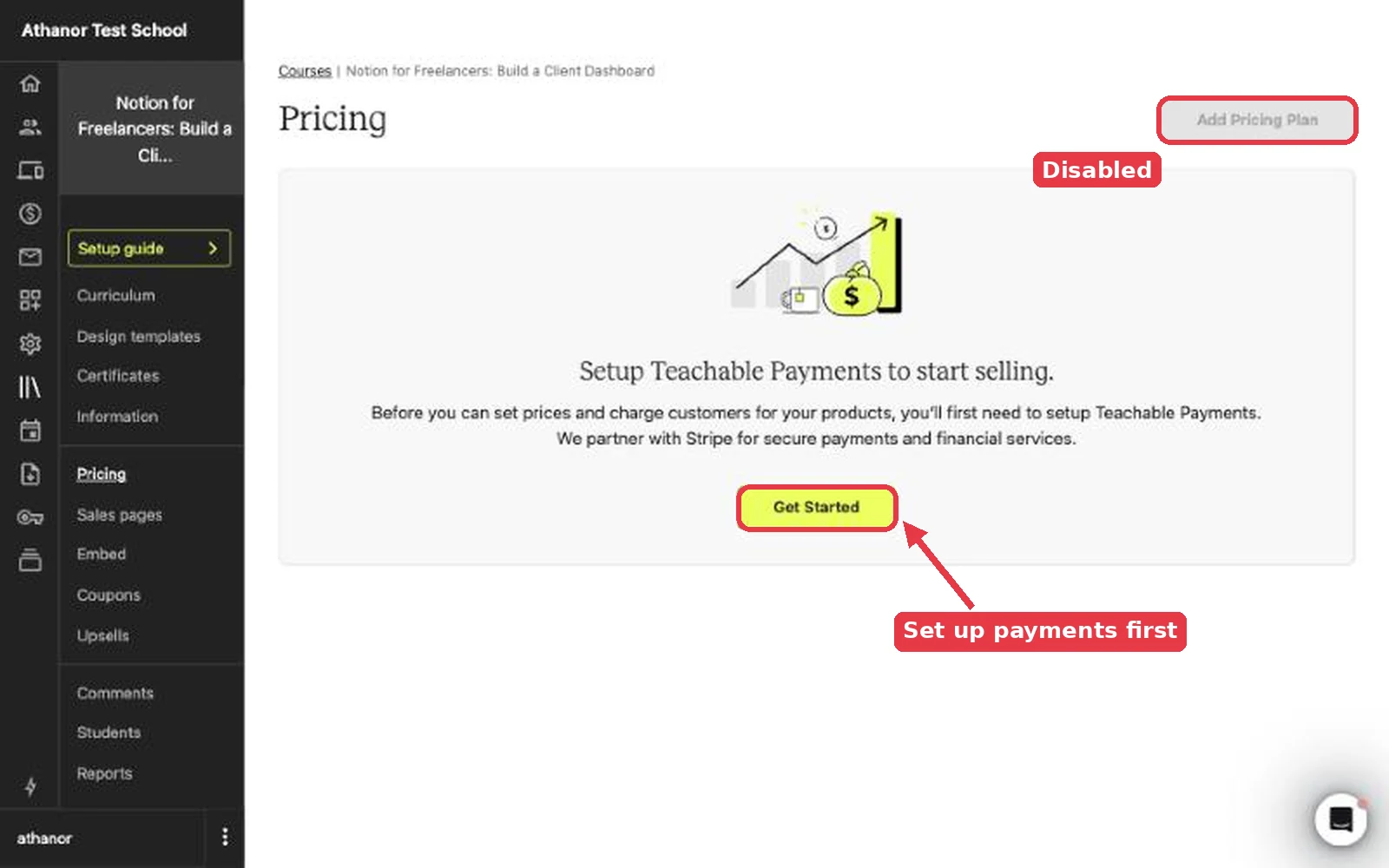
Before any of these fees can apply, payments have to be connected. In our test school, a course’s Pricing page kept Add Pricing Plan disabled until Teachable Payments was set up, so you cannot price a product first and sort out payments later.
Teachable is moving accounts toward a newer Teachable Payments experience, and its official documents currently describe more than one commerce-service model. The newer “transaction fees and bundles” guide describes a Standard bundle with no additional bundle fee and a Global bundle that adds 2.8% while including features such as broader local payment methods, Adaptive Pricing, and bundled tax or recurring-payment handling. The same guide shows that individual Standard services can add their own percentages when used.
Separate Teachable documentation describes BackOffice for Teachable Pay or the Monthly Payment Gateway. BackOffice can automate affiliate and author payouts and tax-form collection, and can enable certain payment methods. Its published fee is 2.8% for schools below $500,000 in trailing 12-month GMV and 2% at or above that threshold. Teachable says BackOffice can be disabled, but disabling it may remove services your checkout or payout workflow uses.
Because the documents cover different payment experiences, do not add Global and BackOffice percentages blindly or assume one replaces the other on every account. Open Settings → Payments, record the gateway and selected service or bundle, and ask Teachable to confirm the exact charge stack for your school. The transaction report is the final operational evidence after a test sale.
Usage fees and add-on costs
Plan pages foreground products, administrators, and video storage, while Teachable’s usage policy also discusses active and imported students. The policy currently lists thresholds that vary by plan and says a per-student usage charge can be assessed at renewal when a school exceeds included capacity. It also distinguishes students who enroll through Teachable checkout from imported students. This is especially important during a migration, when a large historical list may be classified differently from new checkout enrollments.
The same documentation lists potential charges for additional published-product capacity and video storage beyond policy limits. Teachable separately documents additional admin seats at $20 per month on monthly plans or $240 per year on annual plans when the school exceeds its included seats. Those numbers are current official figures, but an upgrade may bundle more capacity and other controls, so compare the full plan difference with the add-on total.
Before importing users, send Teachable a count split by active paid students, inactive historical users, free users, affiliates, and administrators. Ask which categories count toward usage, at what date the count is measured, and whether deletion or archival changes billing. If the answer affects a material migration budget, save it with the account proposal rather than relying on a generic pricing page.
Refunds, chargebacks, and currency conversion
A refunded sale may still cost money. Teachable’s current refund and dispute documentation says processing fees from the original transaction still apply under the newer Teachable Payments experience. Other legacy help text has changed over time, which is another reason to confirm the rule attached to your gateway. Model refunds as a separate cost rate instead of assuming every deduction reverses when the buyer is repaid.
Teachable’s public fee table lists a $15 chargeback fee. A dispute can also temporarily remove the transaction amount from the available balance, and winning the dispute does not necessarily return every associated processing cost. Clear product descriptions, explicit billing cadence, recognizable statement descriptors, accessible cancellation instructions, and prompt support reduce avoidable disputes more reliably than treating chargebacks as an occasional surprise.
The fee table also lists a 0.95% currency-conversion fee where applicable. International card and PayPal rates can be higher than domestic rates, while Adaptive Pricing or local-payment features may add or bundle other costs. Forecast domestic and international orders separately if a meaningful share of students buy outside the school country.
Worked fee examples
The examples below are illustrations, not Teachable quotes. They use the published US domestic-card base rate of 2.9% + $0.30 and ignore tax, refunds, affiliates, authors, usage fees, and optional bundles or BackOffice. Their purpose is to show which line changes when the plan changes.
Example 1: a $100 US card sale on Starter
- Gross charged: $100.00
- Starter plan fee at 7.5%: $7.50
- Illustrative processing at 2.9% + $0.30: $3.20
- Illustrative amount before other deductions: $89.30
Example 2: a $100 US card sale on Builder
- Gross charged: $100.00
- Builder plan fee at 0%: $0.00
- Illustrative processing at 2.9% + $0.30: $3.20
- Illustrative amount before other deductions: $96.80
Example 3: a $1,000 sales month with ten $100 US card orders
Starter produces an illustrative $75 plan fee and $32 in processing, before the subscription and other deductions. Builder produces $32 in the same illustrative processing and no plan fee. Adding current monthly subscriptions gives $146 in Starter subscription plus these two fee layers versus $121 for Builder; on annual monthly equivalents, the gap is wider in Builder’s favor. Real results differ with payment mix and optional services.
This is why the best forecast uses order count and payment method, not gross revenue alone. The fixed processing charge applies per order, and percentages can apply to different bases depending on tax and configuration.
How to audit your real Teachable cost
Run this audit after a test transaction and again after the first full sales month. It turns a generic fee article into an account-specific number.
- Export the transaction report and separate gross product amount, tax, coupons, refunds, and chargebacks.
- Group transactions by card, PayPal, wallet, BNPL, or local method and by domestic versus international treatment.
- Record the Teachable plan fee separately from processor charges.
- Confirm whether Standard, Global, BackOffice, a monthly gateway, or a custom gateway is active.
- Separate affiliate and author payouts from platform charges.
- Review active, imported, and checkout-enrolled student counts before renewal.
- Add subscription and administrator add-ons to calculate total monthly platform cost.
- Divide total platform and commerce cost by collected revenue, while keeping tax out of revenue.
If a report label is unclear, ask support which policy and fee base produced it. Screenshots of current payment settings and one reconciled order are more useful than an old third-party percentage. Our Teachable review explains whether the wider product justifies this cost, while best Teachable alternatives helps if the stack no longer fits.
Bottom line
Starter’s 7.5% plan fee is the most visible Teachable charge, but it is not the only one. Builder and above remove that plan fee, not payment processing. Optional payment services, international methods, currency conversion, refunds, chargebacks, administrators, and student or catalog usage can all change net revenue. The safest plan choice is based on a written fee stack for your gateway and a realistic order mix. If the math supports Teachable, compare the current plans on Teachable’s official site, then reconcile one test order before sending paid traffic.
Related Teachable guides: Our hands-on walkthrough of creating a course on Teachable and what the Teachable free trial includes.
FAQ
Does Teachable charge transaction fees?
Yes, on Starter. The current Teachable plan fee is 7.5% on Starter and 0% on Builder, Growth, and the higher published tier. Payment-processing fees still apply on all plans, so “0% transaction fee” refers to Teachable’s plan-level percentage rather than every cost of accepting a payment.
Are Stripe or PayPal fees included in Teachable’s 7.5% fee?
No. The Starter plan fee and payment-processing fee are separate layers. Teachable’s rates vary by gateway, country, currency, and payment method. Optional services such as a payments bundle or BackOffice can add another layer, so use the transaction report to confirm the actual deductions on a sale.
Does Teachable refund processing fees when a student is refunded?
Current Teachable Payments documentation says processing fees from the original transaction still apply when a refund is issued. Rules have changed and legacy gateways may be documented separately, so verify the policy tied to your payment configuration. Budget a refund reserve rather than assuming all fees reverse automatically.
What is the difference between BackOffice and Teachable Payments Global?
They are commerce-service descriptions found in different parts of Teachable’s current documentation. BackOffice covers services such as automated affiliate and author payouts on eligible gateway setups; the newer Global bundle packages broader payment and tax capabilities. Your school’s payment settings determine what is available and billable, so confirm the exact stack with support.
Can Teachable charge for students or imports?
Teachable’s usage documentation describes plan-specific active- and imported-student thresholds and possible per-student charges, even though the pricing page describes checkout-enrolled students as unlimited. Large migrations should be quoted in writing. Ask how each user type is classified before importing, not after a renewal invoice arrives.