CreatorGuide
How Teachable Payouts Work (2026): Schedules, First-Payout Delays, Holds, and Fees
How Teachable pays creators: daily, weekly, and monthly payout schedules with Teachable Payments, why first payouts take weeks, tax-form holds, refunds and negative balances, and what is deducted before money reaches your bank.
When a student buys your course on Teachable, the money does not land in your bank account immediately, and it does not arrive as the full sticker price. It passes through a payment processor, Teachable deducts any plan fee and payment-processing charges, and the remainder is paid out on a schedule that depends on how your school’s payments are set up. New creators are often surprised by two things: the first payout can take weeks while the payment account is verified, and payouts can be held if tax forms are missing. This guide explains the payout schedules Teachable documents, why first payouts are slow, what can pause them, how refunds and chargebacks affect your balance, and what gets deducted along the way. For the full fee stack, see our Teachable fees explained guide; for plan prices, see Teachable pricing.
The three ways Teachable schools get paid
Teachable’s documentation describes more than one payment setup, and the payout experience differs by setup:
| Setup | Who processes payments | How you are paid |
|---|---|---|
| Teachable Payments (current default for many schools) | Teachable, through Stripe | Payouts to your bank on a schedule you choose |
| Monthly Payment Gateway | Teachable collects the money | Teachable pays out monthly and can handle affiliate and author payouts |
| Custom payment gateway (your own Stripe or PayPal, where available) | Your own processor account | The processor pays you on its own schedule |
Check which one your school uses under your payment settings before relying on any timeline. The rest of this guide focuses on Teachable Payments, which most new schools use.
Teachable Payments payout schedules
Teachable’s help article on getting paid with Teachable Payments describes three schedules:
| Schedule | When money is paid out |
|---|---|
| Daily | About two business days after each sale (a Tuesday sale pays out Thursday) |
| Weekly | Every Thursday |
| Monthly | On the first business day of the month |
Only business days count. Weekends and bank holidays in your country are skipped, so a sale on a Friday before a holiday weekend takes longer to arrive. The schedule controls when funds are sent; your bank may take another day to show them.
Which schedule should you pick? Daily gives the best cash flow and makes reconciliation easier, because each payout maps to a small number of sales. Monthly is simpler to read if you only check finances once a month, but it means waiting up to a month for launch revenue. For most solo creators, daily or weekly is the better default.
Why your first Teachable payout takes longer
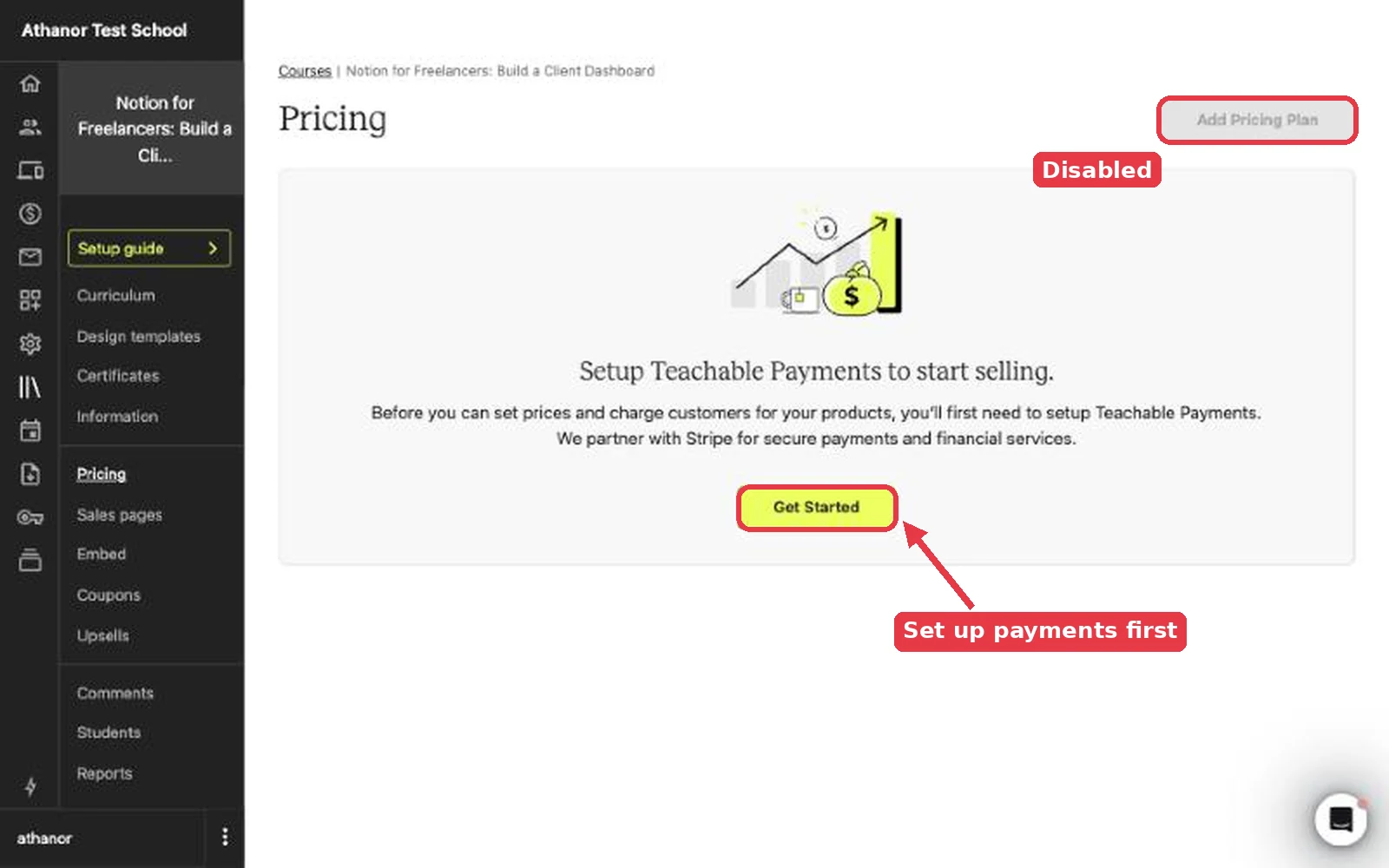
Payouts start with payment onboarding. In our November 18, 2026 test, a course could not be priced until Teachable Payments was set up, so the clock on your first payout effectively starts when onboarding is complete, not when the course is finished.
For new Teachable Payments accounts, Teachable states that initial payouts may take up to four to six weeks while Stripe completes its verification of your account. This is the most common reason creators contact support after their first launch.
To avoid a stalled first payout:
- Complete identity and business verification as soon as you create the school, not after your first sale.
- Use a bank account in the same name as the verified business or individual.
- Answer verification requests quickly. Additional document requests pause the process until you respond.
- Plan launch cash flow around the delay. If you are paying for ads or contractors from launch revenue, assume the first payout arrives a month or more after the launch.
Tax forms and payout holds
Teachable documents a hard rule: if your school’s earnings exceed $500 and the required tax forms have not been submitted for all accounts you control, payouts are placed on hold until the forms are completed. US creators typically submit a W-9 and non-US creators a W-8 form.
This catches creators who launch successfully and only then discover the requirement. Submit tax information during setup, before you reach $500 in earnings, so a good launch week is not followed by frozen payouts.
Refunds, chargebacks, and negative balances
Refunds and chargebacks are taken from your balance:
- Refunds you issue reduce the next payout. If refunds or disputes exceed new sales, your balance can go negative, and Teachable’s documentation states that new sales are used to offset the deficit before payouts resume.
- Chargebacks (a buyer disputing the charge with their bank) carry a published $15 fee on Teachable’s fee page in addition to the reversed amount, and the outcome depends on the evidence you provide.
- Reserves: older Teachable articles describe a rolling reserve held against refunds and chargebacks, while the newer Teachable Payments article states that no reserve is held. Check your own payment settings and payout reports to see whether any amount is being held on your account.
A clear refund policy on the sales page, and prompt responses to student support requests, reduce chargebacks more than anything else.
What is deducted before you are paid
Your payout is what remains after several layers:
| Layer | Example (current published rates) |
|---|---|
| Teachable plan fee | 7.5% of each sale on Starter; 0% on Builder and above |
| Payment processing | 2.9% + $0.30 for US cards on US schools; higher for international cards and PayPal |
| Optional commerce services | A payments bundle or BackOffice can add a percentage, depending on setup |
| Refunds and chargebacks | Reversed amounts plus a $15 chargeback fee |
| Affiliate and author payouts | Commissions you owe partners, if you use them |
Rates are from Teachable’s official fee documentation, verified October 16, 2026. A simple illustration: a $100 course sold on Starter to a US card buyer loses $7.50 to the plan fee and about $3.20 to processing, so roughly $89.30 reaches your payout before any refunds, affiliate commissions, or optional services. On Builder, the plan fee disappears and roughly $96.80 remains. Our Teachable pricing guide shows when Builder’s higher subscription pays for itself (about $533 a month in sales on annual billing).
How affiliate and co-author payouts work
If you run an affiliate program or pay co-authors from your Teachable school, how they get paid depends on your payment setup. Teachable documents BackOffice as a service that can automate affiliate and author payouts and collect their tax forms, with a published fee of 2.8% for schools below $500,000 in trailing 12-month sales. Without it, you track commissions in Teachable’s reports and pay partners yourself. Decide this before recruiting affiliates, because manual payouts become time-consuming quickly.
Reconciling payouts with sales
When a payout looks wrong, it almost always is not. Work through it in this order:
- Export the transaction report for the payout period.
- Separate gross sales, taxes collected, coupons, refunds, and chargebacks.
- Apply the plan fee (Starter only) and processing fee per order.
- Subtract any bundle or BackOffice charges and partner commissions.
- Compare the result with the payout amount and date, remembering business-day timing.
If the numbers still differ, contact Teachable support with the transaction IDs, not the totals.
Teachable payouts vs other course platforms
Most course platforms that process payments for you have similar mechanics: a verification period for new accounts, a payout schedule, and tax-form requirements. The main difference is control. Platforms that let you connect your own Stripe account pay you on Stripe’s schedule and keep the platform out of the money flow. If payout control is critical for your business, compare setups in Thinkific vs Teachable and best Teachable alternatives.
See current Teachable plans and set up payments and tax forms on day one, so your first launch revenue is not stuck in verification.
Related Teachable guides: Our hands-on walkthrough of creating a course on Teachable, what the Teachable free trial includes and our Teachable review for course creators.
FAQ
How often does Teachable pay out?
With Teachable Payments, you can choose daily (about two business days after each sale), weekly (every Thursday), or monthly (first business day of the month). Schools on other payment setups, such as the Monthly Payment Gateway or their own processor, follow different schedules.
Why haven’t I received my first Teachable payout?
New Teachable Payments accounts can take up to four to six weeks for the first payout while Stripe verifies the account. Also check that your tax forms are submitted, because payouts are held once earnings pass $500 without them, and that no verification documents are outstanding.
Does Teachable take a percentage of my sales?
On the Starter plan, Teachable charges a 7.5% plan fee on each sale. Builder, Growth, and Custom plans list 0% plan fees. Payment-processing fees apply on every plan, and optional services such as a payments bundle or BackOffice can add a further percentage.
What happens to my payout if a student requests a refund?
The refunded amount is deducted from your balance and reduces your next payout. If refunds exceed new sales in a period, your balance can go negative, and future sales are used to cover it before payouts resume. Chargebacks also carry a published $15 fee.
Can I get paid through PayPal instead of a bank account?
That depends on your school’s payment setup and country. Teachable Payments pays out to a bank account through Stripe. Check your payment settings or Teachable’s current help documentation for the options available to your school.