CreatorGuide
Teachable Free Trial (2026): Length, Free Plan, Refunds, and What to Test
How Teachable's free trial works in 2026: the 7-day trial, the 30-day trial offer, why there is no free plan, the 30-day refund policy, current promotions, and a checklist for testing before you pay.
The Teachable free trial is the only way to use Teachable without paying, because Teachable no longer offers a permanent free plan. As of November 18, 2026, every self-serve plan on Teachable’s pricing page (Starter, Builder, and Growth) shows a 7-day free trial and a 30-day money-back guarantee. Some visitors are also shown a special offer of a 30-day free trial on Builder, and during November 2026 the pricing page runs Black Friday discounts on Builder and Growth. That is a lot of moving parts for what should be a simple question, so this guide sorts out what the trial includes, how long it really lasts, how the refund policy protects you if you forget to cancel, and, most importantly, what to test in the days you have so the decision is based on your own course rather than a feature tour. Everything here comes from Teachable’s official pricing page and help center, checked on November 18, 2026. For the full plan comparison, see our Teachable pricing guide.
Does Teachable have a free plan?
No. Teachable’s pricing page answers this directly: Teachable is a paid service that includes a 7-day free trial and a 30-day money-back guarantee, so you can explore it at no cost before committing. Older reviews and some help-center notes still mention a “Free plan” that allowed one course or one coaching product; that plan belongs to Teachable’s previous plan lineup. In June 2025 Teachable replaced its Basic, Pro, and Pro+ plans with the current Starter, Builder, Growth, and Custom structure, and the current pricing page lists no free tier.
If you specifically want a permanent free plan to host a first course, the closest alternative among the platforms we cover is Systeme.io, whose free plan includes one course with up to 500 students and processes up to $10,000 in total sales before you must upgrade. Our Teachable vs Systeme.io comparison explains when that trade-off makes sense.
How long is the Teachable free trial?
The standard trial is 7 days on Starter, Builder, and Growth, as shown on each plan card. Teachable’s pricing page also carries a “special offer” pop-up reading “Try Teachable free for 30 days,” which says Teachable has extended its free trial from 7 to 30 days so you can build your course and make your first sale before you pay. The sign-up link behind that pop-up starts a trial that converts to Builder on monthly billing, and its tracking labels identify it as an A/B test. In practice, that means some visitors are offered 30 days and others see only the 7-day trial.
| Trial option | Length | Plan after trial | Who sees it |
|---|---|---|---|
| Standard plan-card trial | 7 days | The plan you chose (Starter, Builder, or Growth) | Everyone |
| Special-offer trial | 30 days | Builder, billed monthly | Some visitors, via a pricing-page pop-up |
| Custom plan | No self-serve trial | Quoted after a sales call | Larger businesses |
Because the 30-day version is a test, do not assume you will get it. Plan your trial around seven days and treat a longer offer as a bonus.
What the trial includes
A trial gives you the plan you selected, with its features and limits. That matters most for three things:
- Products. Starter allows 5 published products, Builder 10, and Growth 50. Courses, coaching products, and digital downloads each count as one; memberships, bundles, and drafts do not.
- Transaction fee. Starter charges a 7.5% Teachable fee on sales; Builder and Growth charge 0% when you use Teachable Payments. Processing fees apply on every plan.
- Plan-gated features. The integrated affiliate program and real-time support start on Builder. Certificates, Teachable branding removal, imported students, custom admin permissions, and free subtitles and translations are listed on Growth.
So start the trial on the plan you would actually buy. Trialing Starter tells you little about Builder’s affiliate tools, and trialing Growth may hide limits you will hit later on a cheaper plan. You can change plans at any time from your school’s admin; Teachable charges the new plan amount at your next billing date. The 30-day offer explicitly invites you to make your first sale during the trial, so you can test real checkout, not only the course builder.
What happens when the trial ends
Teachable plans auto-renew each billing cycle until canceled, and the trial converts into the paid plan you chose unless you cancel first. The 30-day offer states it plainly: “Then Builder monthly. Cancel anytime.” Set a calendar reminder for the day before the trial ends.
If you do get charged and decide not to continue, Teachable’s refund policy helps. Its help center says refunds are available within 30 days of signing up for a new paid plan or upgrading to a higher tier, for both monthly and annual subscriptions, and that this also covers charges incurred during trial periods if you decide not to continue, as well as unexpected charges during free trials. Requests must be made in writing within the 30-day window, after you cancel the plan from Settings → Billing. Teachable reserves the right to deny refunds in cases of abuse, such as repeated requests across multiple schools.
What happened when we canceled our trial
We canceled our own Builder trial on November 18, 2026, the same day we started it, after finishing our hands-on Teachable review. A few details are worth knowing before you do the same.
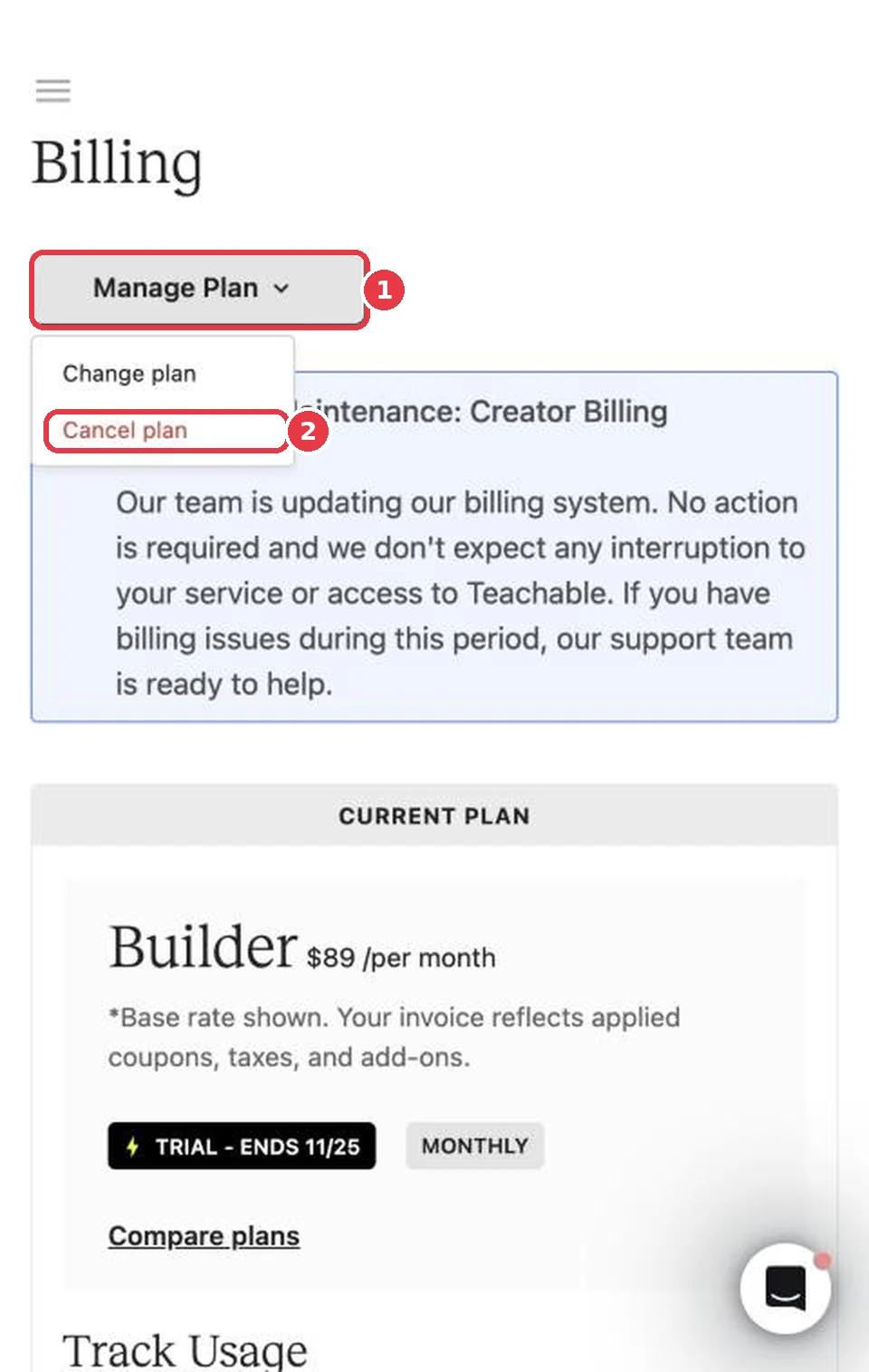
The cancel button is hidden in a menu. On Settings → Billing, there is no visible cancel link. Click Manage Plan at the top of the page; the dropdown offers “Change plan” and, in red, “Cancel plan”. Before canceling, the same page showed our trial ending on 11/25 and an upcoming payment of $89.00 on that date.
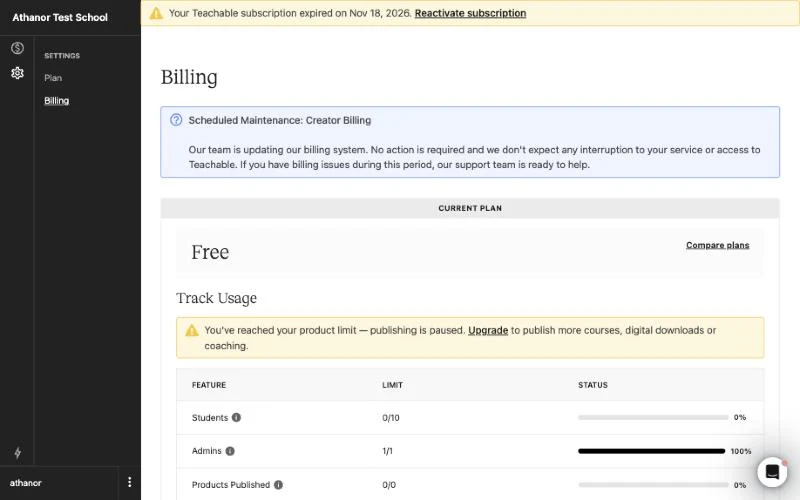
The confirmation and the account disagreed about timing. The confirmation screen said “Your plan has been cancelled” and that the school “will be taken offline on the end of your current billing period,” and it reminded us to export student lists, sales records, and content first. But when we returned to Billing, a banner said the subscription had expired that same day, and the admin sidebar had shrunk to the Plan and Billing settings. In other words, canceling during the trial ended our access immediately rather than at the trial’s end date. Finish testing and export anything you need before you click Cancel.
The account drops to a hidden “Free” plan you cannot sell on. Teachable’s pricing page lists no free plan, yet after cancellation our Billing page showed the current plan as Free, with these limits: 10 students, 1 admin, 0 published products, and 0 apps, plus a warning that “publishing is paused.” The upcoming payment changed to $0.00, and the invoice history recorded a $0.00 “Churn Voluntary (Downgraded)” entry. So the account and its draft content remain, and you can reactivate later, but nothing can be published or sold until you choose a paid plan.
Your card stays on file. The payment method we entered at sign-up was still listed after cancellation. With a $0.00 plan nothing should be charged, but you can remove the card under Payment Methods on the same page if you prefer.
Current promotions (November 2026)
During November 2026, Teachable’s pricing page runs Black Friday offers alongside the trial:
- Monthly billing: 50% off Builder or Growth for the first two months, so Builder costs $44.50 and Growth $94.50 per month for two months, then $89 and $189.
- Annual billing: “4 months free,” shown as Builder at $59 per month and Growth at $119 per month for the first year, then $69 and $139 per month billed annually.
These offers are time-limited and can change daily, so confirm the terms on the checkout page. A discount is only worth taking if the platform already passed your trial test; locking into an annual plan for a promotion and then discovering a deal-breaker is a common and expensive mistake. Our Teachable discounts guide tracks these and other verified ways to pay less.
See Teachable’s current trial and Black Friday offers
What to test during the trial
Seven days is short, so prepare before you start: have one module of real videos, a sales-page draft, and your price ready. Then work through this checklist. When we ran a Builder trial ourselves, the two surprises were that pricing stays locked until Teachable Payments onboarding is finished, and that the AI-generated lessons and sales page needed heavy rewriting—both covered in our hands-on Teachable AI review.
- Build one real product. Upload a representative module with the same video length, files, and quiz types as your finished course.
- Run a full purchase. Create the real price, including any payment plan or subscription, and buy it yourself through Teachable’s checkout. Confirm the receipt, enrollment email, and the student’s first login.
- Check the student view on mobile. Open the course in Teachable’s iOS or Android app and on a phone browser.
- Read the transaction report. See exactly which fees came out of the test sale and compare them with our Teachable fees explained guide.
- Connect your most important tool. Link your email platform or analytics and confirm data arrives. Starter allows one third-party integration, Builder three, and Growth five.
- Test the feature you are paying for. If you chose Builder for the affiliate program, add a test affiliate. If you sell coaching, run a client through an intake form; our Teachable for coaches guide explains that flow.
- Estimate imported students. If you plan to bring an existing list, note that students added outside Teachable’s checkout count toward an allowance of 100 per school, after which Teachable charges $0.50 per student per month on schools created since September 3, 2026.
If all seven steps work, you have real evidence that Teachable fits. If one fails, you have learned that before paying for a year.
How Teachable’s trial compares
| Platform | Free plan | Free trial | Money-back guarantee |
|---|---|---|---|
| Teachable | No | 7 days (30-day offer for some visitors) | 30 days |
| Thinkific | No | 30 days | Check current terms |
| Kajabi | No | 14 days | 30 days |
| LearnWorlds | No | 30 days | Check current terms |
| Systeme.io | Yes | Not needed; free plan has no end date | Not applicable |
Teachable’s standard trial is the shortest of the course platforms here, which is why preparation matters. If you need longer to evaluate, Thinkific’s 30-day trial is the main alternative; see Thinkific vs Teachable. For a broader view, read our Teachable review.
Bottom line
Teachable has no free plan, but its 7-day trial plus a 30-day refund window gives you a low-risk way to test it, and some visitors are offered a 30-day trial on Builder. Start the trial on the plan you would really buy, prepare your content first, and use the days to run one real sale end to end. If the test passes, start your Teachable free trial and decide on monthly or annual billing only after your first sale goes through.
Related Teachable guides: Our hands-on walkthrough of creating a course on Teachable.
FAQ
Is Teachable free to use?
No. Teachable has no permanent free plan in 2026. Every self-serve plan, from Starter at $39 a month to Growth at $189, starts with a 7-day free trial and comes with a 30-day money-back guarantee. Older articles that describe a free Teachable plan refer to the plan lineup Teachable retired in June 2025. In our test, canceling a trial moved the account to an unlisted “Free” plan, but it allowed 0 published products, so it cannot be used to sell anything.
Can I sell courses during the Teachable free trial?
Yes. Teachable’s 30-day trial offer explicitly says you can build your course and make your first sale before you pay, and a trial gives you your chosen plan’s checkout. On a Starter trial, Teachable’s 7.5% transaction fee applies to those sales, while Builder and Growth charge 0% plus processing.
Will Teachable charge me automatically after the trial?
Yes, unless you cancel. Teachable plans auto-renew until canceled, and the trial converts into the paid plan you selected. If you are charged and decide not to continue, Teachable’s refund policy covers charges incurred during trial periods when you request a refund in writing within 30 days.
How do I get the 30-day Teachable free trial?
Teachable shows the 30-day offer through a special-offer pop-up on its pricing page, and the offer converts to Builder on monthly billing. It appears to be an A/B test, so not every visitor sees it. If you only see the 7-day trial, plan your evaluation around seven days.
Which plan should I choose for my Teachable trial?
Choose the plan you expect to pay for. Builder is the usual choice for creators who expect regular sales, because it removes Starter’s 7.5% fee and includes the affiliate program. Choose Growth only if you need its features, such as certificates, more admins, or bulk student imports.