MarketingGuide
MailerLite Review for Creators (2026): Fit, Limits & Value
Hands-on MailerLite review for creators, tested November 2026: forms, welcome automations, the email editor, AI landing pages, digital products, and plan limits.


MailerLite is an email marketing platform for creators, small businesses, and lean teams that need newsletters, automations, and simple landing pages without enterprise complexity. This MailerLite review for creators focuses on—coaches, course sellers, newsletter writers, and digital product publishers—evaluated through a practical workflow: write email → segment readers → capture signups → welcome new subscribers → promote offers.
Research method: official product documentation and pricing pages, plus a hands-on walkthrough in a new MailerLite account on its 14-day premium trial on November 19, 2026. We created two subscriber groups, an embedded signup form, a draft welcome automation, a draft campaign, and an AI-generated landing page. We did not send campaigns, activate the automation, connect a sending domain, or connect Stripe, so this review does not measure deliverability or checkout.
This page answers one question: is MailerLite the right fit for your creator workflow? For plan prices, free-plan caps, trial details, and discounts, use the dedicated guides in which MailerLite guide to read below.
Good fit if you want email + forms + light automation at subscriber-based pricing, sell through external checkout, and can work within plan send caps on Comfort or upgrade to Power for unlimited sends.
Weak fit if you need native course hosting, deep CRM pipelines, paid newsletter ad networks, or agency-grade multi-brand permissions—those jobs belong to other platforms (linked below).
Features
MailerLite’s core is email delivery with a visual editor, subscriber management, and automation workflows triggered by signups, link clicks, or custom events. For creators, the practical feature set usually breaks down as:
| Capability | Creator use |
|---|---|
| Newsletters | Weekly content, launch announcements, nurture sequences |
| Automations | Welcome series, post-purchase follow-up, webinar reminders |
| Landing pages & forms | Lead magnets and waitlists without a separate page builder |
| Segmentation | Groups and interest tags for buyers vs free subscribers |
| Digital products & bookings | Stripe-connected sales of downloads, plus paid and free 1:1 or group calls (plan limits apply) |
| Paid newsletters | Recurring subscriptions synced from Stripe; the in-app Subscription product was marked “Coming soon” in our November 2026 test |
MailerLite also includes a website builder, with one website and one landing page on the Free plan and higher limits on paid tiers—a useful consolidation for “site + form + email” at modest scale. It is not a full funnel OS: complex upsell paths, membership gating, and course hosting typically require checkout or course platforms (Thinkific, Systeme.io, Gumroad-class tools).
Inside MailerLite vs external tools
| Need | In MailerLite | Usually external |
|---|---|---|
| Welcome sequence | Automation builder | — |
| Paid course delivery | Limited digital product / booking slots | Course platform |
| Full sales funnel with order bumps | Basic pages + email | Funnel or all-in-one tool |
| Transactional receipts at scale | MailerSend (separate product) | Developer email API |
For a creator with an existing checkout or course platform, evaluate the email workflow without assuming you need another all-in-one system. Our Kit review helps compare creator email requirements, while the beehiiv review covers newsletter-led publishing decisions. These links are alternatives to investigate, not evidence that one product is cheaper or easier for every creator.
To implement the welcome path inside MailerLite, follow build a welcome sequence. Blogger-specific capture patterns: MailerLite for bloggers. Small-team nurture tables: MailerLite for small business.
Hands-on: setting up a creator workflow
We followed the same path a creator would take in the first hour: split readers into groups, add a signup form, write a welcome automation, draft a newsletter, generate a landing page, and look at how selling works. Screenshots are from the trial account, so some screens show premium features that the Free plan does not include.
1. Segment readers into groups
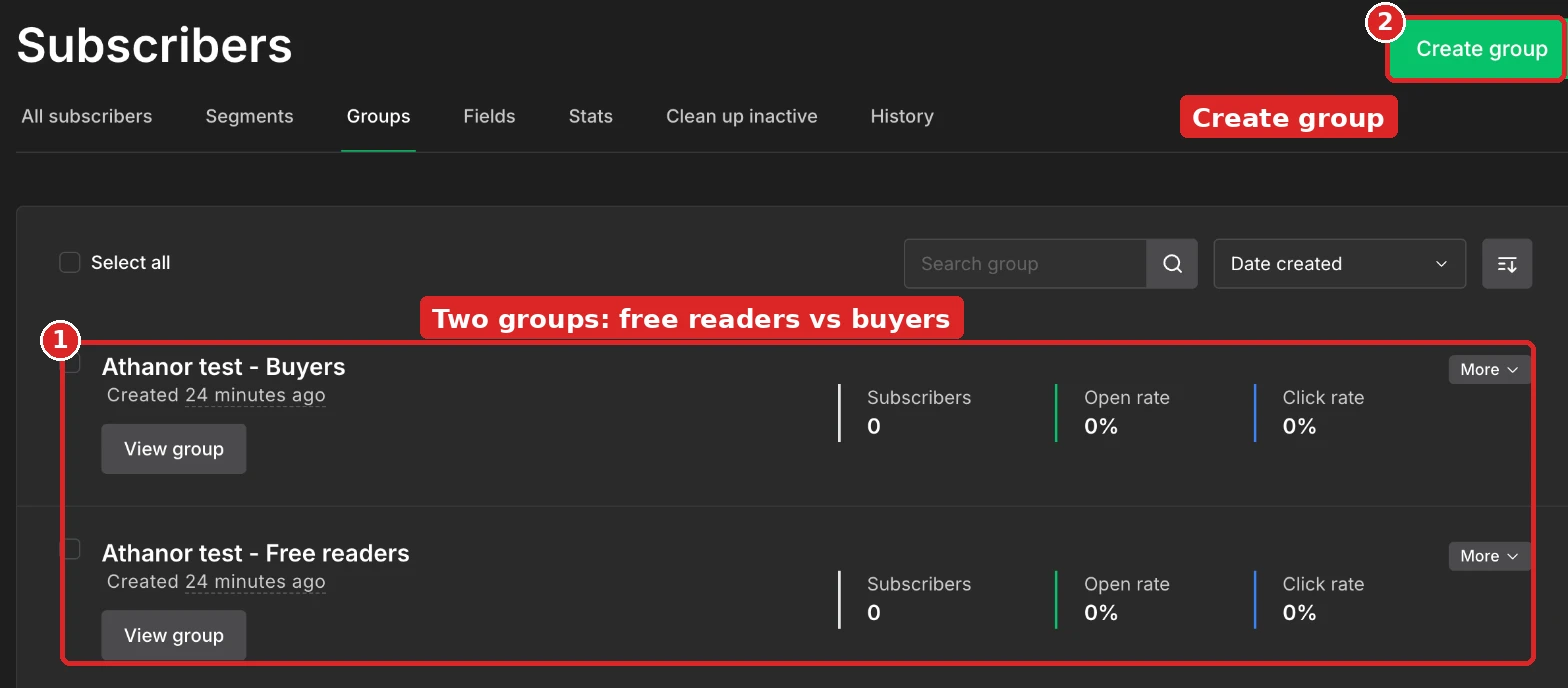
Groups are the simplest way to keep free readers and buyers apart. Creating one is a single name field, and every form, landing page, and automation trigger we set up afterwards offered these groups as a picklist. Segments sit in the next tab for rules-based filtering, but for a creator with one lead magnet and one product, two groups were enough to drive everything below.
2. Capture signups with an embedded form
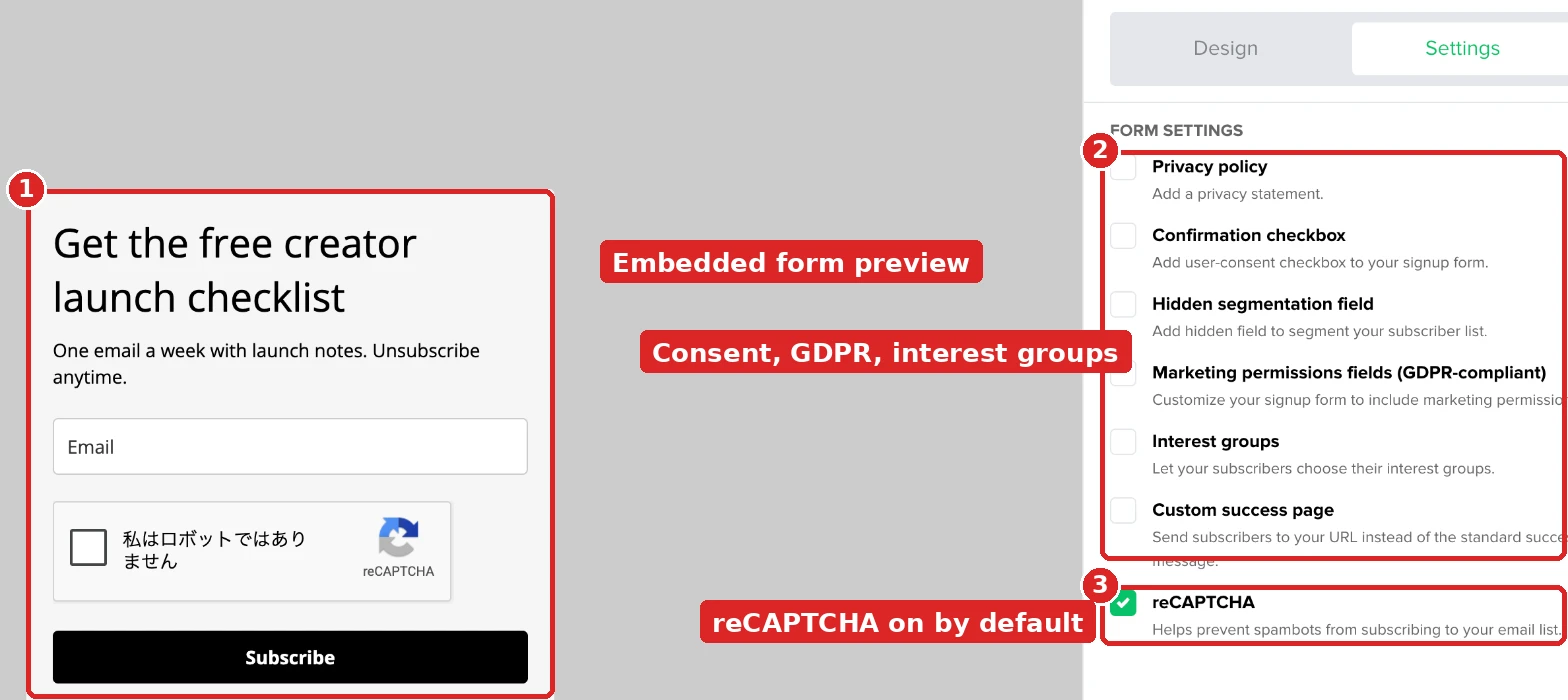
The form builder asks for a name, a type (pop-up, embedded form, or promotion), and the group new signups should join, then opens a drag-and-drop editor. Editing the heading and description took under a minute. The settings panel covers consent checkboxes, GDPR-style marketing permissions, interest groups, and a custom success page, and reCAPTCHA was already switched on.
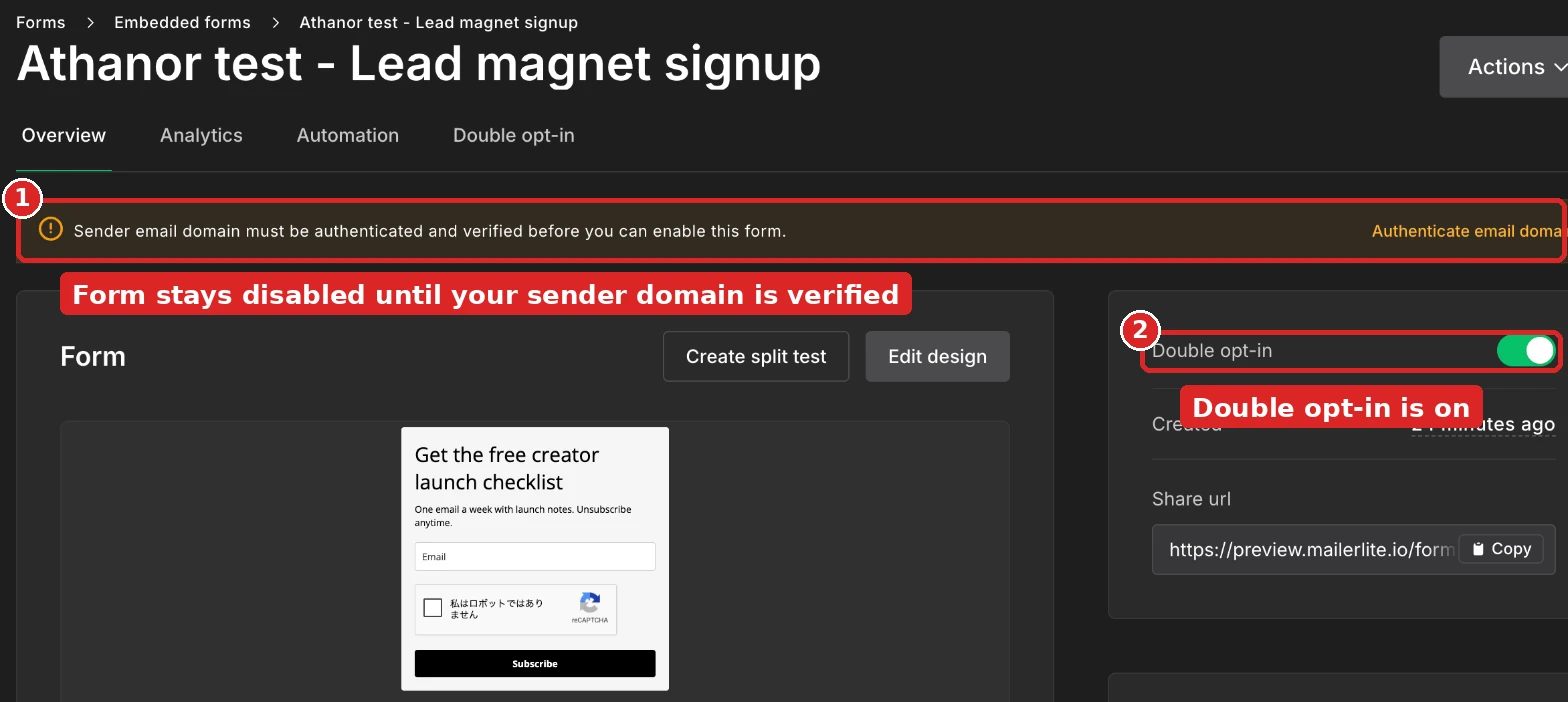
The most important finding came after saving: MailerLite would not let us enable the form until our sender email domain was authenticated and verified. Double opt-in was also on by default. In practice, budget time for DNS setup on your own domain before launch day. A free Gmail-style address is not enough to put a live form on your site.
3. Build the welcome automation
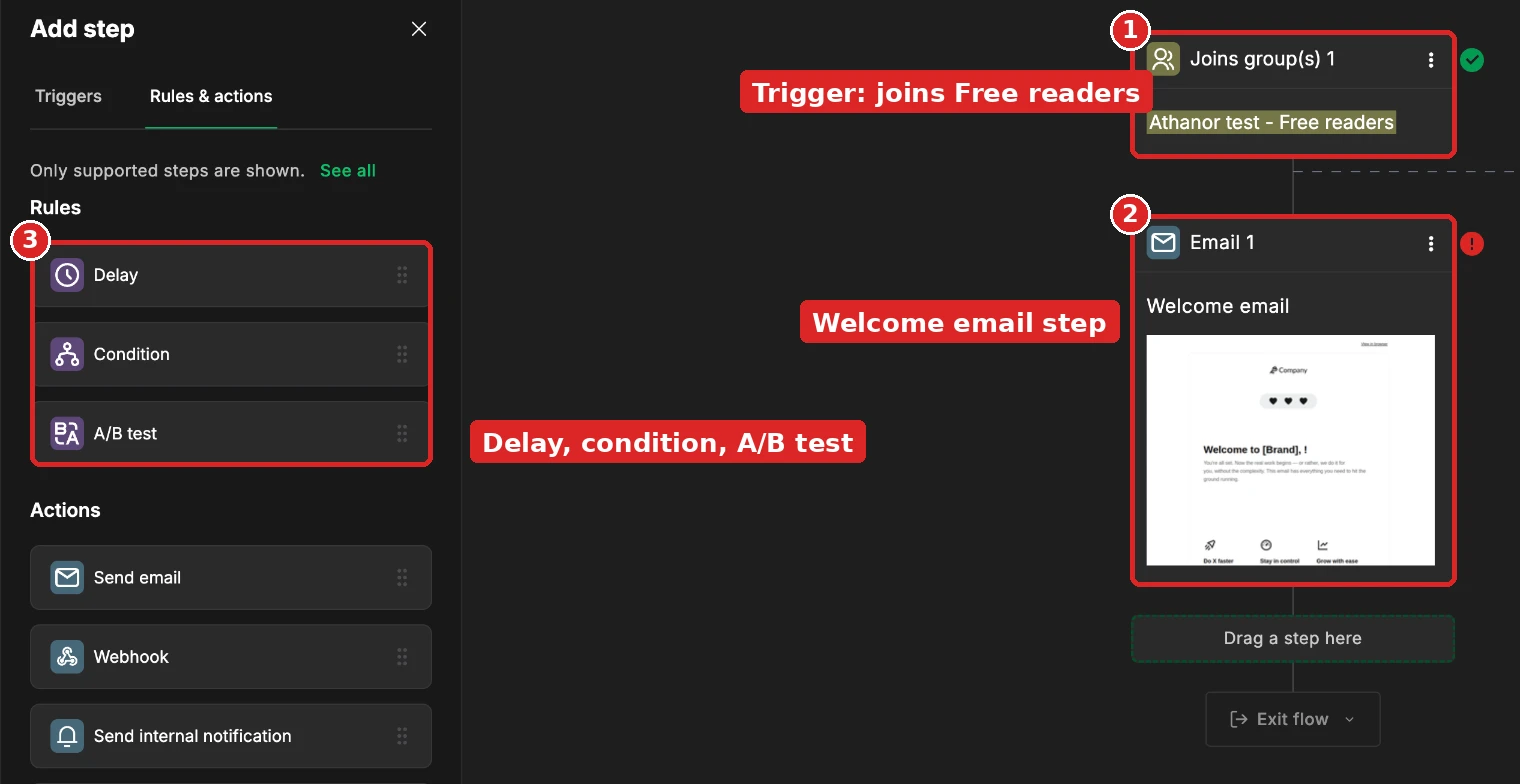
We started from the Simple welcome email template. It drops in a “joins group” trigger and one email, and choosing the Free readers group took two clicks. From the step panel you can add delays, conditions, A/B tests, more emails, webhooks, and internal notifications. The template gallery also marks some workflows as Premium, such as the advanced welcome flow that combines several signup sources, so check the badge before building around a template on Free. We left the workflow inactive.
4. Draft the newsletter
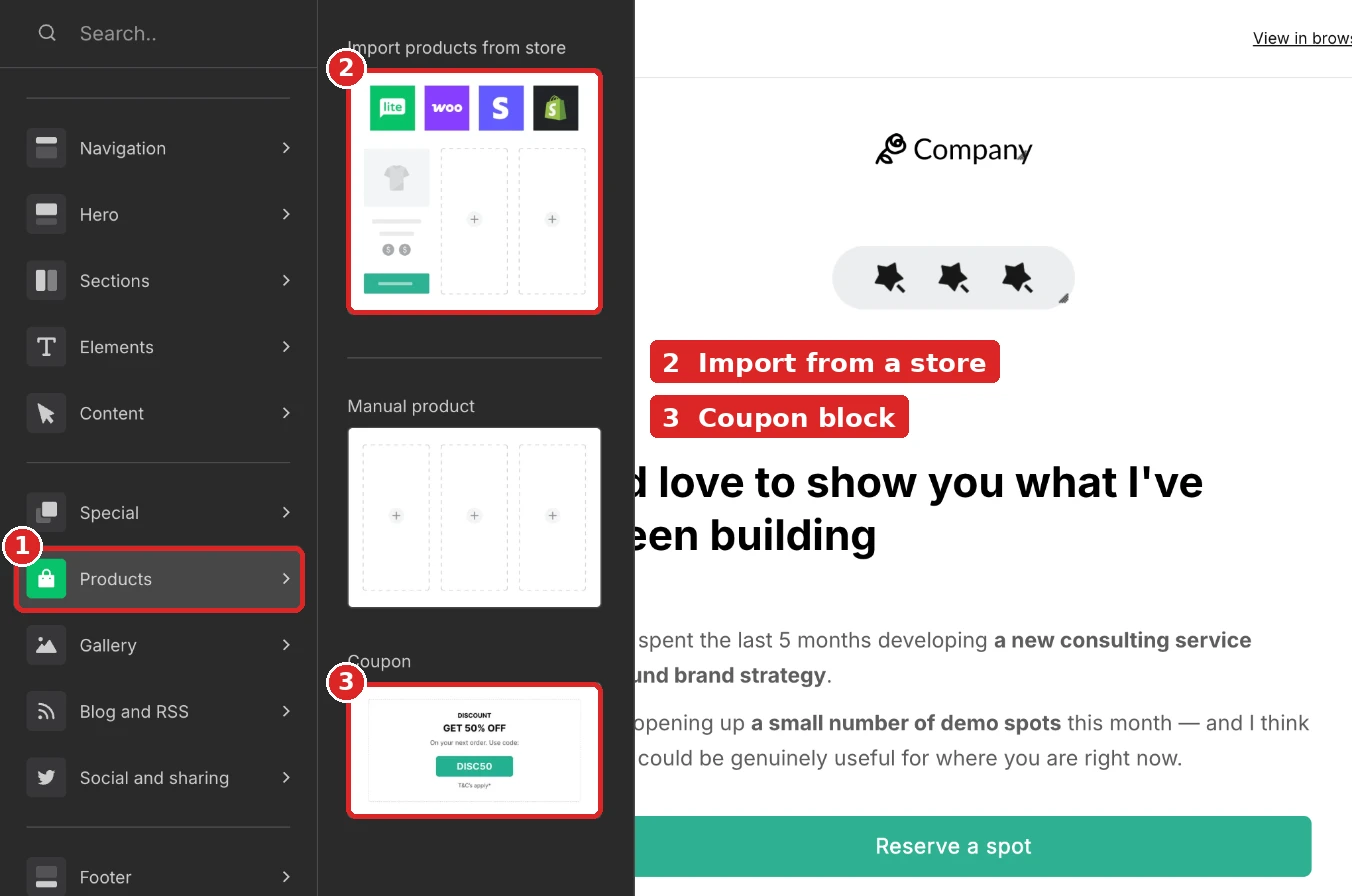
The campaign picker offers regular and A/B split campaigns, while RSS, auto-resend, and multivariate campaigns carry a Premium badge. The template gallery listed 130 templates. For creators, the useful part of the drag-and-drop editor is the Products category: blocks for importing items from a connected store, a manual product card, and a coupon block, so a launch email can carry the offer without hand-built buttons.
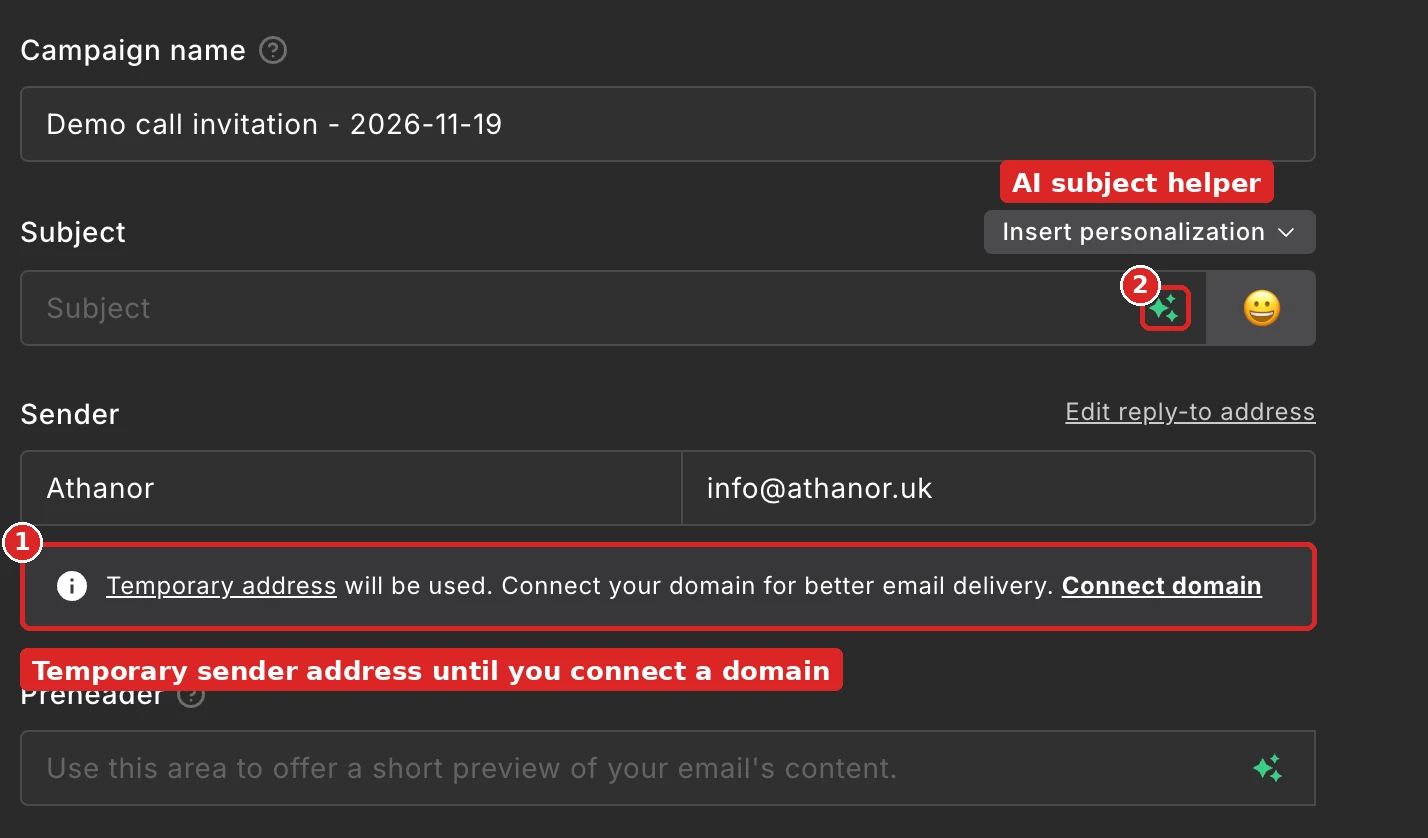
Two details stood out. Clicking Done editing flagged that some template buttons had no link, a useful check before anything goes out. And on the details step, MailerLite said it would send from a temporary address until we connected a domain. The subject and preheader fields both have an AI helper.
5. Generate a landing page with AI
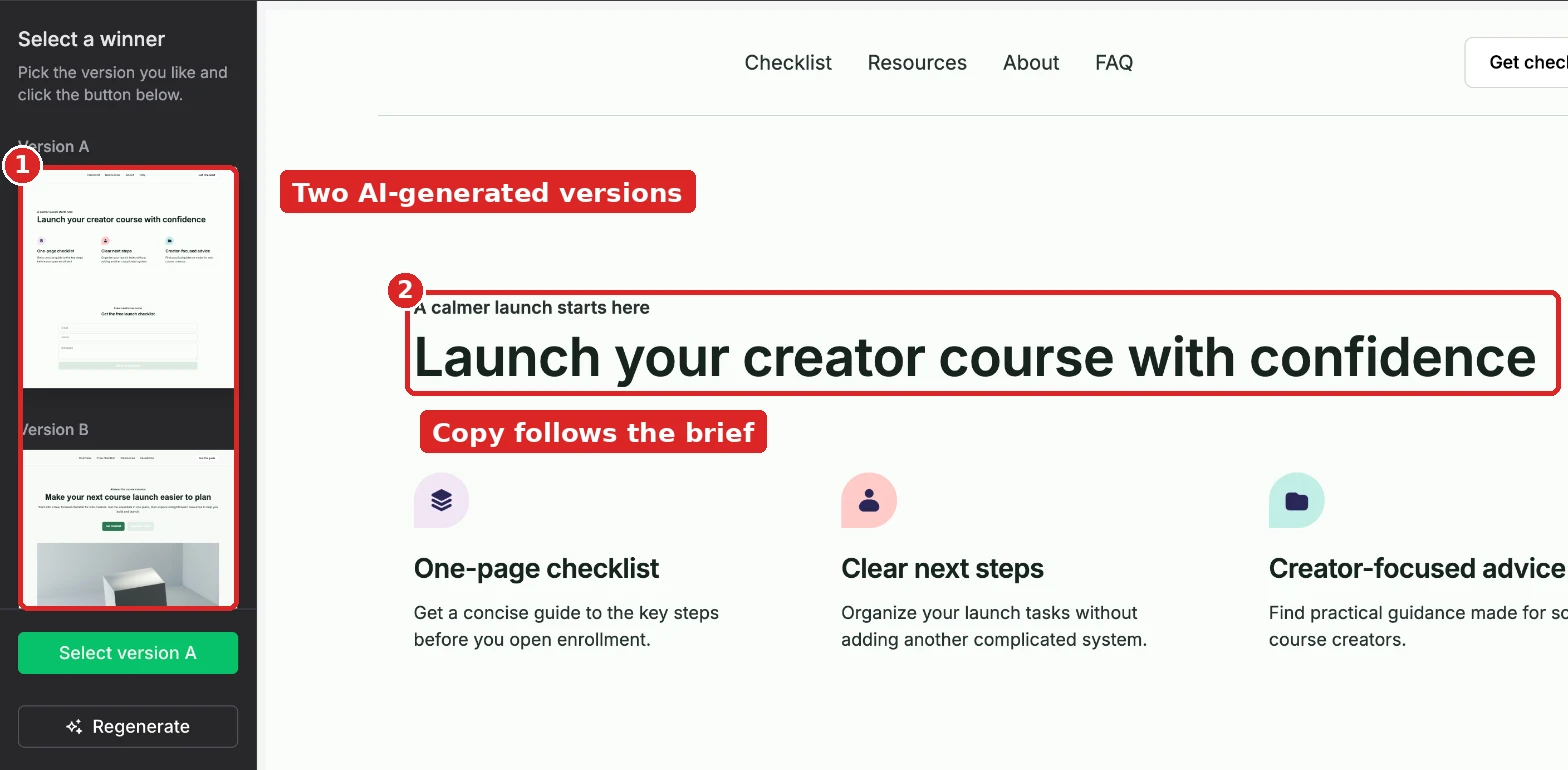
Landing pages can start from a template or from Build with AI. We described a lead magnet page for course creators, chose two goals and a minimalist style, and got two versions to pick from in about 20 seconds. We ran the same brief twice. The second run (above) followed it closely, with a clear headline and three benefit blocks. The first run’s version A, though, added App Store and Google Play badges to a page that only offers a checklist. Treat the output as a first draft and check every block before publishing. One generation used 3,540 of the 100,000 AI credits shown in our trial account.
6. Sell products and bookings
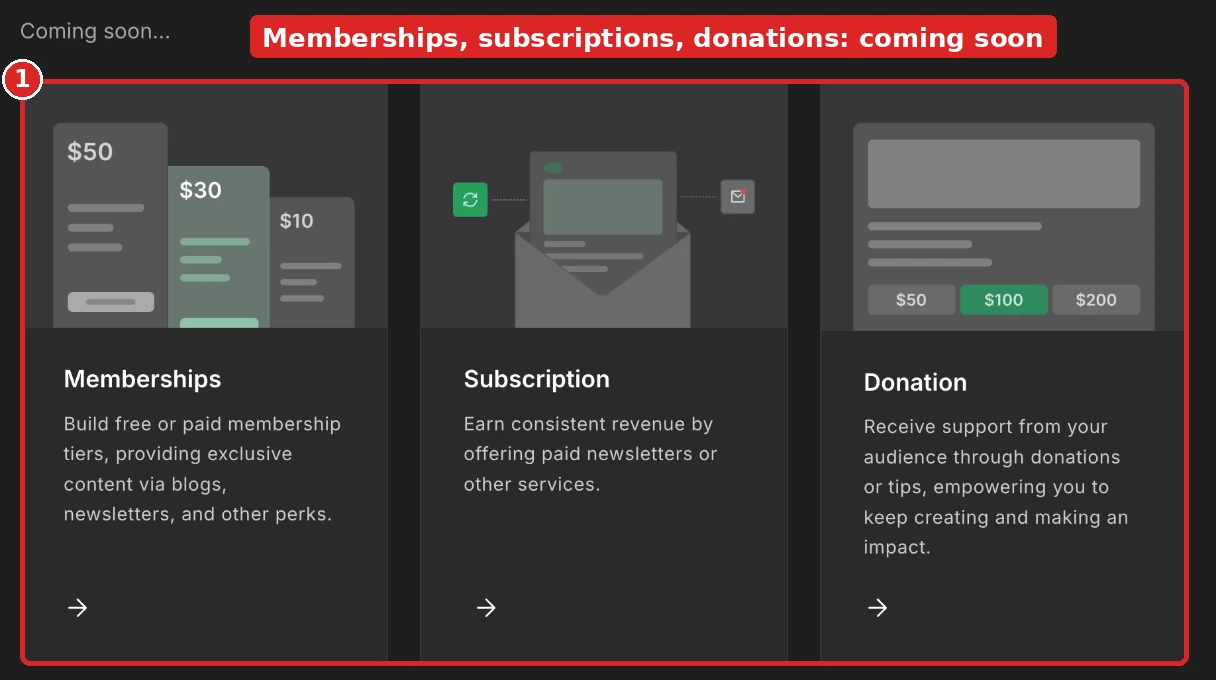
Selling runs through Stripe: you log in to or create a Stripe account before taking payments. The Products page offers digital products (e-books, templates, downloads) and bookings (free discovery calls, paid consultations, webinars). In our account on November 19, 2026, Memberships, Subscription, and Donation were listed as “Coming soon” on that page. MailerLite’s Stripe prompt says recurring subscriptions and memberships can be synced from Stripe into product blocks, so paid newsletters currently mean managing the recurring product on the Stripe side.
7. Check what the paid plans include
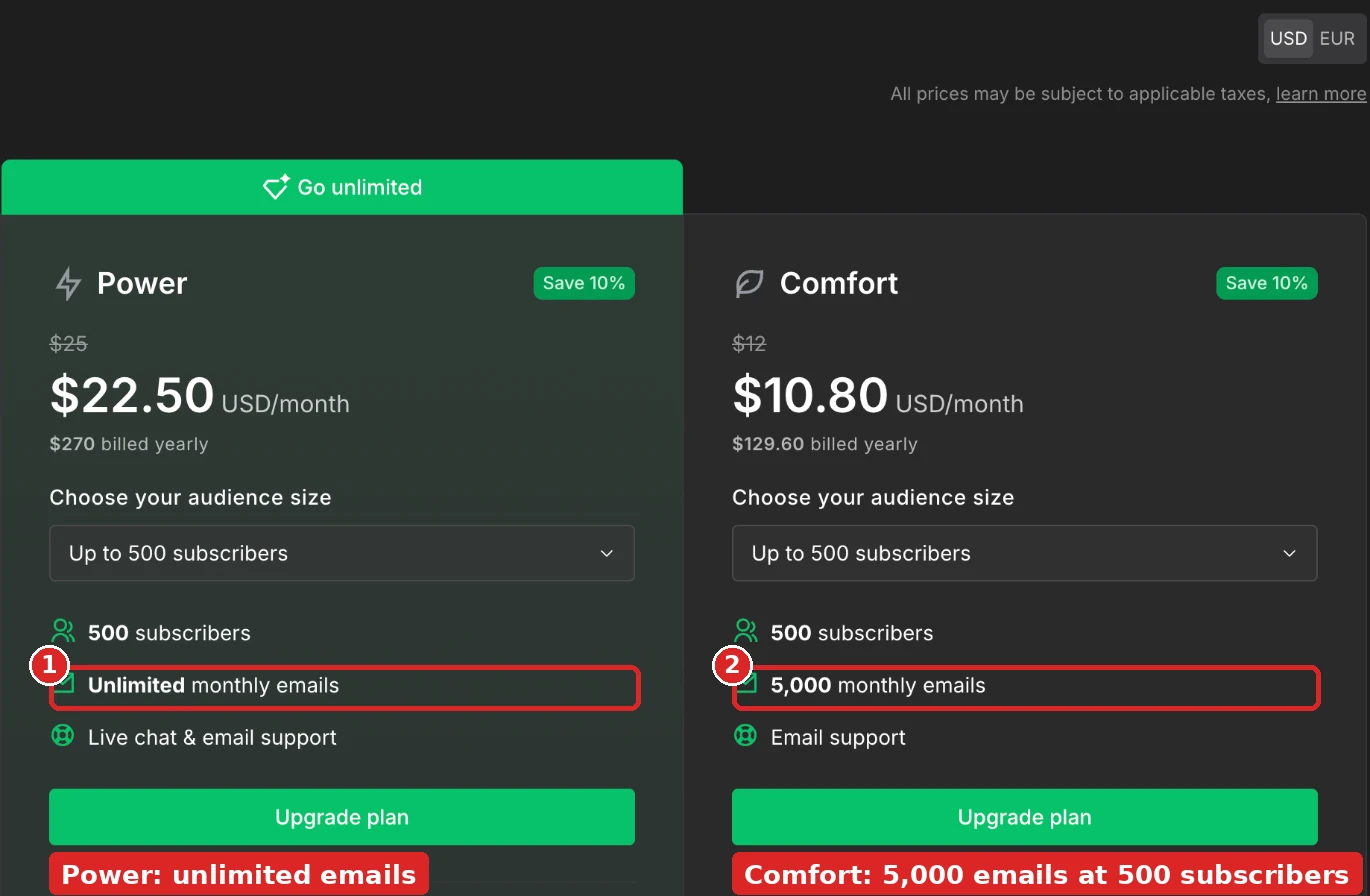
The in-app plan picker matched the public pricing at 500 subscribers: Comfort at $10.80/month billed yearly ($129.60/year) with 5,000 monthly emails, and Power at $22.50/month billed yearly ($270/year) with unlimited monthly emails. Monthly billing is $12 and $25. Comfort’s 5,000 emails is the “10× your tier ceiling” cap in the table below. During our test, the app also showed MailerLite’s Lite Friday banner: 26% off annual plans with code LITEFRIDAY26 until December 18, 2026 (see MailerLite discounts).
What the hands-on test changed in our verdict: setup was fast, and the product blocks and AI page builder make MailerLite more creator-friendly than its “simple newsletter tool” reputation suggests. The real gating items are outside the editor: a verified sending domain before forms go live, and Stripe before you can sell.
Pricing snapshot
This is a summary for judging fit, not a full price guide. MailerLite charges by active subscribers and sending volume, and every paid plan includes the core tools. Starting prices and allowances below were checked against the official pricing page and paid-plan update on October 16, 2026. Use the digital product documentation to check how file sales and bookings fit your offer.
| Plan | Starting price | Subscribers | Monthly emails | Automations | Websites & landing pages | Digital products & bookings |
|---|---|---|---|---|---|---|
| Free | $0 | Up to 250 | 2,500 | 3 | 1 website + 1 landing page | 1 |
| Comfort | From $12/month | By tier | 10× your tier ceiling | 50 | 10 | 5 |
| Power | From $25/month | By tier | Unlimited (fair use) | Unlimited | Unlimited | Unlimited |
| Enterprise | Custom | 200K+ | Custom | — | — | — |
Annual billing saves 10%, and every new account gets a 14-day trial of premium features with no credit card. The practical creator takeaways:
- Comfort is capped, Power is not. Comfort limits monthly emails to 10× the ceiling of your subscriber tier, while Power sends unlimited emails under fair use—so not every paid plan is “unlimited sends.”
- Budget at 12-month list size, not today’s count, if you run lead magnets or referrals. Billing counts any address that was active at any point in the billing cycle.
- Count automation emails toward monthly sends on Free and Comfort.
- Factor in migration time if you import tags and automations from another ESP.
Explore MailerLite on its official site
Which MailerLite guide to read
We split MailerLite coverage so each page answers one question. Pick the one that matches yours:
| Your question | Read this |
|---|---|
| “Is MailerLite right for my creator workflow?” | This review |
| “What does the Free plan include, and where does it stop?” | Free plan limits — 250 subscribers, 2,500 sends, automation caps |
| “What will I pay at my list size, and what’s the difference between Comfort and Power?” | MailerLite plans and costs — USD examples at 500–10,000 subscribers, Comfort vs Power send math |
| “What can I test before paying?” | 14-day premium trial |
| “Can I pay less?” | Annual and nonprofit discounts — documented savings only |
| “How do I build my first automation?” | Build a welcome sequence |
Pros and cons
Pros
- Subscriber-based tiers make it possible to budget against a stated list size and sending schedule.
- The documented automation builder supports a signup-to-welcome workflow alongside campaigns.
- Forms and landing pages can cover simple lead capture without adding a separate page builder; in our test, reCAPTCHA and double opt-in were on by default.
- Email product and coupon blocks, plus an AI landing page generator, shorten the path from signup to offer.
- Digital products and paid newsletters give creators options to evaluate alongside email.
Cons
- Not an all-in-one—courses, complex funnels, and CRM depth live elsewhere
- If you manage several client brands, check the required account boundaries and permissions before assuming one creator account covers that workload
- Comfort send and feature-use caps require planning; Power costs more at the same subscriber tier
- Forms cannot be enabled until your sender domain is authenticated, so plan DNS setup before launch
- Deliverability and automation behavior should be validated with your domain during the 14-day trial—we did not send live campaigns for this article
When a creator should look elsewhere
- You need funnels + checkout + email in one login on a tight budget → evaluate Systeme.io review
- You sell courses as the core product → start with best online course platform for creators
- You run paid newsletter ads and boost monetization as primary revenue → compare beehiiv review for newsletter creators
When the paid plan is worth considering
Consider paying when a specific constraint interrupts a useful workflow: your next campaign will exceed the send allowance, your welcome path needs more steps, or your team needs additional access. Price that requirement at your expected list size using our MailerLite pricing guide. Avoid upgrading simply because a feature looks useful in a table.
For example, a creator who sends a weekly newsletter and sells through an existing checkout should test the signup, grouping, welcome sequence, and purchase follow-up they actually need. A creator building a course business should also check learner access and delivery outside the email flow. Our assessment is about product fit; we have not measured setup time or inbox placement.
Who it is for
MailerLite fits creators who:
- Send consistent email (weekly or more) and need reliable automations for launches
- Capture leads with forms and simple landing pages without Webflow-level design
- Want predictable costs while growing from hundreds to tens of thousands of subscribers
- Already sell via external checkout and need ESP + tags, not a full commerce suite
Weaker fits:
- Agencies managing many client brands with strict permissioning—consider ActiveCampaign-class tools (ActiveCampaign review)
- Creators who refuse to manage more than one platform and need native course + funnel + email—Systeme.io or Kajabi-class stacks may reduce glue work
- Publishers whose product is the newsletter business with ad network features—beehiiv may align better
FAQ
Is MailerLite good for creators?
Yes, when email is the center of your audience relationship and you want automations and landing pages without enterprise complexity. It is less ideal when your stack must native-host courses, memberships, and multi-step funnels in one product. In our November 2026 test, setup was quick, but forms could not go live until the sending domain was verified, so plan that step before launch.
MailerLite vs Kit for creators?
Compare the same list size, sending schedule, required automations, and sales workflow before choosing. A feature you will not use should not decide the purchase, and a starting price is not the same as your account cost. Our Kit vs MailerLite comparison gives the questions to take into a trial.
Does MailerLite replace a funnel builder?
Partially. MailerLite covers forms, landing pages, and email nurture. Multi-step sales funnels, order bumps, and integrated checkout usually need a dedicated funnel or all-in-one platform alongside it. MailerLite can sell single digital products and bookings through Stripe, which is enough for a lead magnet plus one offer.
Do I need my own domain to use MailerLite?
For a live signup form, yes in practice. In our November 2026 test, MailerLite blocked enabling an embedded form until the sender email domain was authenticated and verified, and campaign drafts showed a temporary sender address until a domain was connected. Set up the DNS records on a domain you own before your launch date.
Is there a free plan or trial?
Yes. The Free plan covers up to 250 subscribers and 2,500 emails a month, and new accounts get a 14-day trial of premium features without a credit card. See free plan limits for what stops working at the cap and the 14-day premium trial for what you can test.
How does MailerLite pricing scale?
Pricing increases with subscriber bucket and Comfort vs Power tier. Model costs at your expected list size in 12 months using MailerLite plans and costs—do not assume unlimited sends on every paid plan.
Before switching, test one complete signup-to-offer path and identify which parts depend on a paid feature. The trial checklist helps make that test concrete. If the flow fits, compare your required plan cost with the tools it would replace; if it does not, use the relevant comparison before migrating your audience.