MarketingGuide
MailerLite Free Trial (2026): What You Get in 14 Days
MailerLite's 14-day premium trial explained: subscriber and send caps, features you can test, what's excluded, and what happens when the trial ends.


The MailerLite free trial is a 14-day premium trial that starts automatically when you register a new account. You do not need a payment method to begin. During the trial you can test many Comfort and Power features, but caps stay close to Free: up to 250 subscribers and 2,500 emails (test emails do not count toward the send cap). Unlimited sending, unlimited users, and several branding or infrastructure options are not included until you purchase a paid plan.
Sources: MailerLite trial help, verified October 16, 2026. Compare ongoing Free limits in MailerLite Free plan limits and paid tiers in MailerLite pricing.
Explore MailerLite on its official site
Trial limits vs Free vs paid
| 14-day premium trial | Free (after trial) | Comfort / Power | |
|---|---|---|---|
| Cost | $0 | $0 | Paid by subscriber bucket |
| Subscribers | 250 max | 250 max | Higher tiers |
| Email allowance | 2,500 during the trial | 2,500 per month | Comfort: 10× tier cap; Power: unlimited (fair use) |
| Premium features | Many unlocked for testing | Free feature set only | Full plan features |
Purchasing Comfort or Power during the trial ends the trial and starts billing for the plan you select.
Features you can test
MailerLite’s trial documentation explicitly describes:
- Multiple automation triggers for testing more than one entry condition in a workflow.
- Stripe-connected digital product and subscription sales through MailerLite pages, subject to the setup and payment requirements for your account.
- Live chat during the first 14 days after registration, including the remaining trial days if you purchase Comfort partway through.
Start with the one feature your production workflow needs. Check its current trial availability and paid-plan requirements before building the rest of your launch around it.
Not every paid feature is available on trial. MailerLite explicitly excludes during the 14 days:
- Unlimited email sending (still capped at 2,500)
- Unlimited users (still 2 seats)
- Custom domains, custom user permissions, and removing the MailerLite logo
- Create your own landing page template, dedicated IP
The excluded custom domains feature is separate from authenticating the domain used to send email. Check the intended page or sending feature rather than assuming that one domain setting covers both jobs.
Domain authentication during trial
New accounts using a custom domain can send initial campaigns before domain authentication completes—only during the trial. After trial expiry, MailerLite requires authenticated domains to continue sending campaigns. Plan DNS setup early so day 15 is not your first deliverability crisis.
Prepare your sending domain and permission-based signup list before registering, so the fixed trial window can be used on a working signup-to-email flow. MailerLite’s account setup guide explains registration, email verification, and sending requirements; its domain authentication guide covers the DNS setup.
What a new trial account looks like (November 19, 2026)
We registered a new account to check the trial against the documentation. The sidebar showed Trial – 14 days left with an Upgrade button, and the dashboard opened with MailerLite’s Lite Friday offer (26% off annual plans until December 18, 2026; see MailerLite discounts). Three findings matter for planning your 14 days.
Premium features are usable but labeled. Campaign types such as RSS, auto-resend, and multivariate, and some automation templates, carry a Premium badge. You can build with them during the trial, but anything badged stops working when the account reverts to Free. Keep a list of badged features your workflow touches; that list is your real plan requirement.
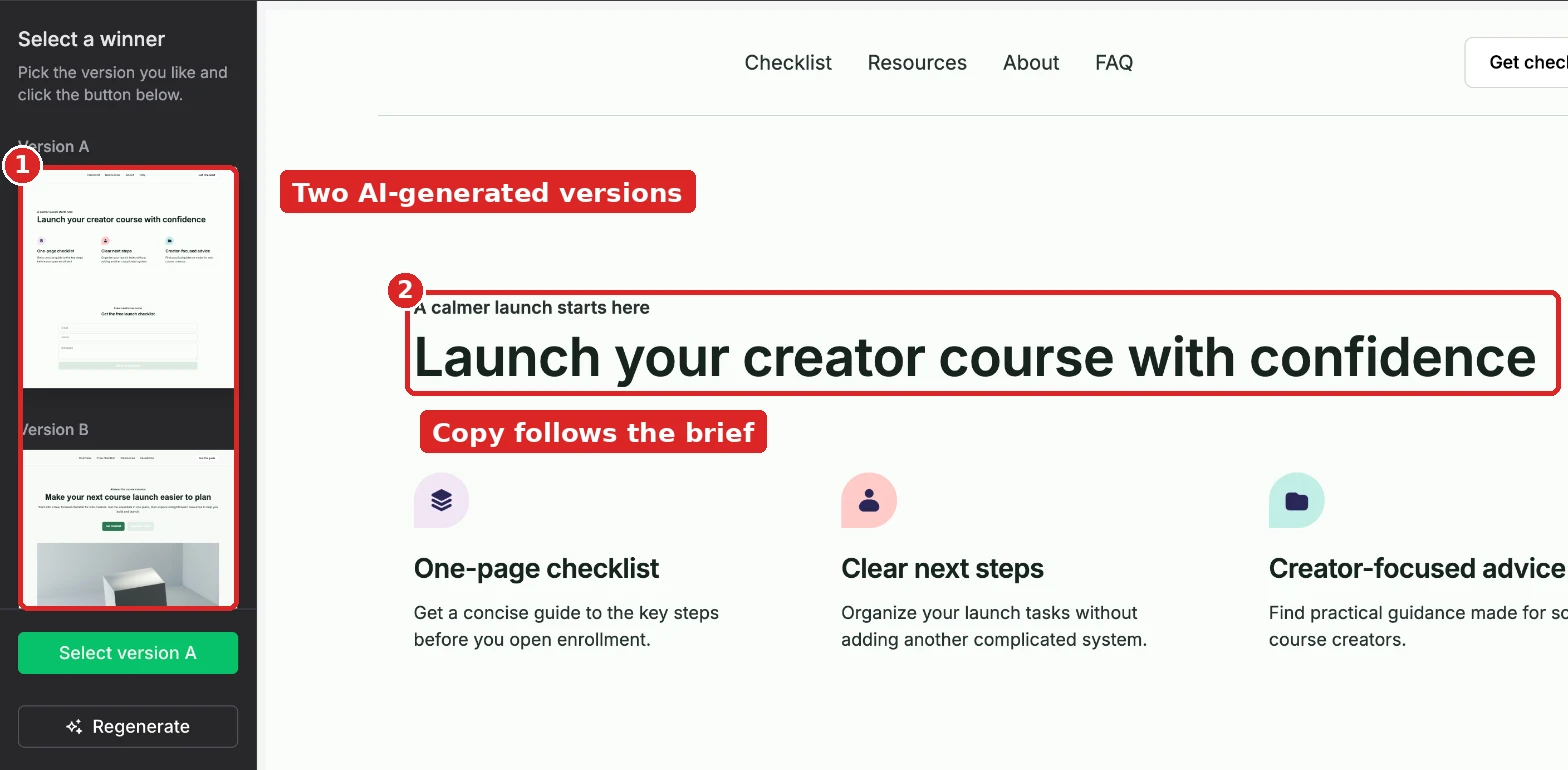
AI tools run on credits. The landing page Build with AI flow showed 100,000 available credits in our trial account. One generation from a short brief returned two page versions in about 20 seconds and used 3,540 credits. That is plenty for testing, but treat the output as a draft: on one run the AI added app-store badges to a page that only offered a checklist.
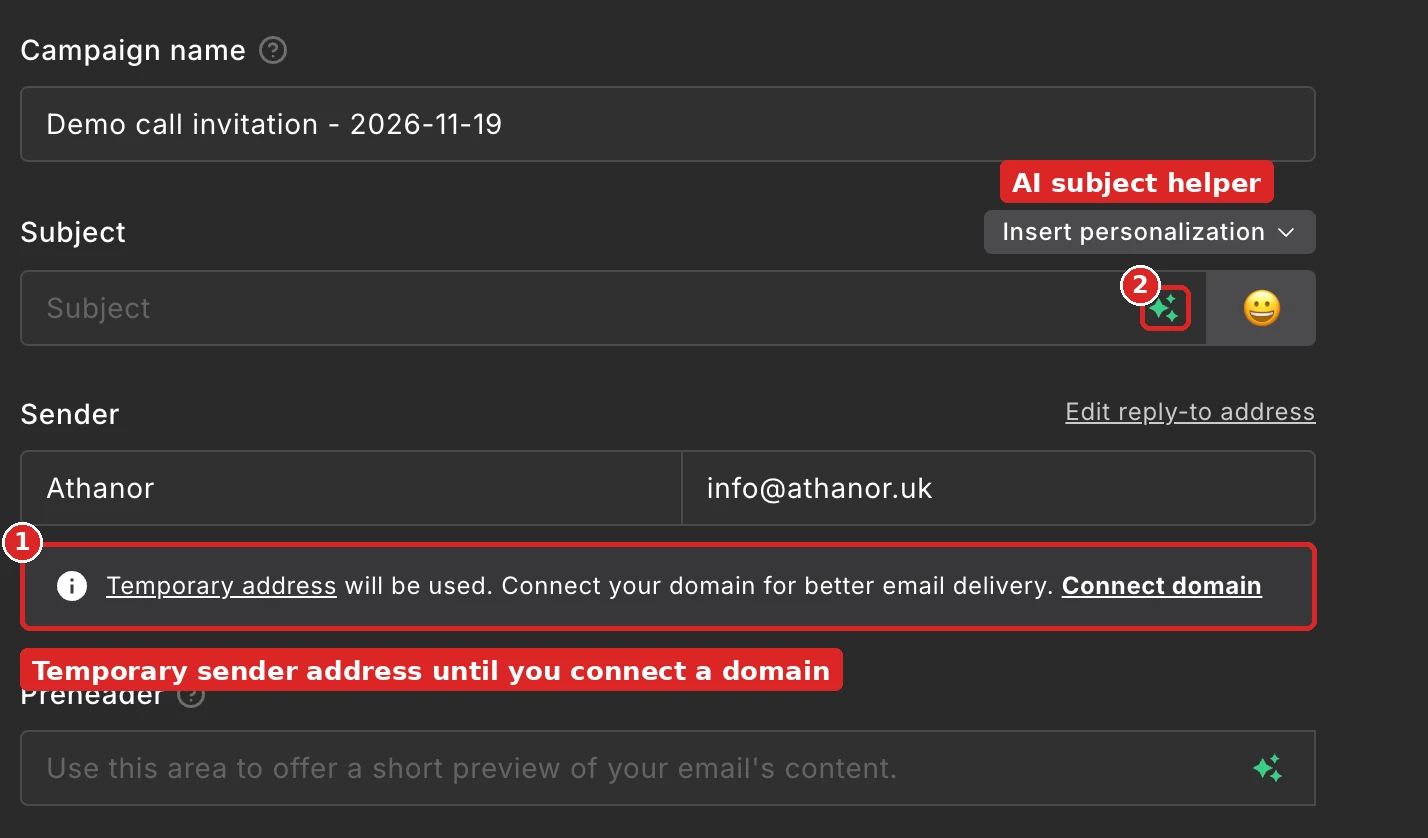
Domain setup gates the parts you most want to test. Our campaign draft showed a temporary sender address with a Connect domain prompt, and our signup form could not be enabled until the sender domain was authenticated and verified. If you register first and add DNS records later, you can lose several trial days waiting for verification. Set up the domain on day one.
What to test in 14 days (editorial checklist)
Use the trial to answer your go-live questions—not to benchmark MailerLite against every competitor:
- Signup flow — embed a form or publish a landing page; confirm subscribers land in the right group.
- Welcome sequence — build a 2–3 email automation (step-by-step guide); send test messages to a personal inbox.
- Newsletter send — send a campaign to a small segment; review mobile rendering and link tracking.
- Paid-only features you need — preference center, auto-resend, multiple triggers, AI assistant—confirm they exist in your workflow before choosing Comfort vs Power.
- Plan decision — model subscriber bucket and send volume on MailerLite pricing; note annual and nonprofit discounts if they apply.
Keep a short pass/fail checklist: did the correct person enter the correct group, receive the right sequence, and reach the intended page? Receiving a test message demonstrates that one path worked; it is not a deliverability benchmark or a guarantee about every subscriber’s inbox.
When the trial ends
MailerLite does not delete your subscribers, campaigns, or automations when the trial expires. Your account reverts to Free:
- Free limits apply (250 subscribers, 2,500 sends, 3 automations, etc.).
- Paid-only features stop working (preference center, auto-resend, unsubscribe page builder, and others listed in trial help).
- Automations using multiple triggers stop until you upgrade to Power.
Options: stay on Free (Free plan limits), upgrade to Comfort or Power, or contact support to end the trial early and remain on Free.
FAQ
Do I need a credit card for the MailerLite trial?
No. MailerLite states the premium trial applies on registration without adding a payment method (trial help). In our November 2026 test, the account opened straight into the dashboard with the trial counter visible; we were not asked for payment details at any point while building forms, automations, and drafts.
Is the trial the same as the Free plan?
No. The trial unlocks many paid features for 14 days while keeping 250 / 2,500 caps. After day 14 you keep data but lose paid features unless you subscribe. The practical difference is the Premium badges: during the trial you can use badged templates and campaign types, and on Free you cannot.
Can I run the trial twice?
The official documentation describes a trial for new accounts. It does not establish a general right to a second trial or extension. If setup problems consumed your trial, ask MailerLite support about your account rather than assuming that creating another account will give you the same eligibility.
Can I keep using the automations I built during the trial?
Your saved data remains, but a saved workflow is not necessarily a working Free-plan workflow. MailerLite specifically says multiple-trigger automations stop when the trial ends unless you upgrade to Power. Before the last day, list the paid features your workflow uses and decide whether to simplify it for Free or budget for the required plan.
Choose the plan from the workflow you can actually demonstrate by the end of the trial. If that workflow works inside Free’s limits, you can keep using Free. If it depends on paid features, compare the relevant plan cost before purchasing; the creator review helps when the remaining question is product fit.