MarketingComparison
Kit vs MailerLite: Creator Email Platforms Compared (2026)
Kit vs MailerLite compared in 2026: free plans (10,000 vs 250 subscribers), paid pricing at 1,000 subscribers, automations, commerce, and which fits your list.



Kit vs MailerLite is a common fork for creators who outgrow a basic newsletter tool but do not yet need enterprise marketing automation. Kit (formerly ConvertKit) optimizes tag-based creator workflows, commerce, and visual automations; MailerLite optimizes affordable sending, forms, landing pages, and straightforward automations for small businesses and creators on a budget. The two also take opposite approaches to their free tiers: Kit’s free Newsletter plan reaches much larger lists but with little automation, while MailerLite Free is small but includes working automations. That single difference often decides the choice before any feature comparison. We tested MailerLite’s setup in a new account in November 2026; Kit details below come from its public plans as reported in late 2026. Read our Kit review for creators and MailerLite review for creators for full product depth.
Quick verdict
Choose Kit if tagging, creator commerce, and launch-style automations are central to how you earn, or if you want to grow a free list past a few hundred readers before paying anything. Its free tier covers far more subscribers; its paid tiers cost more at the same list size.
Choose MailerLite if you need reliable email, forms, landing pages, and a welcome automation at lower cost per subscriber once you pay, and can live with less creator-native commerce tooling. At 1,000 subscribers, MailerLite Comfort costs about half of Kit Creator.
Neither replaces a full funnel platform. When checkout and funnels must live in the same tool as email, see the Systeme.io review.
Comparison table
| Factor | Kit | MailerLite |
|---|---|---|
| Core strength | Tag-based creator automations + commerce | Simple ESP + forms + landing pages |
| Free plan | Newsletter: up to 10,000 subscribers, limited automation | Free: up to 250 subscribers, 2,500 emails/month, 3 automations |
| Entry paid price (1,000 subscribers) | Creator about $39/mo ($33/mo yearly) | Comfort $19/mo; Power $39/mo |
| Automation | Visual, tag-triggered | Workflow builder with delays, conditions, A/B tests |
| Commerce | Native digital products and paid newsletters | Digital products and bookings via Stripe |
| Best for | Launches, cohorts, creator monetization | Budget list building, SMB newsletters |
| Pricing detail | Kit pricing | MailerLite pricing |
Verify both prices at your subscriber count and billing period—headline “starting at” figures mislead when lists grow.
Automation philosophy
Kit segments with tags and visual automations tuned to product launches, welcome sequences, and purchase behavior. A subscriber can carry many tags, and automations branch on them, which suits creators who run several products and want each buyer to see different follow-ups. Power users praise that flexibility; beginners may find setup slower than template-first tools.
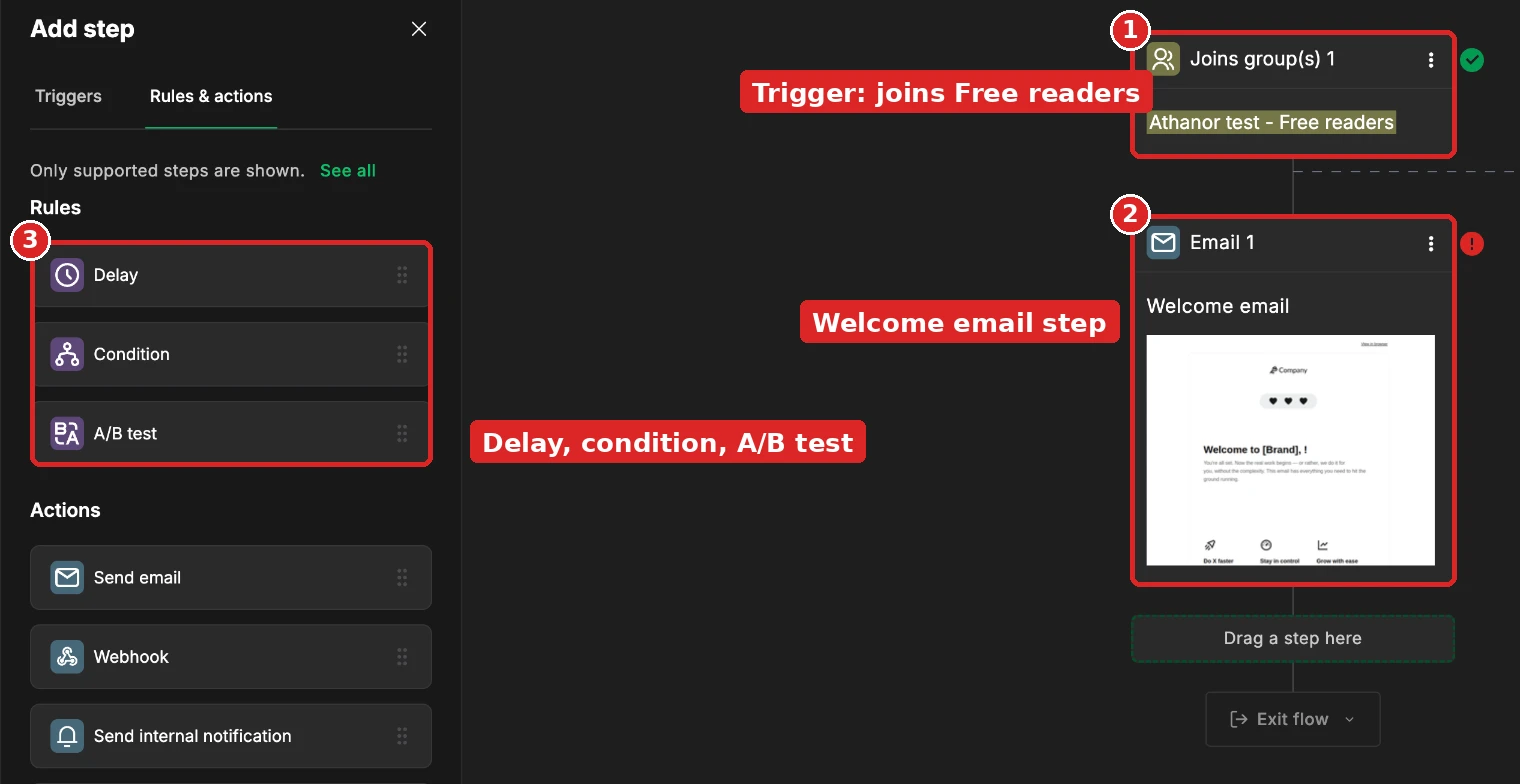
MailerLite organizes subscribers into groups and segments and starts automations from triggers such as joining a group. In our November 2026 test, the Simple welcome email template built the trigger and first email in one click, and the step panel offered delays, conditions, A/B tests, webhooks, and internal notifications. Fit is strong when you send weekly content and run one or two sequences, not twelve launch branches. The full build is in our MailerLite automation guide.
Setup effort in the first week
How fast you get from “new account” to “a stranger can sign up and get a welcome email” matters more than any feature list when you are starting.
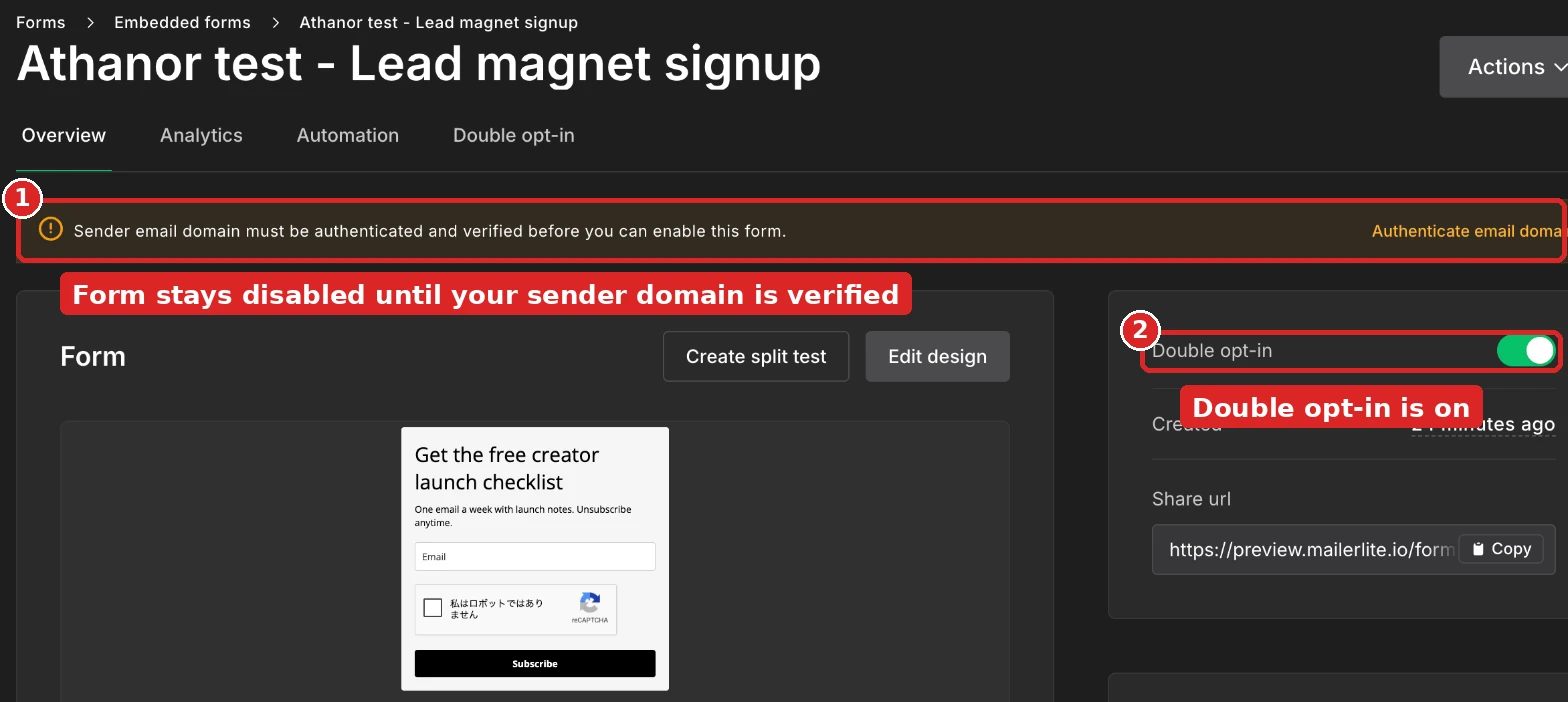
On MailerLite, our November 2026 test followed a short path: create a group, build an embedded form assigned to that group, then start an automation from the Simple welcome email template and point its trigger at the group. Each step took a few minutes. The blocker was outside the builders: MailerLite would not enable the form until our sender domain was authenticated and verified, and campaign drafts used a temporary sender address until then. Plan for DNS changes and their propagation time before launch day.
On Kit, the equivalent path uses forms, tags, and a sequence or visual automation. The concepts take longer to learn because tags replace groups as the main way of organizing people, but the payoff comes later, when one subscriber belongs to several products and launches at once. On Kit’s free plan, check how much automation is available before you design a multi-email welcome series around it.
Commerce and monetization
Kit pushes creator monetization (digital products, paid newsletters, and its recommendation network) inside the email platform, so a creator can sell and deliver without a separate store.
MailerLite sells digital products and bookings through Stripe. In our test account, the Products page listed Memberships, Subscription (paid newsletters), and Donation as coming soon, with recurring products synced from Stripe as the current route. That makes MailerLite workable for a creator selling a few downloads or calls, but not a commerce hub.
A simple decision rule: count the products you expect to sell through email in the next twelve months. With one or two downloads or a booking page, MailerLite plus Stripe is enough, and the lower subscription cost wins. With a catalog of products, recurring paid newsletters, or upsells that depend on what someone bought before, Kit’s tags and built-in commerce save you from stitching together a store, a payment tool, and email automations yourself. Either way, keep checkout fees in the comparison, since both route card payments through a processor that charges its own fees.
If paid newsletter + ad network is the business model, also compare beehiiv vs Kit—beehiiv optimizes newsletter-native monetization.
Pricing at the same subscriber count
Both tools bill primarily on list size, but the bill also depends on plan tier and what you actually use. Use the same assumptions on both calculators:
- Subscriber bucket (1,000 vs 5,000 vs 10,000 today—not “starting at” entry tiers)
- Billing period (monthly vs annual)
- Features you need (visual automations, commerce, remove branding)
Free tiers. Kit’s free Newsletter plan is reported to cover up to 10,000 subscribers, with automation limited to a basic level; check the current allowance on kit.com/pricing. MailerLite Free stops at 250 active subscribers and 2,500 emails a month, but includes three automations and A/B testing. If you are building an audience before selling, Kit lets you grow much further for $0; if you need a working welcome sequence from day one on a small list, MailerLite Free covers it.
Paid tiers. Kit raised prices in 2026: pricing trackers report Creator from about $39/month at 1,000 subscribers ($33/month yearly) and Pro from about $79/month ($66/month yearly). MailerLite’s published USD prices (checked October 16, 2026):
| Active subscribers (up to) | MailerLite Comfort (monthly) | MailerLite Power (monthly) | When MailerLite is enough |
|---|---|---|---|
| 1,000 | $19 | $39 | Weekly newsletter + one welcome automation on Comfort if sends stay under 10,000/month |
| 5,000 | $49 | $69 | Comfort allows 50,000 sends/month at this bucket; Power if you run frequent launches plus heavy automations |
| 10,000 | $89 | $129 | Power when you need unlimited automations/seats or Comfort’s cap feels tight |
At 1,000 subscribers, Kit Creator costs about the same as MailerLite Power and roughly double MailerLite Comfort. Kit can still be the cheaper stack if you would otherwise pay for a separate checkout tool. Compare paid-to-paid at the tier that unlocks the automations you need. See MailerLite pricing for annual billing (~10% off) and MailerLite discounts for the Black Friday code valid until December 18, 2026.
Switching costs and migration
Switching later is possible but not free, so weigh where you expect to be in a year rather than where you are now.
- Subscribers move by CSV export and import. Keep consent records and signup dates, and re-confirm whether the new platform requires double opt-in for imported contacts.
- Organization has to be translated. Kit tags become MailerLite groups or segments, and the reverse. A list with dozens of tags can take an afternoon to map cleanly.
- Automations and forms do not transfer. Rebuild each sequence, then replace every embedded form on your site so new signups reach the new platform. Check landing pages and link-in-bio pages too, since forgotten forms keep sending signups to the old account.
- Sending reputation starts over on the new account. Authenticate the domain first and warm up with your most engaged readers before mailing the full list.
If you expect to sell digital products heavily within a year, starting on Kit avoids a migration. If you mainly need a dependable newsletter and a welcome sequence, starting on MailerLite and staying there is the common path.
Worked scenarios
Scenario A — Coach, 2,500 subscribers, weekly newsletter, one welcome sequence, courses sold on Thinkific
- MailerLite: Likely Comfort (~$33/mo USD at the 2,500 bucket, Oct 2026)—groups + automation cover nurture; checkout stays external.
- Kit: Worth it if you run tagged launch automations and sell digital products inside Kit often enough to drop another tool.
Scenario B — Creator, 8,000 subscribers, four launches/year with branching tags and upsells
- Kit: Stronger fit for tag logic and repeat launch templates.
- MailerLite: Possible on Power, but you may hit workflow complexity before price—test with the 14-day premium trial if launch automations fit in trial limits.
Scenario C — Beginner, under 250 subscribers, validating a lead magnet
- MailerLite Free if you want a three-email welcome sequence working now—see Free plan limits.
- Kit Free if you expect the list to pass 250 before you are ready to pay, and can live with basic automation for now.
Who should choose which
Pick Kit — Course creators, coaches, and writers running repeated launches with tag logic and product upsells, and anyone who wants to grow a free list into the thousands before paying. The higher paid price buys commerce and tagging you would otherwise assemble from several tools.
Pick MailerLite — Creators and small businesses prioritizing cost once they pay, simple newsletters, forms and landing pages, and one or two automations. You will also need a verified sending domain before forms go live, so plan that setup early.
Pick neither — Teams that need CRM pipelines and ecommerce automation depth should evaluate ActiveCampaign vs Kit or GetResponse pricing instead of stretching either creator tool.
Scorecard
Kit vs MailerLite at a glance
- Launch automationsKitVisual, tag-triggered automations built for creator launches.
- Creator commerceKitA native emphasis on selling digital products.
- Cost per subscriberMailerLiteLower cost at comparable list sizes.
- Forms and landing pagesMailerLiteA simple email tool with landing pages for list building.
Choose Kit if
You run repeated launches with tag logic and product upsells.
Choose MailerLite if
You prioritize cost, simple newsletters, and forms before advanced commerce.
FAQ
Kit or MailerLite for beginners?
It depends on whether list size or automation matters first. Kit’s free plan reaches far more subscribers, so it suits beginners growing an audience. MailerLite Free is limited to 250 subscribers but includes three automations, so it suits beginners who need a welcome sequence working right away.
Can I migrate between them?
Yes. Export subscribers with their tags or groups, import them, and rebuild automations by hand; neither tool imports the other’s workflows. Budget time to map Kit tags to MailerLite groups (or the reverse) and to re-verify your sending domain on the new platform.
ConvertKit vs MailerLite?
ConvertKit rebranded to Kit, so “ConvertKit vs MailerLite” is the same comparison. Compare current Kit plans, not legacy ConvertKit screenshots: the plan names and prices changed in 2026, and old reviews often quote a much smaller free tier and lower paid prices.
Kit vs MailerLite is a workflow and economics choice, not a feature-count contest. MailerLite leads on cost once you pay and has clear send math on Comfort vs Power; Kit leads on free-list size and when creator tags, commerce, and launch automations are the product. Confirm pricing at your list size on both official pages, then read Kit pricing and MailerLite pricing before switching.