MarketingGuide
MailerLite Free Plan Limits 2026: What You Get & When to Upgrade
MailerLite Free plan limits for subscribers, monthly emails, automations, and sites—plus how Free differs from the 14-day trial and paid Comfort/Power tiers.


MailerLite free plan limits (checked October 16, 2026): up to 250 active subscribers, 2,500 monthly emails, 3 active automations, 1 website, 1 landing page, 3 signup forms, and 1 digital product or booking—plus core editors and integrations. It is a long-term free tier, not a 14-day preview. When you outgrow sends or features, upgrade to Comfort or Power (compare paid plans) or test premium tools during MailerLite’s 14-day premium trial first.
For product fit beyond limits, see our MailerLite review for creators.
Explore MailerLite on its official site
Free vs premium trial vs paid plans
| Free | 14-day premium trial | Comfort / Power (paid) | |
|---|---|---|---|
| Duration | Ongoing | 14 days from registration | Monthly or annual subscription |
| Payment method | Not required | Not required to start | Required when you purchase |
| Subscribers | Up to 250 active | Up to 250 during trial | Priced by subscriber bucket |
| Email allowance | 2,500/month | 2,500 during the trial (test sends excluded) | Comfort: 10× tier cap; Power: unlimited (fair use) |
| Typical goal | Launch list + basic automation | Test paid features before checkout | Scale sends, team seats, advanced automation |
Trial details and excluded features: MailerLite free trial guide. Paid pricing tables: MailerLite pricing.
Free plan limits (official)
Sources: MailerLite pricing and Free plan update FAQ, verified October 16, 2026.
| Limit type | Free allowance |
|---|---|
| Active subscribers | 250 |
| Monthly email sends | 2,500 (one email to one subscriber = one send) |
| User seats | 2 |
| Active automations | 3 |
| Websites | 1 |
| Landing pages | 1 (combined website/page limits apply on paid tiers; Free uses separate caps above) |
| Signup forms | 3 |
| Digital products / bookings | 1 |
| Support | Community |
The Free plan update confirms the ongoing allowances above. The current pricing comparison also lists five steps per automation on Free. Three workflows with five steps each are a different constraint from one complex launch sequence: map the steps your welcome path needs before deciding that the free tier is sufficient. API and MCP access on Free is limited and does not include sending emails through those interfaces.
Monthly send math (including welcome email)
Example: you finish a month with 220 subscribers and run:
- 4 newsletters to the full list → 220 × 4 = 880 sends
- Welcome automation with 3 emails for 30 new signups → 30 × 3 = 90 sends
- One manual campaign to a 100-person segment → 100 sends
Total ≈ 1,070 sends—under the 2,500 cap with headroom for another launch email or automation branch.
With a stable 250-person list, four broadcasts use 1,000 sends, leaving 1,500 for other campaigns and automation steps. Eight broadcasts use 2,000, leaving only 500. The number of subscribers alone does not tell you whether Free is enough: count every planned message, then allow room for signups and extra campaigns. These are our arithmetic examples, not a claim about a typical customer’s sending pattern.
Before you hit a wall: three paths
- Stay on Free intentionally — prune inactive subscribers, reduce send frequency, and keep automations within 3 active workflows.
- Clean the list — review whether disengaged contacts still belong on your list. Reducing active subscribers can help you stay within the cap; it does not reset emails already sent this month.
- Upgrade — when you need more sends, automations, forms, or seats. Model cost at your next subscriber milestone on MailerLite pricing.
Minimum viable free stack
A complete creator setup without paying:
- Signup form on your site or a landing page. Start with one entry point so that you can trace each signup into the workflow.
- Welcome automation (counts toward 3 automation slots)—walkthrough: build a welcome sequence.
- Recurring newsletter campaign to the full list, staying inside 2,500 sends/month.
When you need a second lead magnet page, RSS campaigns, auto-resend, a preference center, or more than three automations, Free stops being sufficient—those features sit on Comfort or Power. Campaign A/B testing is the exception people often miss: MailerLite’s Free plan page lists it as included, so you can test two subject lines without paying.
What we checked in a new account
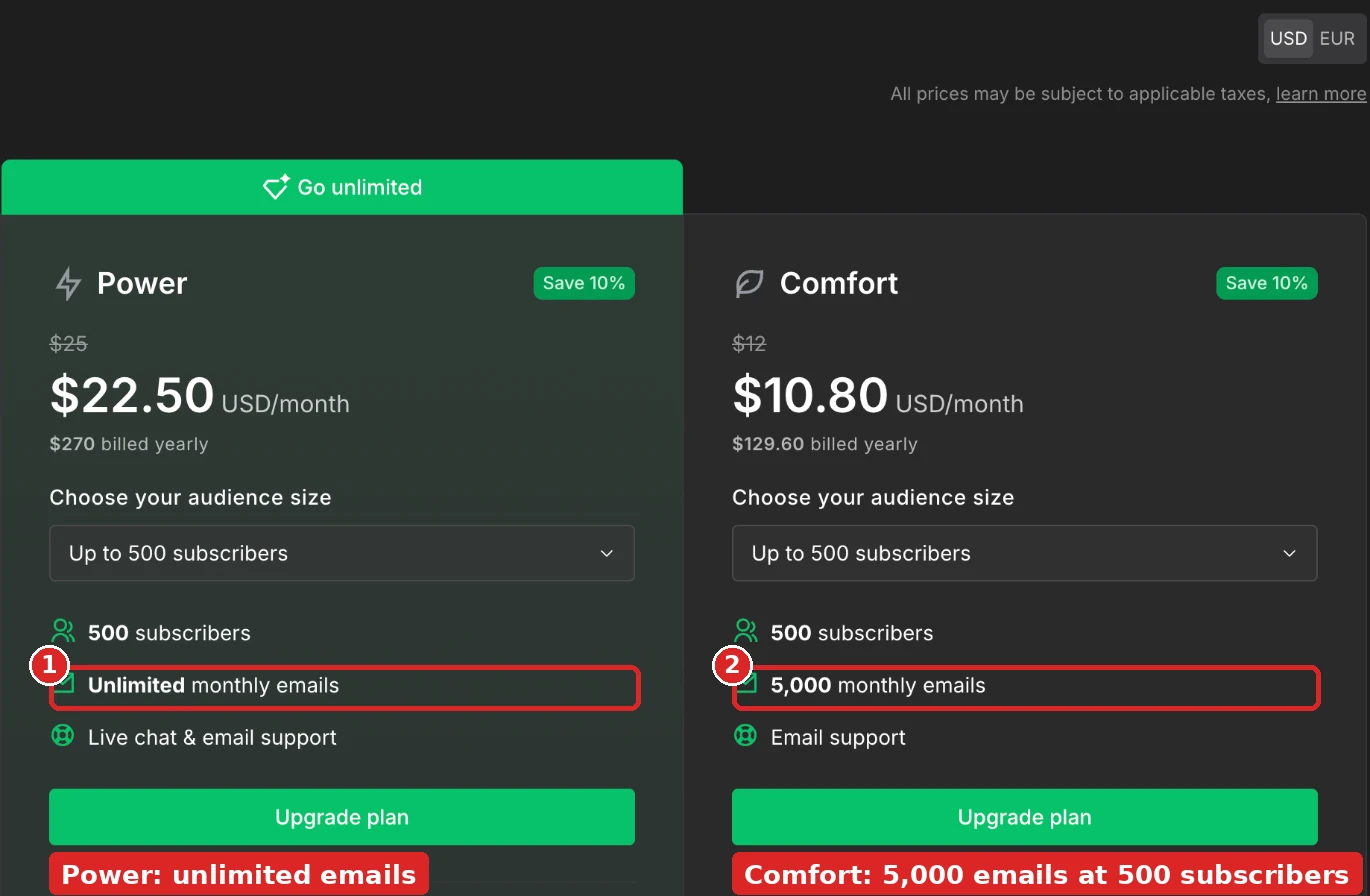
We opened a new MailerLite account on November 19, 2026 to see where the Free limits show up in practice. The account starts on the 14-day premium trial, so it shows more than Free will after day 14, but three things carry over to anyone planning to stay at $0:
- The first paid step is small but capped. The in-app plan picker at the up-to-500-subscriber tier listed Comfort with 5,000 monthly emails ($12 monthly, or $10.80 a month billed yearly) and Power with unlimited monthly emails ($25, or $22.50 billed yearly). Comfort doubles Free’s 2,500 sends; it does not remove send counting.
- Premium badges tell you what disappears after the trial. In the campaign picker, RSS, auto-resend, and multivariate campaigns carried a Premium badge, while regular and A/B split campaigns did not. Automation templates are marked the same way. If a workflow you build during the trial depends on a badged feature, it will not keep working on Free.
- A verified sending domain comes before a live form. Our saved signup form showed: Sender email domain must be authenticated and verified before you can enable this form. Budget time for DNS setup on a domain you own; it is not a paid feature, but it is a prerequisite for collecting the subscribers that count toward the 250 limit.
When to upgrade from Free
| Signal | Likely next step |
|---|---|
| 251+ active subscribers | Paid plan at the next subscriber bucket |
| Monthly sends near 2,500 | Comfort (higher cap) or Power (unlimited sends) |
| Fourth automation | Comfort (50 automations) or Power (unlimited) |
| Second site / multiple lead magnets | Comfort or Power (higher form/page limits) |
| Team member #3 | Comfort (3 seats) or Power (unlimited seats) |
| Test paid features without billing yet | 14-day premium trial (still 250 / 2,500 caps) |
FAQ
Is MailerLite Free the same as the 14-day trial?
No. Free continues indefinitely with Free limits. The premium trial lasts 14 days, unlocks many paid features to evaluate, then reverts to Free unless you purchase Comfort or Power. Both share the 250-subscriber and 2,500-email caps, so the trial is a feature preview, not extra sending capacity.
Do automation emails count toward the 2,500 limit?
Yes. Every email delivered to a subscriber—including automated steps—counts toward monthly sends on Free (pricing FAQ). A three-email welcome sequence for 30 new signups uses 90 sends, so a busy signup month can eat into the allowance you planned for newsletters. Test sends to yourself are a separate case during the trial, as the trial guide explains.
Can I send daily on the Free plan?
Only if campaign and automation sends combined stay within 2,500 for the month. For a stable 250-person list, one message per day would require 7,500 sends in a 30-day month, before welcome emails. Free can suit a smaller daily audience, but it does not support that daily schedule for a full 250-person list.
What happens if I exceed 250 subscribers on Free?
The Free plan update FAQ says campaigns, automations, and adding subscribers are paused above the active-subscriber limit. You can upgrade or reduce the active list. Exceeding the email allowance is different: sending pauses until an upgrade or the next monthly reset. A free account is not automatically charged simply for crossing the limit.
Before choosing a paid plan, write down which limit you expect to hit first: subscribers, sends, automation steps, pages, or seats. Use the pricing guide to compare the required upgrade, or use the trial checklist if you still need to test the workflow. Staying on Free is reasonable when the setup you need fits its allowances.