MarketingGuide
What Is HighLevel (GoHighLevel)? How It Works and Who It's For
A plain-language explainer of HighLevel: the agency and sub-account structure, what a typical lead-to-review workflow looks like, key terms like snapshots and wallets, published pricing, and who should skip it.


HighLevel, often called GoHighLevel after its original domain, is a cloud platform that bundles a CRM, marketing automation, funnels and websites, calendars, a shared inbox for SMS, email, and social messages, and review management into one login. It was built for marketing agencies that run these systems for many clients at once, and it is also used directly by service businesses such as clinics, home-service companies, and coaches. The short version: HighLevel replaces a stack of five or six tools (CRM, email platform, SMS tool, scheduler, landing-page builder, review tool) with one system, and adds an agency layer on top so you can manage each client separately and even sell the platform under your own brand. This explainer covers how that structure works, what using it looks like day to day, the terms you will meet in every HighLevel tutorial, what it costs, and who should not buy it.
The one idea that explains HighLevel: agency and sub-accounts
Most CRMs are built for one company. HighLevel is built in two levels:
- The agency account is yours. It is where you manage billing, branding, templates, and every client.
- Sub-accounts (called “locations” in some older documentation) are separate workspaces, usually one per client business. Each has its own contacts, pipelines, calendars, phone numbers, funnels, and automations. A dental client never sees a roofing client’s leads.
This structure is why agencies choose HighLevel. You can build a system once, save it as a template, and roll it out to the next client in minutes. It is also why HighLevel can feel oversized for a single business: if you will only ever have one sub-account, you are paying for agency machinery you do not use.
What HighLevel looks like inside: a hands-on walkthrough
To check the explanation above against the real product, we started a 14-day Starter trial on November 18, 2026 and built one client sub-account for a fictional business, “Athanor test - Appliance Repair Co”, using HighLevel’s own sample data. We did not buy a phone number, connect a domain, send any SMS or email, or publish a workflow, so this walkthrough shows the structure and setup, not deliverability or live results.
1. Creating a sub-account
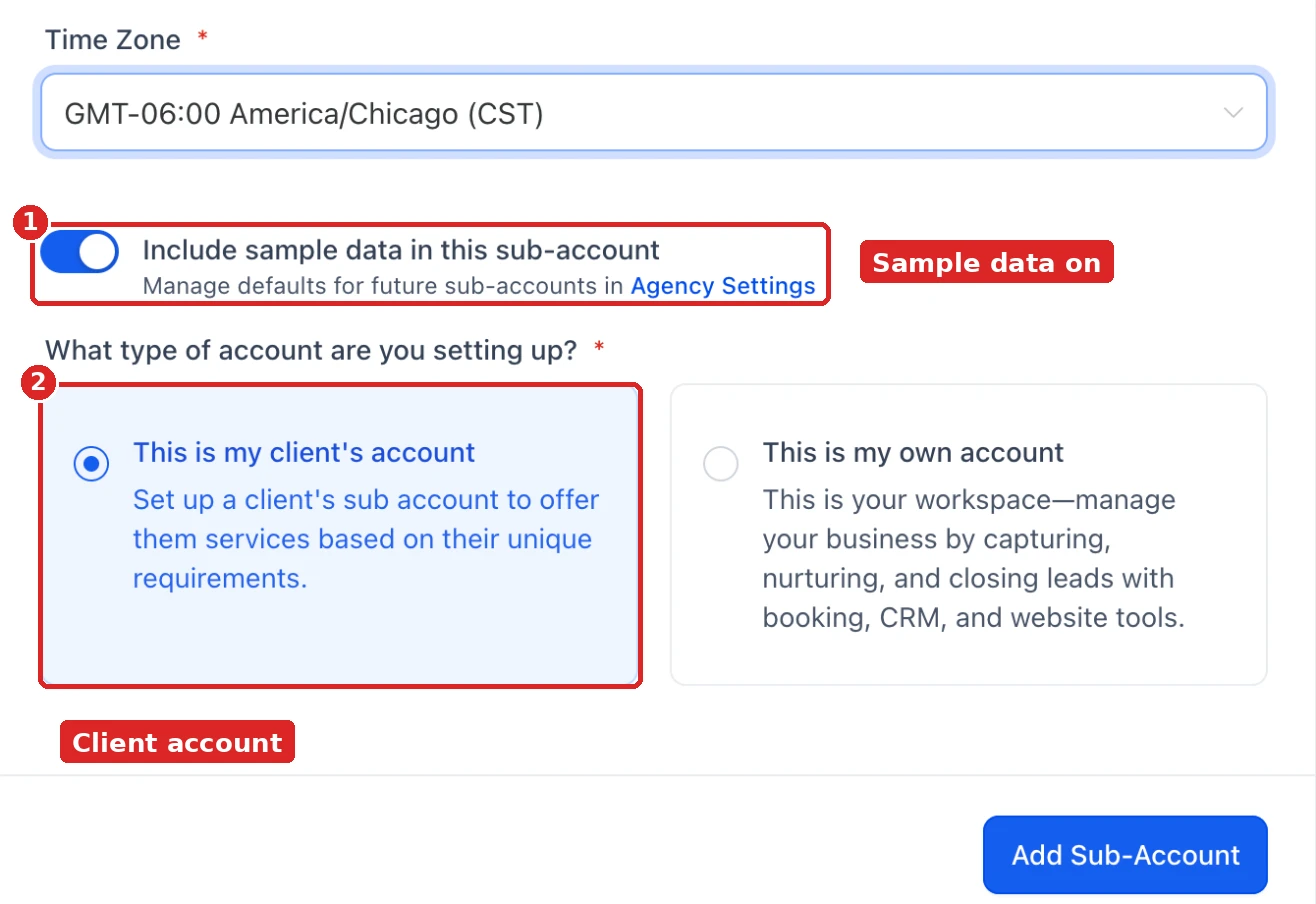
Adding a client is one form from the agency view: business name, address, time zone, and a choice between “This is my client’s account” and “This is my own account”. The sample data toggle is useful during a trial because it fills the workspace with example contacts and drafts, so you can see how the pieces connect before importing real leads.
2. Starting from a snapshot instead of a blank account
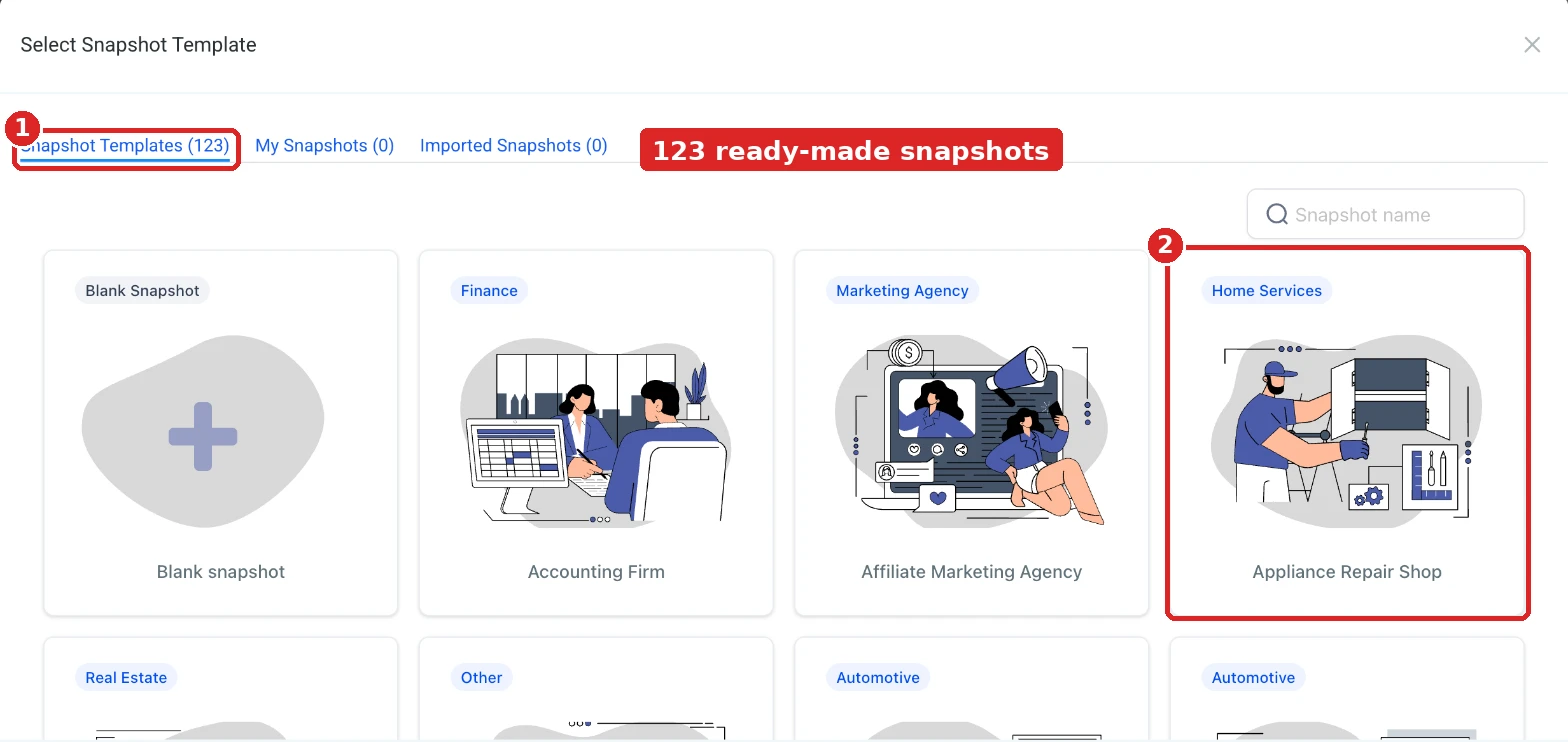
This is where the “snapshot” idea becomes concrete. Our trial offered 123 ready-made snapshot templates grouped by industry (finance, real estate, automotive, home services, marketing agencies, and more). We chose the Appliance Repair Shop template, and the new sub-account arrived with funnels, workflows, and pipelines already in place. An agency saving its own setup as a snapshot gets the same effect for every future client.
3. One client’s CRM, isolated from the rest
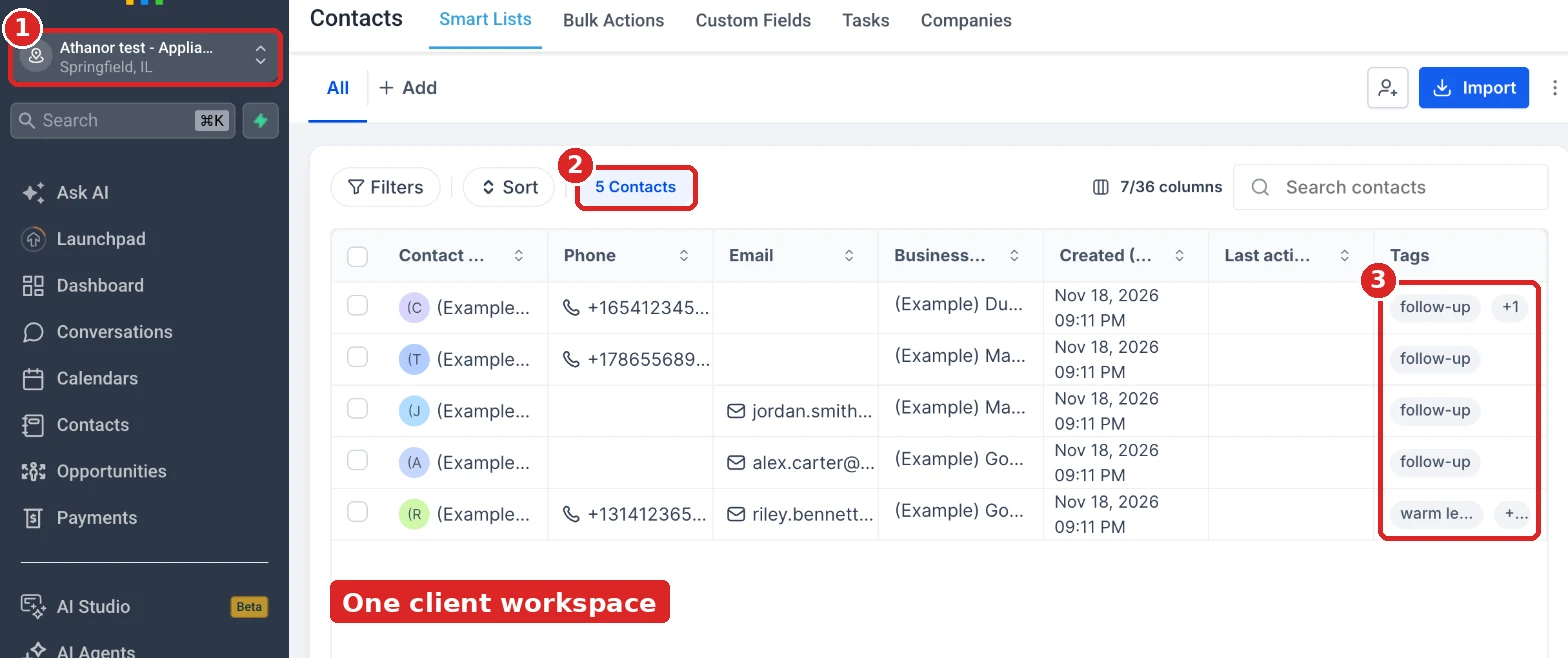
Inside the sub-account, the left sidebar holds everything for that one business: Conversations, Calendars, Contacts, Opportunities, Payments, and the AI tools. The switcher at the top (marked 1) is how you move between clients; data never mixes. The sample contacts already carried tags such as “follow-up” and “warm lead”, which the snapshot’s workflows use to decide what happens next.
4. Automations arrive as drafts
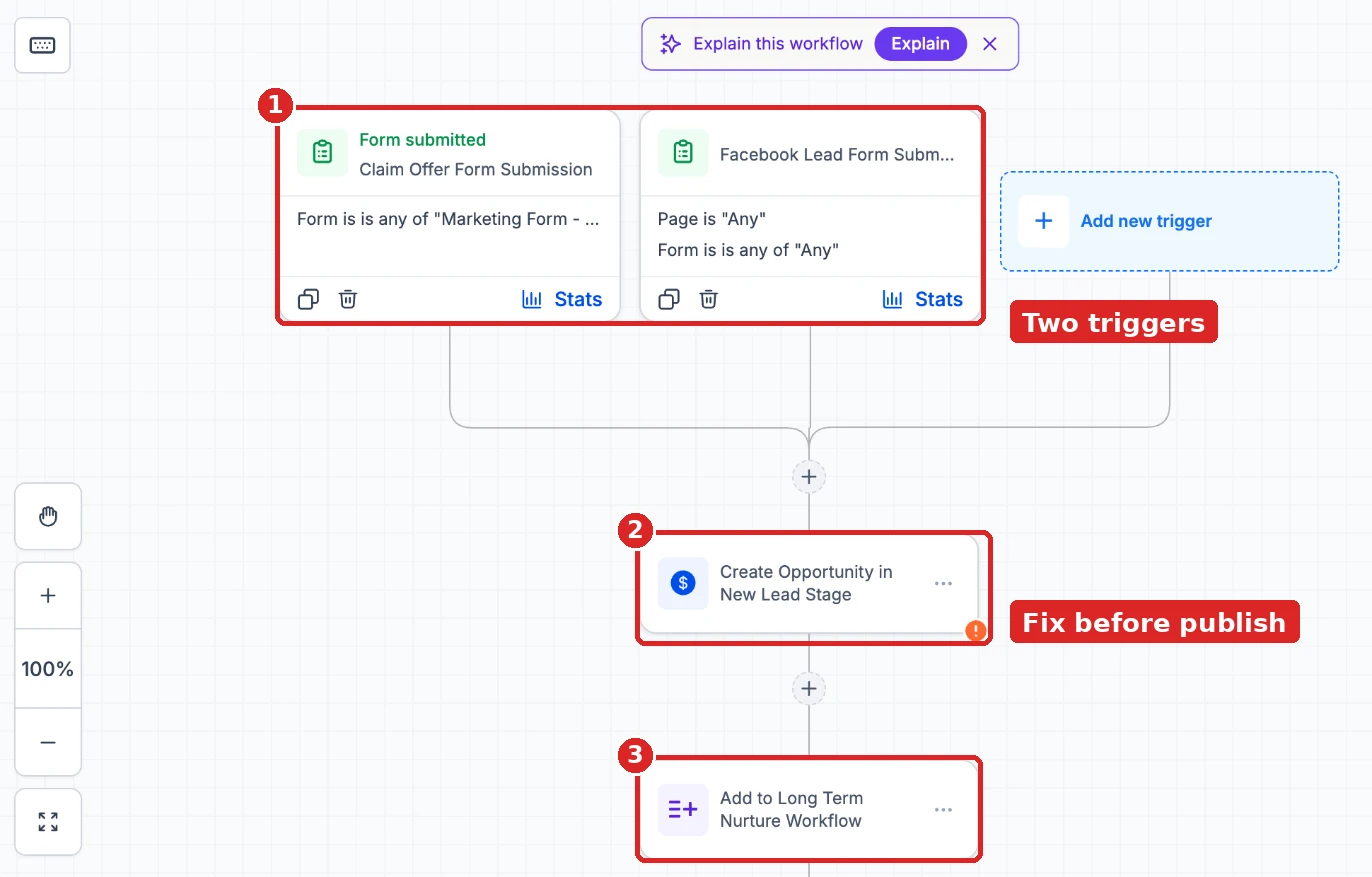
The snapshot’s “Fast 5-Min Lead Follow-Up” workflow shows HighLevel’s trigger-then-actions model: a website form or a Facebook lead form starts it, the contact becomes an opportunity in the “New Lead” pipeline stage, and then moves into a long-term nurture sequence. Note the orange warning on step 2: imported workflows often need a pipeline or form re-selected before they can be published. Every snapshot workflow in our test was a Draft, which is the safe default but also means nothing runs until someone reviews and publishes it.
5. Funnels need a domain before they go live
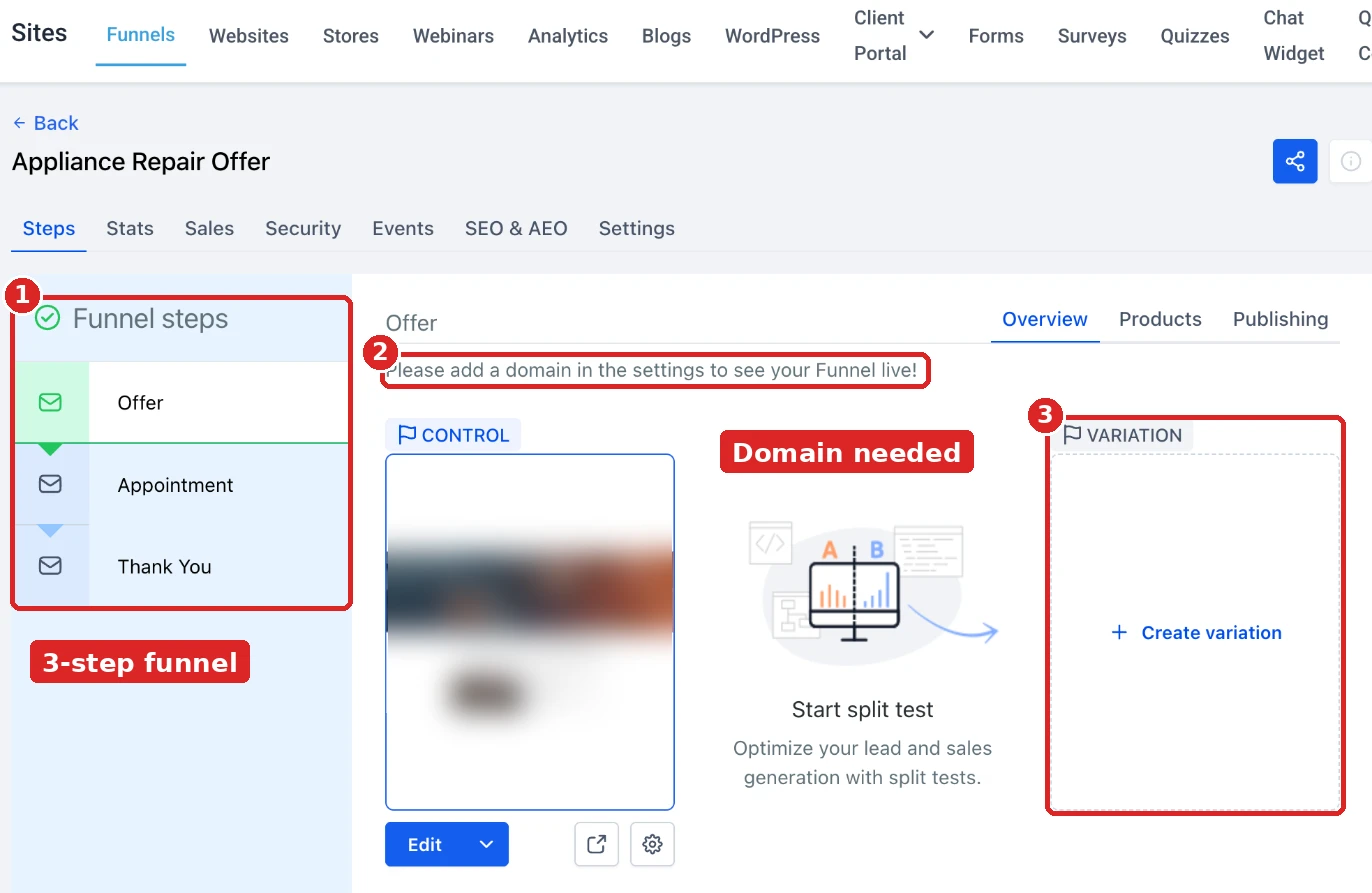
The included funnel had three steps (offer page, appointment booking, thank-you page) and an A/B “variation” slot for split testing. The notice above the preview is the practical catch: you must connect a domain in settings before the funnel is visible to anyone. Together with the draft workflows, this is why a HighLevel snapshot is a fast start, not a finished system.
What the hands-on test confirmed: the agency/sub-account model works exactly as described, and snapshots remove most of the blank-page work. The time goes into the last mile: domains, phone numbers, email sending, and reviewing each draft workflow before publishing it.
What a typical HighLevel workflow looks like
The easiest way to understand the product is to follow one lead through a local service business set up in a sub-account:
- Capture. A visitor fills in a form on a landing page built with HighLevel’s funnel builder, or messages the business through a website chat widget, Facebook, or Instagram.
- Record. The contact is created in the CRM and placed in a pipeline stage such as “New lead.”
- Respond. An automation workflow sends an instant SMS and email reply. Replies from every channel land in one Conversations inbox, so staff answer from a single place.
- Book. The lead picks a time on a HighLevel calendar. The workflow sends reminders and moves the pipeline stage to “Booked.”
- Follow up. If the lead does not book, the workflow keeps nudging over several days, then hands off to a human.
- Review. After the job, the workflow asks the customer for a Google review and tracks responses.
Each step would traditionally be a separate tool connected with integrations. In HighLevel it is one record moving through one automation, which is where most of the time savings come from. Our guide on how businesses lose leads after contact forms explains why the “respond” and “follow up” steps matter most.
Key HighLevel terms you will see everywhere
| Term | What it means |
|---|---|
| Sub-account | A separate client workspace with its own data and settings |
| Snapshot | A saved template of funnels, workflows, pipelines, calendars, and settings that can be loaded into a new sub-account |
| Workflow | HighLevel’s automation builder: a trigger (form submitted, tag added, appointment booked) followed by actions |
| Conversations | The shared inbox for SMS, email, web chat, and social messages |
| Wallet | A prepaid balance that usage charges (SMS, calls, email sends, AI) draw from |
| Rebilling | Passing a sub-account’s usage costs on to that client, at cost or with a margin |
| LeadConnector (LC) | The brand name used on HighLevel’s phone, email, and mobile app services |
| SaaS Mode | Agency Pro feature for selling your own software subscriptions built on HighLevel |
| Agency view / sub-account view | The two dashboards you switch between: managing all clients, or working inside one |
Knowing these nine terms makes most HighLevel documentation and YouTube tutorials far easier to follow.
What HighLevel includes
The platform’s main modules are a CRM with pipelines, the workflow automation builder, funnels and website pages, forms and surveys, calendars and appointment booking, email and SMS campaigns, the Conversations inbox, reputation and review requests, membership and course areas, and social media scheduling. On top of the base plans, HighLevel sells AI products: its help center lists an AI Employee plan priced per enabled sub-account, covering features such as Conversation AI (automated chat replies), Voice AI, and review responses. For module-by-module detail, see our HighLevel features overview.
How much does HighLevel cost?
HighLevel’s official pricing page (verified on September 7, 2026 and rechecked on October 26, 2026) lists three agency plans, each with a 14-day free trial. Inside our trial account in November 2026, the Billing Dashboard showed the Starter plan at $97 per month with a note that the card on file is charged automatically when the trial ends:
| Plan | Monthly | Annual | Sub-accounts | Key difference |
|---|---|---|---|---|
| Starter | $97 | $970 | 3 | Core features |
| Unlimited | $297 | $2,970 | Unlimited | Rebill usage at cost, basic API |
| Agency Pro | $497 | $4,970 | Unlimited | SaaS Mode, rebill with markup, advanced API |
All three list unlimited contacts and users. Usage is separate: SMS, calls, email sends, phone numbers, and AI features are charged to your wallet on every plan. A business that sends many texts should budget for usage on top of the subscription. The full breakdown, including which plan to pick, is in our HighLevel pricing guide.
Who HighLevel is for
- Marketing agencies running lead generation, CRM, and follow-up for multiple local or service clients. This is the core audience.
- Agencies that want recurring software revenue by reselling a branded version of the platform. See our HighLevel white label guide.
- Multi-location service businesses that want each branch in its own workspace with shared templates.
- Single service businesses with heavy lead volume (clinics, home services, high-ticket coaching) where fast SMS follow-up and booking directly affect revenue.
Who should probably skip it
- Solo creators selling a course or digital product. HighLevel can do it, but cheaper all-in-ones are designed for that job. Systeme.io starts with a free plan and paid tiers from $17/month.
- Sales teams that only need a pipeline CRM. Pipedrive or HubSpot’s free CRM are simpler if you do not need funnels, SMS, and sub-accounts.
- Teams that want something working the same day. HighLevel is powerful but not instant; workflows, phone numbers, domains, and email sending all need setup. Our HighLevel onboarding checklist shows the order that avoids rework.
- Businesses that cannot tolerate usage-based bills. If unpredictable SMS and AI costs are a problem, budget carefully or choose a tool with flat pricing.
HighLevel vs the tools it replaces
| Job | Typical separate tool | In HighLevel |
|---|---|---|
| Contact and deal tracking | A CRM such as HubSpot or Pipedrive | CRM and pipelines |
| Email newsletters and sequences | An email platform such as ActiveCampaign | Email campaigns and workflows |
| SMS follow-up | A dedicated SMS tool | Built in, billed by usage |
| Booking | A scheduling tool | Calendars |
| Landing pages | A page or funnel builder | Funnels and websites |
| Review requests | A reputation tool | Reputation module |
The trade-off is depth versus breadth. Specialist tools are often stronger at their single job; HighLevel wins when connecting the jobs is the real problem. For head-to-head views, see HighLevel vs HubSpot and HighLevel vs Systeme.io.
Try HighLevel free for 14 days if the agency and sub-account model matches how you work. Build one complete lead-to-booking workflow during the trial; that single test tells you more than any feature list.
FAQ
Is HighLevel the same as GoHighLevel?
Yes. GoHighLevel was the original name and is still the domain (gohighlevel.com), so both names are used interchangeably. The company now mostly presents the product as HighLevel. Some services inside the product, such as phone and email, carry the LeadConnector name.
Is HighLevel a CRM?
It includes a full CRM with contacts, pipelines, and tasks, but it is broader than a CRM. It also handles messaging, automation, booking, funnels, and reviews, and it adds an agency layer for managing many client accounts. Calling it an all-in-one marketing and CRM platform for agencies is more accurate.
Can a single business use HighLevel without an agency?
Yes. A business can subscribe directly and use one sub-account for itself. The Starter plan is the usual choice, since it includes three sub-accounts. Many single businesses also get HighLevel through an agency that sets it up and manages it for them.
Does HighLevel have a free plan?
No. HighLevel offers a 14-day free trial on its published plans rather than a permanent free tier. Usage charges such as SMS and calls still apply during and after the trial, so add a small wallet balance before testing messaging.
Is HighLevel hard to learn?
The individual tools are approachable, but the system is large. Expect a few weeks to become comfortable with workflows, snapshots, and sub-account setup. Agencies usually shorten this by importing a ready-made snapshot and changing it, rather than building everything from scratch.