MarketingGuide
What Is Systeme.io? How the All-in-One Works, What's Free, and Who It Fits
A plain-language explainer of Systeme.io: what the all-in-one replaces, how funnels, email, courses, and automations connect, the free plan and paid tiers, and who should pick something else.


Systeme.io is an all-in-one platform for selling online: it combines a funnel and landing-page builder, email marketing, online courses, membership areas, a checkout with upsells, a blog and website builder, and simple automations under one subscription. It is aimed at solo creators, coaches, and small online businesses who would otherwise pay for and connect five separate tools. Its best-known feature is a free plan that does not require a credit card, with paid plans starting at $17 per month on the official pricing page. In short, Systeme.io trades depth for simplicity and price: each module is less advanced than a specialist tool, but everything already talks to everything else, and the bill stays small. This explainer covers how the pieces fit together, what you see when you sign up, what you get for free, the published plans, and who should choose a different tool. We opened a free account on November 20, 2026, to check each step; the screenshots below come from that test account, and we did not publish pages, send emails, or upgrade.
What Systeme.io replaces
| Job | Separate tool many creators use | In Systeme.io |
|---|---|---|
| Landing and sales pages | A page builder or funnel builder | Funnels and pages with templates |
| Email list and sequences | An email marketing platform | Email campaigns, newsletters, and automation rules |
| Checkout and payments | A checkout or cart tool | Order forms with order bumps and upsells, using Stripe or PayPal |
| Course hosting | A course platform | Courses and membership areas |
| Webinars | A webinar tool | Evergreen webinars on the Webinar plan |
| Affiliate program | An affiliate management app | Built-in affiliate program for your own products |
| Blog and website | A website builder | Blog and website pages |
| Bookings | A scheduling tool | Built-in booking calendar with paid bookings |
| Community | A community platform | Free or paid communities linked to courses |
| Link in bio | A link-in-bio or creator store | A mobile page that sells products directly |
| Sales pipeline | A simple CRM | Kanban-style CRM pipelines |
The value is not that any single row beats a specialist. It is that a sign-up on a page can tag a contact, start an email sequence, and grant course access without integrations or extra fees.
How the pieces connect
Everything in Systeme.io revolves around contacts and tags:
- A visitor opts in on a funnel page (for example, a free guide offer). When you create a funnel, Systeme.io asks for its goal first, and in our test the “Build an audience” goal generated an opt-in page and a thank-you page with a template already applied.
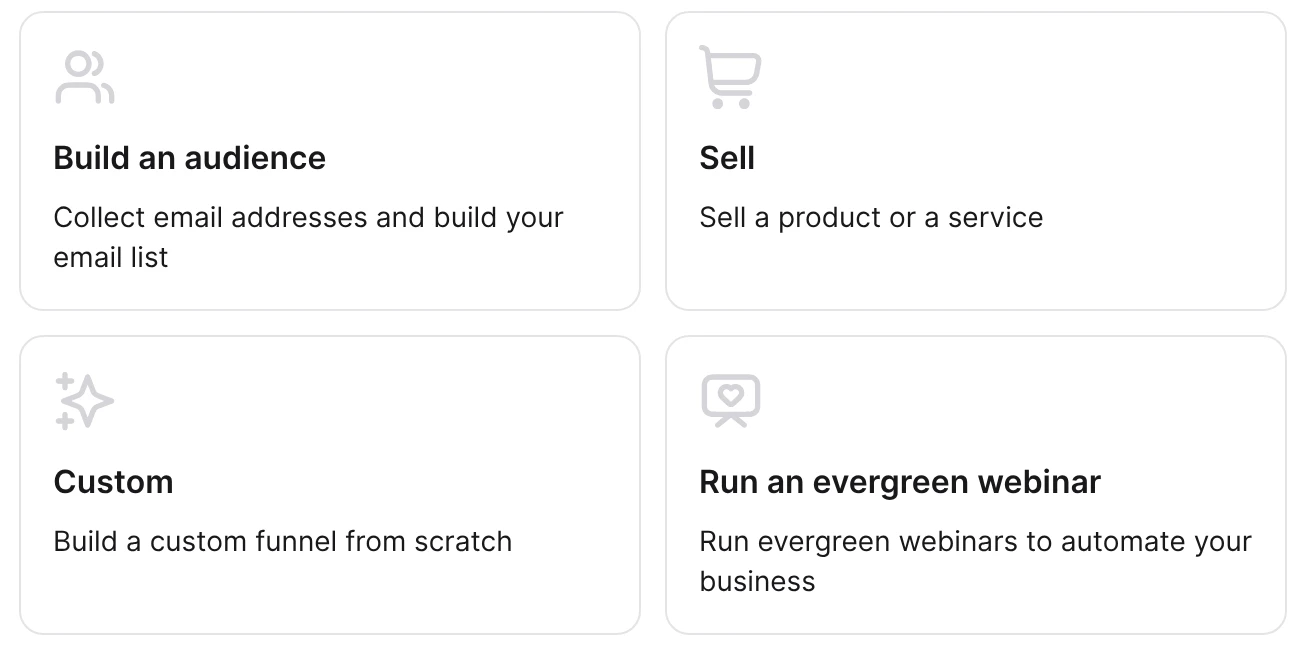
The funnel goal picker in our free test account, captured November 20, 2026.
- An automation rule on that page fires. Each funnel step has its own Automation Rules tab, where the trigger “Funnel step form subscribed” is pre-filled with that funnel and page. The actions we were offered were: subscribe to or unsubscribe from a campaign, send an email or SMS, add or remove a tag, move the contact to a pipeline stage, enroll in a course or course bundle (or revoke access), grant community access, and send a webhook.
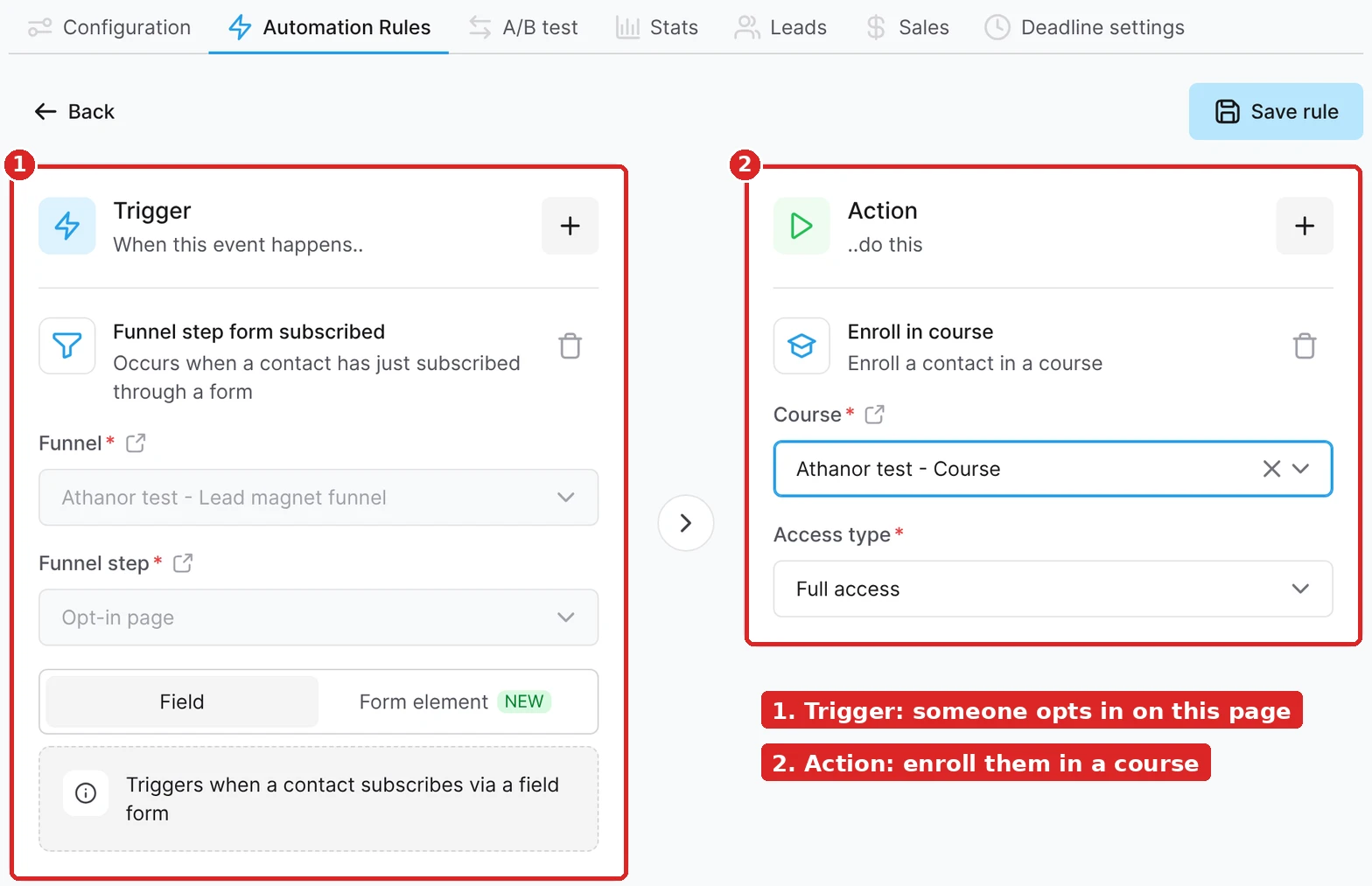
An example rule on a funnel opt-in page in our test account, captured November 20, 2026. We did not save it. The coach marks are ours.
- The email campaign (a timed sequence) nurtures the contact over several days and links to a sales page.
- The contact buys through an order form step. The purchase can trigger more rules: grant access to the course, add a “customer” tag, or remove them from the sales sequence.
- Optional upsell steps after checkout offer a related product with one click.
If you understand “page → rule → tag → campaign → purchase → access,” you understand most of Systeme.io. Our Systeme.io funnel setup guide walks through building this exact flow.
What you see when you sign up
Signing up takes an email address, a confirmation link, and a short form for your name and password (with a reCAPTCHA). Your first and last name become the default sender name for emails and the display name in courses and communities, so use your brand name if you prefer. Logging in later from a new device asked us for a code sent by email.
The dashboard groups everything under one top menu:
| Menu | What is inside |
|---|---|
| CRM | Contacts, tags, pipelines, and the booking calendar |
| Sites | Websites, sales funnels, link-in-bio pages, and blogs |
| Emails | Newsletters (broadcasts), campaigns (sequences), and email statistics |
| SMS | SMS templates and statistics (sending requires your own Twilio account) |
| Automations | Automation rules and workflows |
| Assets | Courses, communities, physical products, coupons, and files |
| Sales | Orders, transactions, subscriptions, affiliate invoices, and your affiliate program |
Two setup details are worth knowing before you build:
- Verify a sender email first. In our new account, the campaign form had no sender to choose until we added and verified an address. Even the login email was not offered.
- Your default subdomain is based on your email address. Funnels, courses, and pages start on an automatically generated
systeme.iosubdomain derived from the address you signed up with. If you would rather not show that address, connect a custom domain before you share any links.
Systeme.io terms worth knowing
| Term | What it means in Systeme.io |
|---|---|
| Funnel | A sequence of pages (steps) with one goal, such as collecting emails or selling a product |
| Step | One page inside a funnel: squeeze page, sales page, order form, upsell, thank-you page |
| Contact | Anyone who has given you their email; plan limits count contacts |
| Tag | A label on a contact (for example “lead-checklist” or “customer”) used to segment and trigger automations |
| Campaign | An automated email sequence sent on a schedule after someone joins |
| Newsletter | A one-off broadcast email to a selected group of contacts |
| Automation rule | A trigger plus actions on a page or event; the free plan includes one |
| Sender email | A verified address that campaigns and newsletters are sent from |
| Sub-account | A separate workspace for another brand or client, unlimited on every plan |
| Workflow | A multi-step automation with conditions, for more complex logic than a single rule |
| Order bump / upsell | An add-on offer on the checkout, and a one-click offer after purchase |
Most Systeme.io tutorials assume you know the difference between a campaign and a newsletter, and between a rule and a workflow. With these terms, the help center and templates become much easier to follow.
Systeme.io pricing at a glance
Plans published on Systeme.io’s pricing page, rechecked on November 20, 2026:
| Plan | Monthly | Annual | Contacts | Main limits |
|---|---|---|---|---|
| Free | $0 | $0 | Up to 2,000 | 3 funnels, 1 email campaign, 1 automation rule, 1 course, 1 custom domain |
| Startup | $17/month | $170/year | Up to 5,000 | 10 funnels, 10 campaigns, 10 automation rules, 5 courses |
| Webinar | $47/month | $470/year | Up to 10,000 | 50 funnels, 100 campaigns, 100 rules, 20 courses, evergreen webinars |
| Unlimited | $97/month | $970/year | Unlimited | Unlimited funnels, rules, courses, and domains |
Annual billing is priced as two months free. A quote-based Custom plan is also offered for teams. Inside the account, the My plan page shows your live usage against every limit:
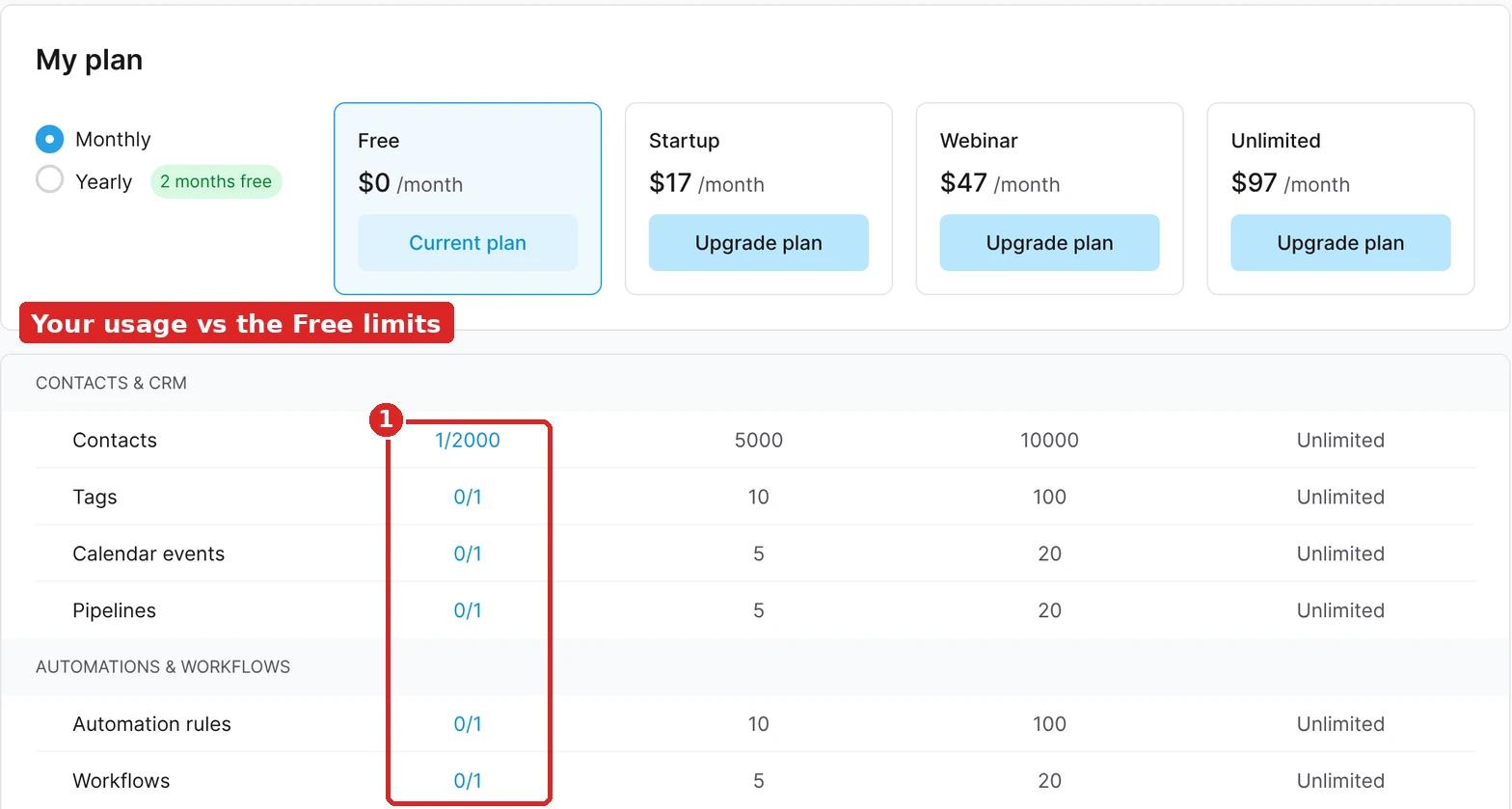
The My plan page in our free test account, captured November 20, 2026. The coach marks are ours.
Systeme.io’s FAQ states 0% transaction fees when you sell through supported gateways such as Stripe or PayPal. You still pay the gateway’s own processing fees. For limits that only show up once you build, see what the Systeme.io free plan actually includes and the full Systeme.io pricing guide.
What the free plan is good for
The free plan is unusually usable. With 2,000 contacts and three funnels you can run a real lead magnet, a sales page, and a small course. The constraint people hit first is usually one automation rule or one email campaign: that is enough to tag new subscribers and send one welcome sequence, but not enough to also handle purchases, course access, and sequence changes automatically. The in-app plan page also shows a $10,000 sales revenue limit on the Free plan, which the public pricing table does not list, so a successful first launch can force the upgrade too. Most creators upgrade to Startup when they start selling, not when they run out of contacts. Our free vs paid comparison covers the upgrade moment in detail.
Who Systeme.io is for
- First-time creators selling a course, ebook, template pack, or coaching offer, who want one bill and no integrations.
- Coaches and consultants who need a booking-adjacent funnel, email follow-up, and a simple client area.
- Affiliate marketers building email lists and bridge pages. Systeme.io’s free plan makes it a common starting point.
- Budget-conscious creators moving off expensive stacks such as Kajabi or ClickFunnels. See Systeme.io vs Kajabi and Systeme.io vs ClickFunnels.
Who should choose something else
- Agencies managing many client businesses. Systeme.io does include unlimited sub-accounts and a white-label option, but its tooling is built for creators selling their own offers. Agencies that need two-way SMS and calling, a shared client inbox, reputation management, and client rebilling should look at HighLevel.
- Course businesses that need advanced learning features such as complex quizzes, certificates at scale, or compliance reporting. A dedicated course platform like Thinkific or Teachable goes deeper. See Systeme.io vs Thinkific.
- Email-first businesses with complex segmentation. If email automation is the whole business, ActiveCampaign or Kit offer more advanced logic.
- Physical-product stores. Systeme.io can sell physical goods, but catalog, inventory, and shipping are far stronger on Shopify.
Systeme.io vs separate tools: the honest trade-off
The all-in-one approach saves money and setup time, and removes the most common failure point for small businesses: broken connections between tools. The cost is less control. Page design is template-driven rather than pixel-perfect, email reporting is simpler than dedicated platforms, and you depend on one vendor for your whole funnel. For most creators under a few thousand customers, that trade is worth it. When it stops being worth it, the usual move is to keep Systeme.io for funnels and checkout and add a specialist tool for the one job you have outgrown.
Create a free Systeme.io account and build one opt-in page plus one automation rule. If that takes under an hour and feels natural, the rest of the platform will too.
FAQ
Is Systeme.io really free?
Yes. The free plan has no time limit and does not require a credit card, according to the official pricing page. It includes up to 2,000 contacts, three funnels, one email campaign, one automation rule, one course, and one custom domain, and the in-app plan page caps Free-plan sales at $10,000. Paid plans raise those limits and add features such as evergreen webinars.
Does Systeme.io take a cut of my sales?
Systeme.io’s FAQ states 0% transaction fees on sales through supported payment gateways such as Stripe and PayPal. Those gateways still charge their normal processing fees, so budget for them when pricing low-cost products. On the Free plan, the in-app plan page also caps total sales at $10,000 before you need a paid plan.
Can I host online courses on Systeme.io?
Yes. Courses and membership areas are built in, and automation rules can enroll buyers automatically after purchase. For creators whose main product is a large or highly structured course library, a dedicated course platform may offer stronger learning features.
Is Systeme.io good for beginners?
It is one of the easier all-in-ones to learn because there are fewer settings than in tools like HighLevel or ClickFunnels. Templates cover common funnels. Start with our Systeme.io getting started guide for a step-by-step first week.
Where can I read a full evaluation?
Our Systeme.io review covers features, limits, pros and cons, and who should buy it, and best Systeme.io alternatives covers what to choose if it does not fit.