MarketingGuide
HighLevel for Agencies: Can You Run Many Clients on It? (2026)
How marketing agencies use HighLevel, tested in a November 2026 trial: sub-accounts, snapshots, per-client feature limits, reselling add-ons, rebilling, SaaS Mode, and where agencies should look elsewhere.


Marketing agencies adopt HighLevel when client work outgrows a spreadsheet plus five disconnected tools. The appeal of HighLevel for marketing agencies is structural: every client gets its own workspace, you can copy a proven setup into a new client in minutes, and you can resell the platform under your own brand. Can an agency running marketing for many clients rely on HighLevel? Yes, if you set it up as intended: Unlimited ($297 a month) removes Starter’s three-sub-account cap, snapshots clone a working setup into each new client, and per-client limits keep accounts separate. The weak spots are usage costs that grow with every client’s texts and calls, and the setup time a new account needs. This guide is about that agency use case specifically. It combines HighLevel’s official pricing and help documentation with a hands-on test: on November 18, 2026 we started a Starter trial, created a client sub-account for a fictional appliance repair business, and walked through the screens an agency owner uses every week. For a feature-by-feature evaluation, read our HighLevel review; for plan numbers and usage rates, see HighLevel pricing.
What we did not test: we did not buy phone numbers, connect a domain, send messages, publish workflows, or activate SaaS Mode, so this guide does not measure deliverability or client-facing results.
How an agency runs clients in HighLevel
The agency account is the control room. From there you create sub-accounts, one per client, and each holds that client’s contacts, pipelines, calendars, funnels, conversations, and automations. Your team can switch into any sub-account; the client only sees their own. Starter includes three sub-accounts on the official pricing page, and Unlimited and Agency Pro remove that cap.
In practice an agency’s week looks like this:
- Onboard a new client by creating a sub-account and loading a snapshot (a saved template of funnels, workflows, pipelines, and calendars).
- Customize the last mile: the client’s domain, phone number, email sending, logo, and offer.
- Run lead flow: ads or forms feed the pipeline, workflows send instant replies and reminders, and replies land in one Conversations inbox.
- Report and retain: pipeline stages, booked appointments, and review requests show the client what the retainer is producing.
- Bill usage: SMS, calls, email, and AI usage are charged from a wallet and, on Unlimited and above, can be rebilled to the client.
If you want a plain-language overview of these terms first, start with What is HighLevel?.
Hands-on: the agency screens that matter
Snapshots turn one good setup into many clients
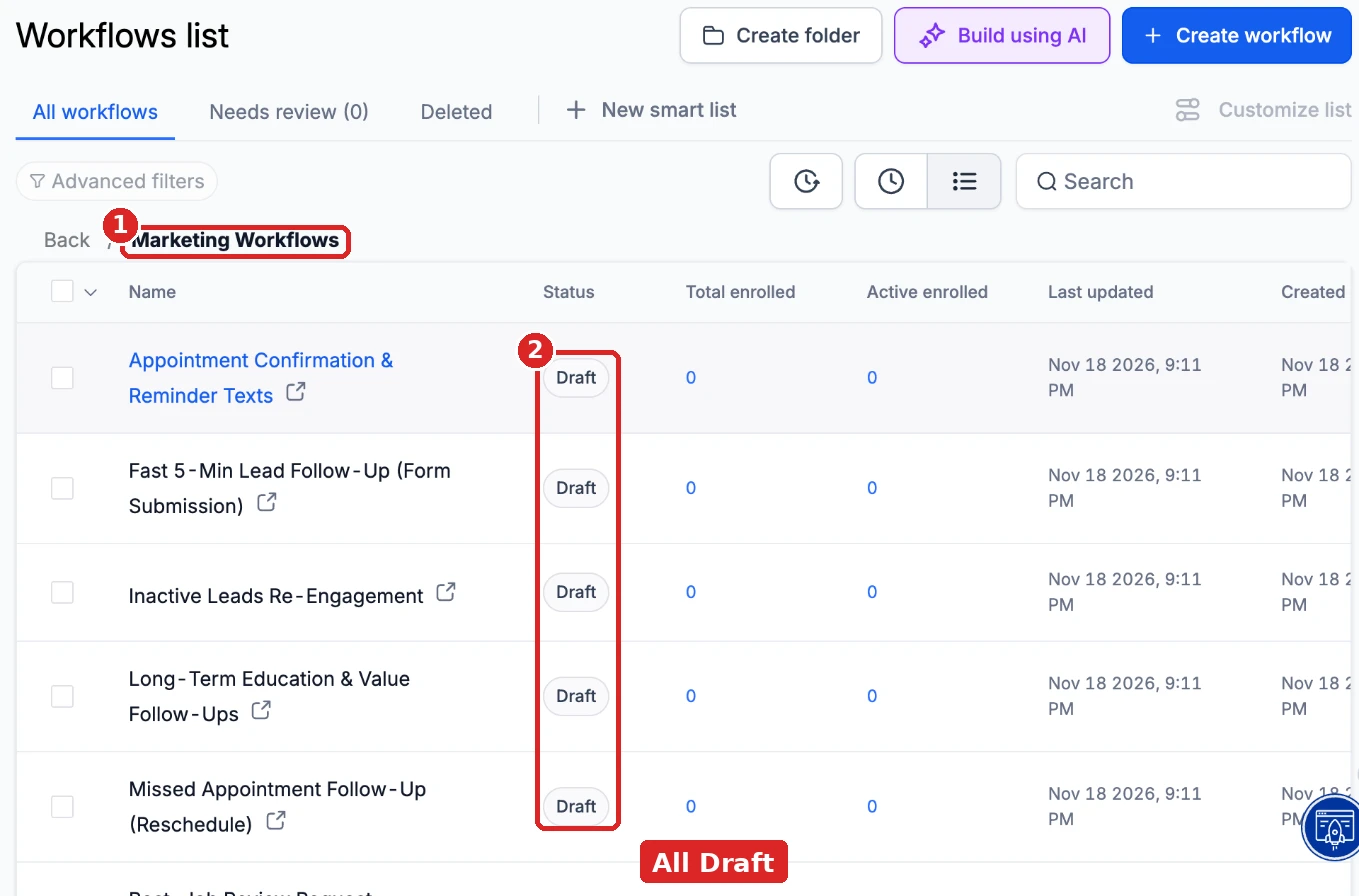
Our trial offered 123 ready-made snapshot templates by industry. Loading the Appliance Repair Shop snapshot gave the new sub-account a full “Marketing Workflows” folder: appointment confirmations and reminder texts, a five-minute lead follow-up, inactive lead re-engagement, long-term nurture, missed appointment rescheduling, and a post-job review request. Every one arrived as a Draft. For agencies that is the right default, because it forces a review of each trigger and message before anything reaches a client’s customers, but it also means “load snapshot” is the start of onboarding, not the end. The real leverage comes when you save your own polished client build as a snapshot and reuse it.
Per-client features and limits
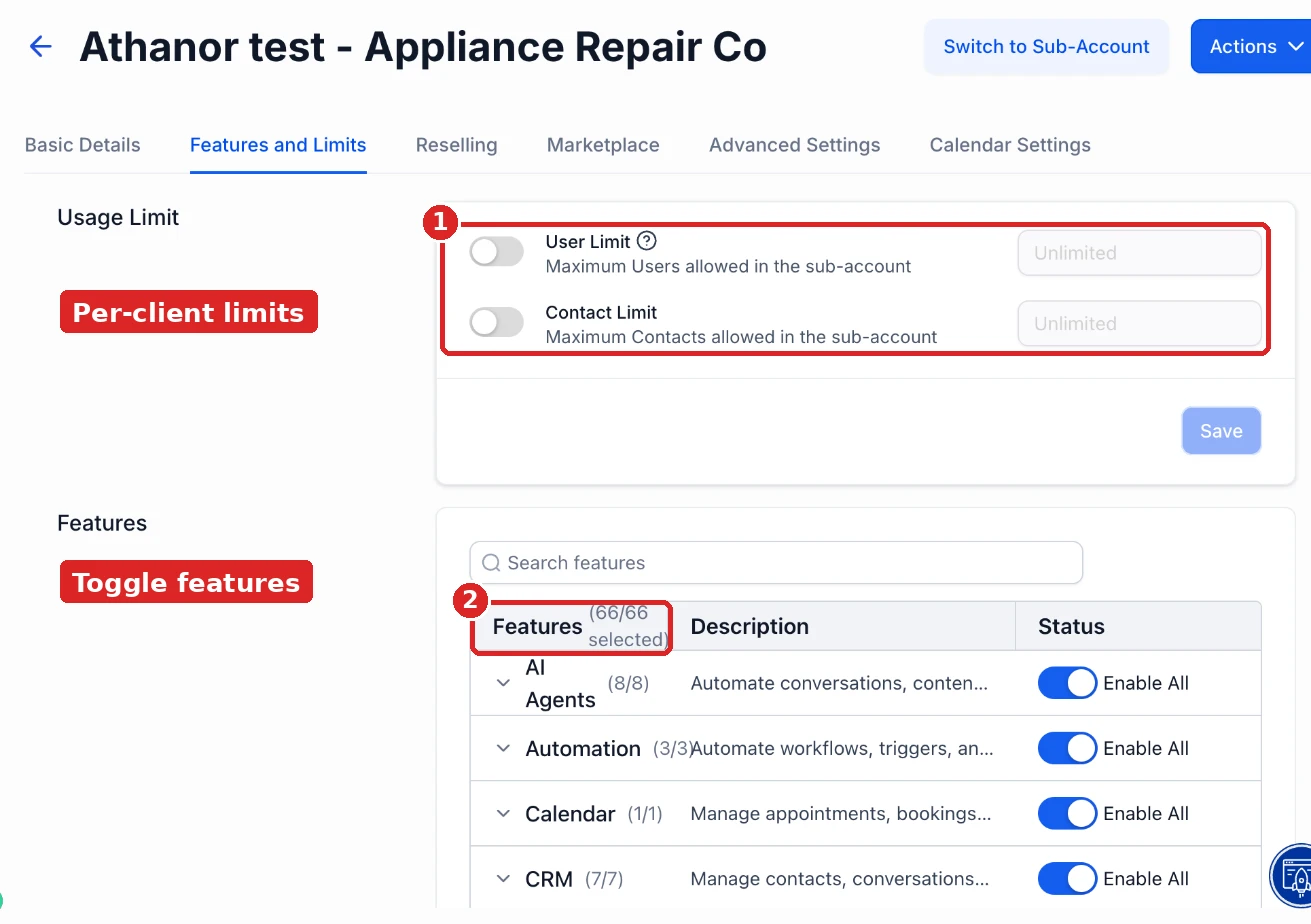
Each sub-account has a Features and Limits tab. You can cap the number of users and contacts for that client and switch whole feature groups on or off (66 features in our account, grouped as AI Agents, Automation, Calendar, CRM, and more). This is how agencies package tiers: a “lead follow-up” client might see only CRM, conversations, and calendars, while a full-service client gets funnels, AI, and reputation tools. Keeping the menu small also cuts support questions from clients who click into tools they do not use.
Reselling add-ons with your own margin
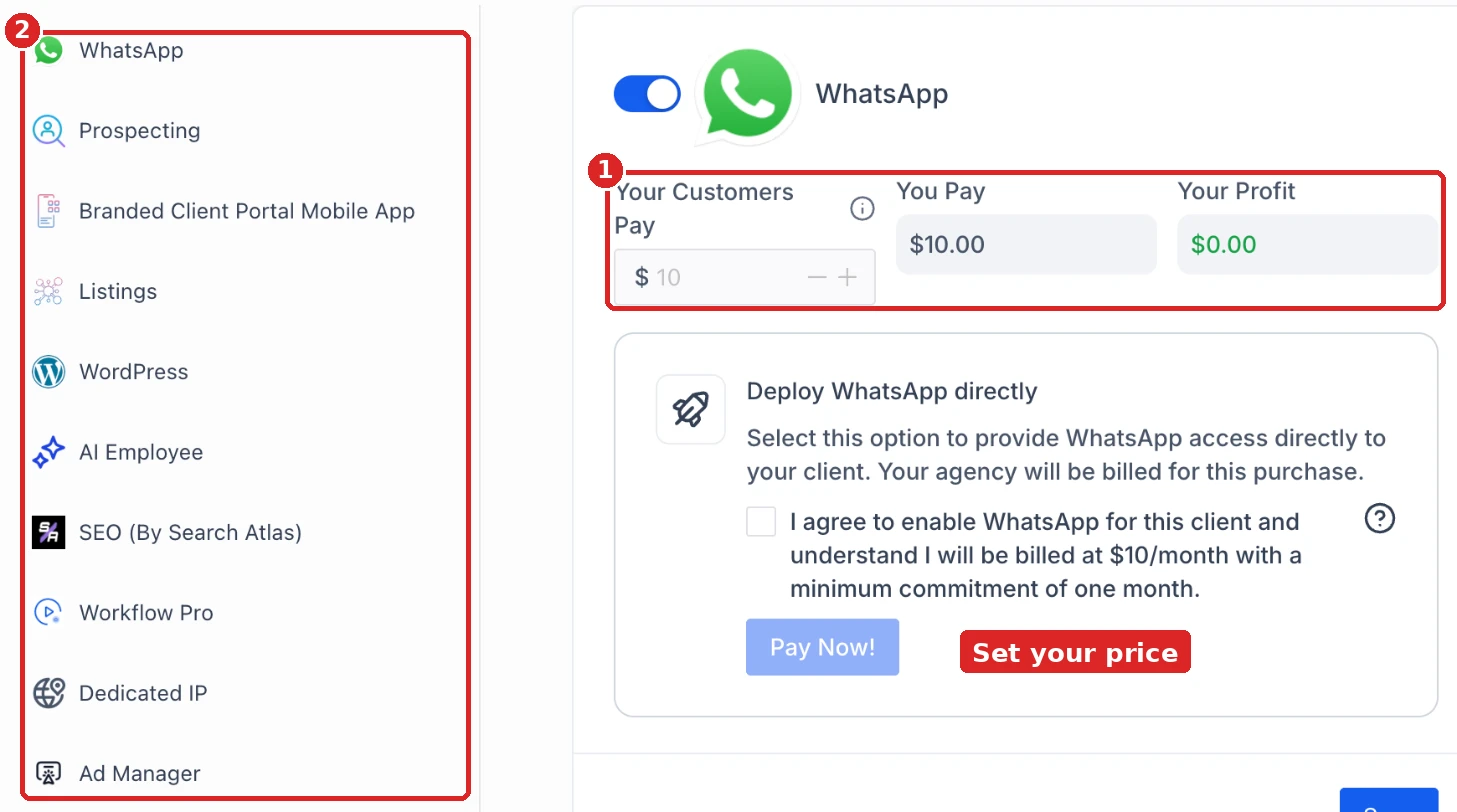
The Reselling tab lists add-ons you can offer each client, including WhatsApp, Prospecting, the Branded Client Portal Mobile App, Listings, WordPress hosting, AI Employee, SEO, Workflow Pro, Dedicated IP, and Ad Manager. For WhatsApp, the screen showed what you pay ($10.00 per month), what your customer pays, and your profit. We left the agreement box unticked, because ticking it bills the agency. The point for agency owners: add-ons can be a margin line rather than a pass-through cost, as long as you set the customer price deliberately.
Watching usage across clients
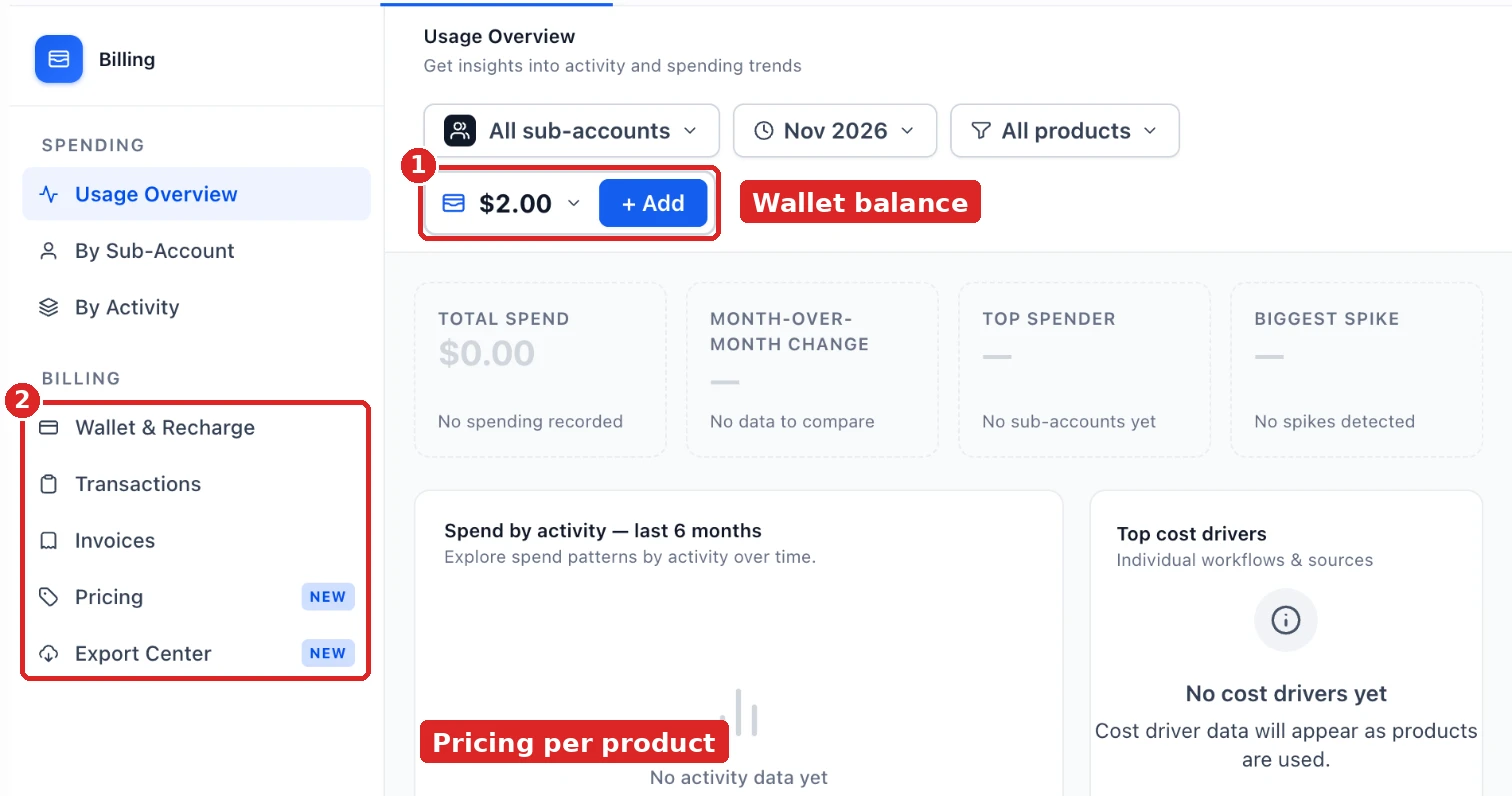
Usage is tracked in the agency Wallet & Transactions area, filterable by sub-account, month, and product, with “By Sub-Account” and “By Activity” views. An in-app Pricing page listed 67 metered products, with outbound SMS at $0.0083 per segment in the US. That is small per message and meaningful at volume, which is why agencies past a handful of messaging-heavy clients usually want rebilling on Unlimited or Agency Pro.
Which HighLevel plan fits an agency
| Agency stage | Plan (official pricing) | Why |
|---|---|---|
| Testing the model with 1 to 3 clients | Starter, $97/month | Three sub-accounts and the core toolset |
| Growing past three clients | Unlimited, $297/month | Unlimited sub-accounts, rebill usage at cost, basic API |
| Selling software access, not just services | Agency Pro, $497/month | SaaS Mode, rebilling with markup, advanced API |
Annual billing on each plan equals ten months of the monthly price. The usual mistake is upgrading to Agency Pro for SaaS Mode before you have a sales plan for it; Unlimited covers most service agencies. The full breakdown, including add-ons such as AI Employee and the white-label mobile app, is in our HighLevel pricing guide, and HighLevel white label covers branding and resale.
Where HighLevel falls short for agencies
Not a specialist in every lane. Agencies with clients who need advanced e-commerce, strict compliance workflows, or enterprise sales operations may still buy point solutions alongside HighLevel.
Usage fees stack. The subscription is not the full bill. SMS, email volume, phone numbers, AI products, and resellable add-ons are separate charges, and the agency wallet is charged first unless you rebill.
Onboarding takes real time. Snapshots arrive as drafts, funnels need a connected domain, and phone and email sending need setup and registration. Agencies that skip documentation repeat the same mistakes for each client; our onboarding checklist gives the order that avoids rework.
Overkill without clients. If you have one brand and no client accounts, Systeme.io or a similar all-in-one may pay off faster. Compare on HighLevel vs Systeme.io.
Migration friction. Moving mature automations from HubSpot, ActiveCampaign, or older funnel tools is a project. Weigh the best HighLevel alternatives if migration cost exceeds the consolidation benefit.
Who it is for
HighLevel fits marketing agencies, SMMA operators, and consultants delivering done-for-you CRM, funnels, and messaging for several clients, especially when white-label portals and resold add-ons are part of the offer. It fits Unlimited-plan agencies past three clients who need rebilling without upgrading every quarter, and Agency Pro shops actively selling software-style access rather than just considering it.
It is a weak fit for single-brand businesses with no client sub-accounts and for teams that need one deep specialty more than a wide toolkit. If you are still choosing between CRMs, our best CRM for agencies guide ranks the options by agency workflow.
Start a HighLevel 14-day trial and build one pilot sub-account that mirrors your most common client stack. Review every snapshot workflow, connect a test domain, and only then roll the setup out to other clients. Set a reminder before day 14: the trial charges the card on file automatically.
FAQ
How many clients can I run on HighLevel Starter?
Three sub-accounts on the published Starter plan at $97 per month. A fourth client requires Unlimited at $297 per month on the official pricing page, which also lets you rebill usage such as SMS and calls to each client at cost.
Do clients need to know they are on HighLevel?
White-label branding is designed to present your agency, not HighLevel, on the desktop app, and a branded client mobile app is available as a paid add-on. Confirm the current white-label scope for your plan tier in HighLevel’s documentation before promising it in a proposal.
Can I limit what each client sees?
Yes. Each sub-account has a Features and Limits tab where you can switch feature groups on or off and set user and contact limits. In our November 2026 trial, a new sub-account had all 66 features enabled by default, so trim the menu before inviting the client.
Do snapshots work immediately after loading?
Not entirely. In our test, every workflow from the loaded snapshot arrived as a draft, one needed a pipeline stage re-selected, and the funnel required a connected domain before it could go live. Budget review time for each new client.
How does HighLevel compare to Systeme.io for agencies?
Systeme.io is built for solo creators launching their own offers; HighLevel is built for multi-client delivery with sub-accounts, rebilling, and white-label branding. See HighLevel vs Systeme.io for a side-by-side comparison of plans and features.