MarketingGuide
Systeme.io for Digital Product Launches (2026): Checkout, Order Bumps, Upsells, and Launch Sequences
How to launch ebooks, templates, and digital products on Systeme.io: Sell funnels, order forms, order bumps, one-click upsells, coupons, sales limits, deadline funnels, and launch emails, with verified plan limits and the Free plan's $10,000 sales cap.

Systeme.io is built for exactly the kind of launch most digital product sellers run: a waitlist or lead magnet, a short launch email sequence, a sales page, a checkout with an order bump, a one-click upsell, and automatic delivery, with 0% transaction fees on every plan. Ebooks, templates, presets, printables, and mini-courses all fit. The free plan can run a first small launch, but its single email sequence, single automation rule, and $10,000 sales cap mean most serious launches belong on Startup at $17 a month. This guide walks through a launch in the order you will build it, with screenshots from a free account we tested on November 20, 2026, and the limits that matter on launch day.
Is Systeme.io a good fit for digital product launches?
It fits well if you:
- Sell digital products such as ebooks, templates, presets, guides, or mini-courses.
- Launch to an email list with a time-limited offer, then sell evergreen afterwards.
- Want bumps, upsells, coupons, and delivery automation without add-on apps.
- Want affiliates to promote your launch, with commissions set per offer.
It is a weaker fit if you:
- Sell a large catalog of products with complex variants; a store platform such as Shopify fits better.
- Need marketplace discovery (Gumroad, Etsy) rather than selling to your own audience.
Start free on Systeme.io and build your launch funnel before your launch date.
The launch toolkit and its limits
| Launch job | Systeme.io feature | Free | Startup ($17/mo) | Webinar ($47/mo) |
|---|---|---|---|---|
| Build anticipation | Waitlist or lead magnet funnel | 3 funnels | 10 funnels | 50 funnels |
| Launch emails | Email campaigns + newsletters | 1 sequence | 10 sequences | 100 sequences |
| Checkout | Order form (Sell funnel) | Included | Included | Included |
| Raise order value | Order bumps / one-click upsells | 1 / 1 | 10 / 10 | 100 / 100 |
| Launch discounts | Coupon codes | 1 | 10 | 50 |
| Urgency | Deadline funnels | Included | Included | Included |
| Test variants | A/B tests | 1 | 10 | 50 |
| Deliver and tag | Automation rules | 1 | 10 | 100 |
| Revenue | Sales cap (in-app plan page) | $10,000 | Unlimited | Unlimited |
Building the sales funnel
Create a funnel with the Sell goal. In our test, it created two steps, an Order form and a Thank you page. Add a sales page before the order form and an upsell after it with Add step; the step types include sales pages, order forms, upsells, downsells, and thank-you pages.
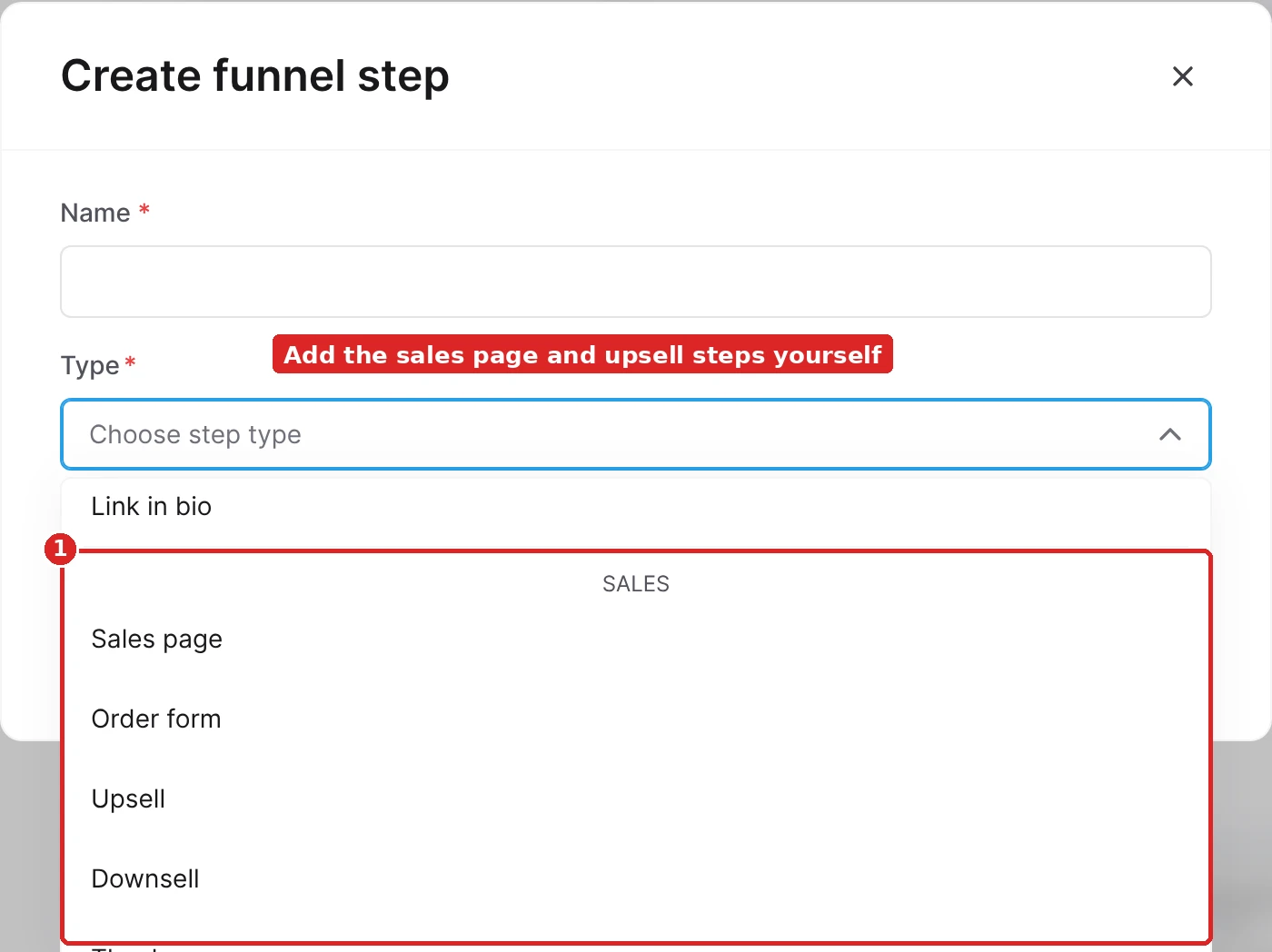
Adding steps to a Sell funnel in our test account, captured November 20, 2026. The coach mark is ours.
The order form is where the launch offer lives. First choose the offer type, digital product (which covers courses, bundles, tags, communities, and events) or physical product; until you do, the order bump stays greyed out. The same screen sets coupons, an optional sales limit to cap units (useful for founding-member pricing), and an affiliate commission for this offer.
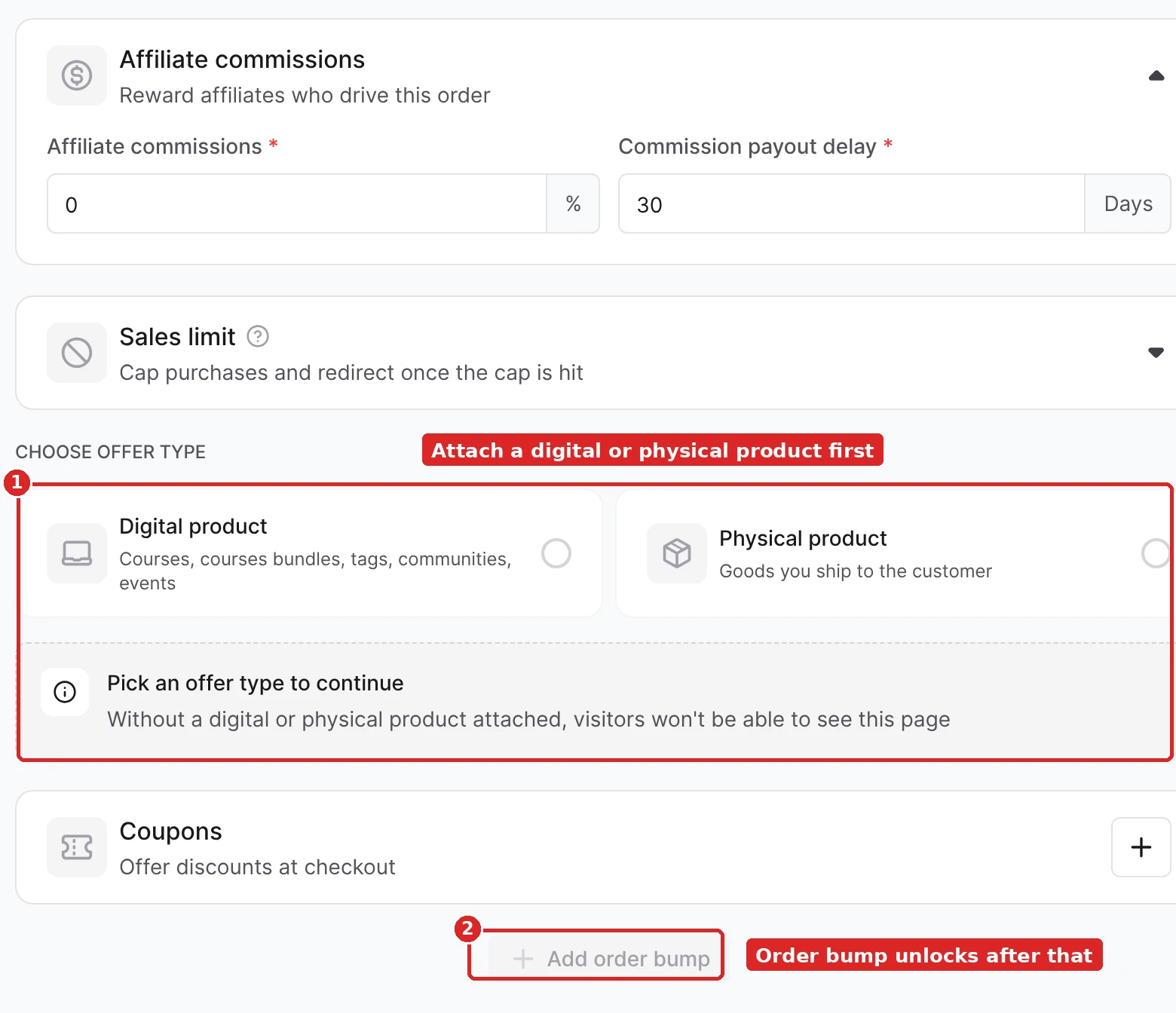
Order form settings in our test Sell funnel, captured November 20, 2026. The coach marks are ours.
Before any of this works, connect a payment gateway. Stripe and PayPal are the usual choices, and our account also listed Mollie, GoCardless, Razorpay, Flutterwave, Mercado Pago, Xendit, and others. Our funnel setup guide shows every screen.
A seven-day launch plan
| Day | Action | In Systeme.io |
|---|---|---|
| −14 to −1 | Grow a waitlist | Opt-in funnel; rule adds a “waitlist” tag |
| 1 | Open cart | Newsletter to the waitlist; sales page live; launch coupon active |
| 2 | Teach and show proof | Launch sequence email |
| 3 | Answer objections | Launch sequence email; FAQ on the sales page |
| 4 | Mid-launch bonus | Order bump or bonus announced |
| 5 | Case study or demo | Launch sequence email |
| 6 | 24 hours left | Deadline funnel countdown; reminder email |
| 7 | Close cart | Final emails; coupon expires; switch to evergreen |
After the launch, a purchase rule tags buyers as customers and removes them from the launch sequence, so they stop receiving pitches for something they own. For copy and structure, read how to build a product sales funnel and how to create an upsell funnel. To keep selling after the launch, see how to create an evergreen funnel.
Which plan your launch needs
| Launch size | Plan | Why |
|---|---|---|
| First test launch, small list | Free | One sequence, one bump and upsell; watch the $10,000 cap |
| Real launch with waitlist, launch, and buyer sequences | Startup ($17/mo, $170/yr) | 10 sequences, 10 rules, 10 coupons, unlimited revenue |
| Webinar-led launches | Webinar ($47/mo) | Evergreen webinars, 100 rules, 50 A/B tests |
| Multiple products and brands | Unlimited ($97/mo) | No limits |
A launch needs at least three sequences (waitlist, launch, and buyer onboarding) and several rules, which is why Startup is the realistic minimum. See Systeme.io pricing and free vs paid plans.
Try Systeme.io free and upgrade to Startup before your cart opens.
Product ideas that launch well on Systeme.io
- Ebooks and guides: see how to sell ebooks online.
- Templates and toolkits: see how to sell templates online.
- Mini-courses: hosted as a course with unlimited students on paid plans.
- Bundles: a digital offer can grant a course bundle or community access.
For the platform comparison, our best platforms for selling digital products guide covers marketplaces and store builders too.
Limits and launch-day risks
- The $10,000 Free cap. A good launch can exceed it in days; upgrade before cart open.
- Sender verification. You cannot create a campaign until a sender address is verified, so do it weeks before launch.
- Sending holds. Some users report sending holds or account reviews on new accounts. Warm up with a few broadcasts, mail only opted-in contacts, and keep a contact export.
- Gateway testing. Run a test purchase through the exact offer type, including the bump and upsell, before launch day.
FAQ
Can I sell digital products on Systeme.io?
Yes. Order forms sell digital products, and automation rules deliver them by email, course access, or community access. Every plan includes 0% transaction fees, order bumps, upsells, coupons, and deadline funnels. The Free plan caps total sales at $10,000, so most sellers launch on Startup.
Does Systeme.io have order bumps and one-click upsells?
Yes. Free includes one order bump and one upsell, Startup ten of each, and Webinar one hundred. The order bump is configured on the order form after you choose the offer type, and upsells and downsells are added as separate funnel steps.
How do I create urgency for a launch?
Use deadline funnels, which the pricing page lists on every plan, to tie an offer to a deadline, and countdown timers on the sales page to make it visible. Confirm how the deadline is calculated in the funnel settings before launch. Combine them with a launch coupon and a final 24-hour email to close the cart clearly.
Which Systeme.io plan do I need for a product launch?
Startup at $17 a month, or $170 a year, is the practical minimum because a launch needs several email sequences and automation rules and should not risk the Free plan’s $10,000 sales cap. Use Webinar if your launch is built around an evergreen webinar.
The bottom line
Systeme.io gives digital product sellers a complete launch kit, including checkout, bumps, upsells, deadline funnels, launch emails, and affiliate commissions, without paying a cut of sales. Build and test the funnel on Free, then move to Startup before your cart opens. For the bigger picture, read our Systeme.io review and how to sell digital products without a tech stack.
Create your free Systeme.io account and set your launch date.