MarketingGuide
Systeme.io for Consultants (2026): Lead Funnels, Booking, Pipelines, and Follow-Up
How independent consultants use Systeme.io to win clients: authority lead magnets, a booking calendar for strategy calls, Kanban CRM pipelines, automated follow-up, and paid engagements, with verified plan limits and where a full CRM fits better.


Independent consultants rarely lose deals because of a bad proposal; they lose them because follow-up slips. Systeme.io helps by putting the whole pipeline in one account: an authority lead magnet, a nurture sequence, a booking calendar for strategy calls, a Kanban CRM pipeline to track each prospect, and checkout for paid audits or retainers. It starts free, and Startup at $17 a month covers most solo consultancies, with five pipelines, five booking event types, and ten automation rules. It is not a full sales CRM with calling, quotes, and team inboxes, so firms with several salespeople should compare HubSpot or HighLevel. This guide maps a consulting workflow to Systeme.io’s features and limits, verified in a free account on November 20, 2026.
Is Systeme.io a good fit for consultants?
It fits well if you:
- Are a solo consultant or a small firm selling audits, workshops, projects, or retainers.
- Win clients through expertise content: a guide, assessment, webinar, or newsletter.
- Want booking, follow-up, and payment for paid diagnostics without stitching tools together.
- Also sell scalable products such as a course or templates alongside services.
It is a weaker fit if you:
- Run a sales team that needs call logging, quotes, deal forecasting, and shared inboxes; see HubSpot vs Systeme.io.
- Need proposals and e-signatures built in; you will still use a separate proposal tool.
Open a free Systeme.io account and build your strategy-call funnel today.
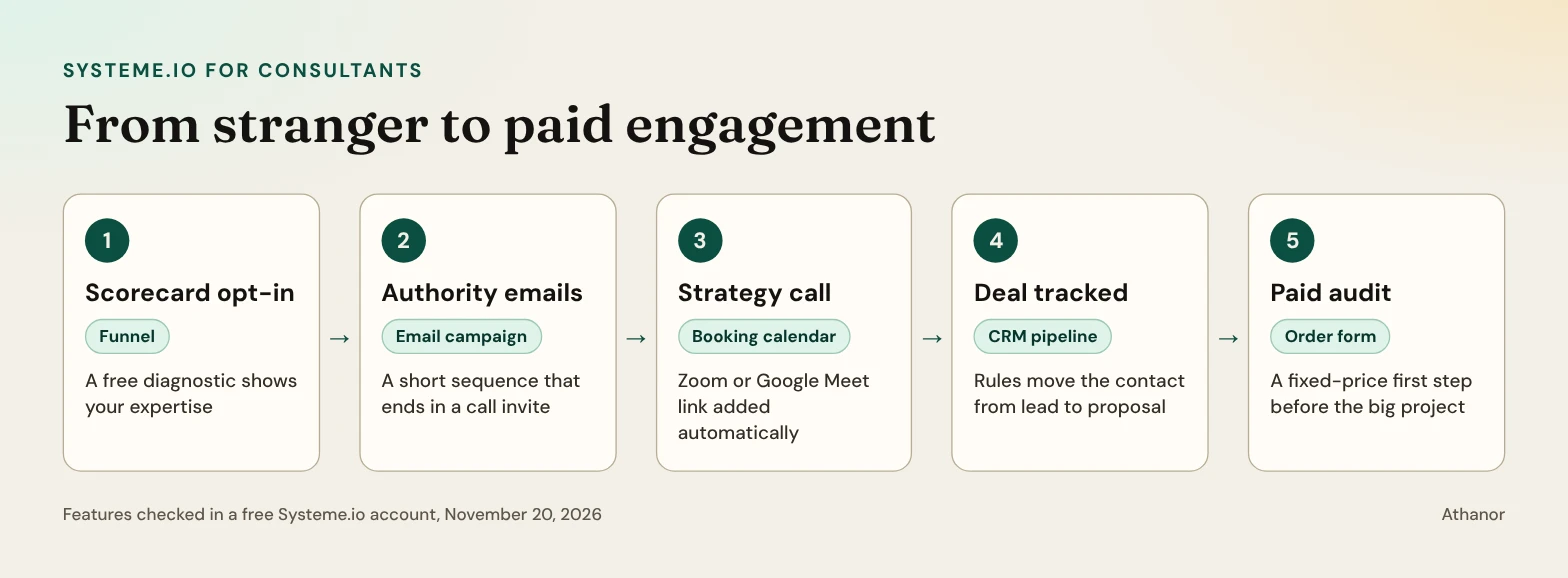
Illustration by Athanor, based on features checked in a free Systeme.io account on November 20, 2026.
The consulting setup in Systeme.io
| Consulting job | Systeme.io feature | Free plan | Startup ($17/mo) |
|---|---|---|---|
| Show expertise | Opt-in funnel with a guide, checklist, or assessment | 3 funnels | 10 funnels |
| Stay top of mind | Email sequence + unlimited newsletters | 1 sequence | 10 sequences |
| Book strategy calls | Booking calendar (free or paid events) | 1 event type | 5 event types |
| Track prospects | Kanban CRM pipelines with custom stages | 1 pipeline | 5 pipelines |
| Sell paid diagnostics | Order form with coupons and order bump | Included | Included |
| Automate follow-up | Rules and visual workflows | 1 rule, 1 workflow | 10 rules, 5 workflows |
| Connect other tools | Webhooks, API, Google Sheets, Zoom | Included (API 30 requests/min) | Included (60/min) |
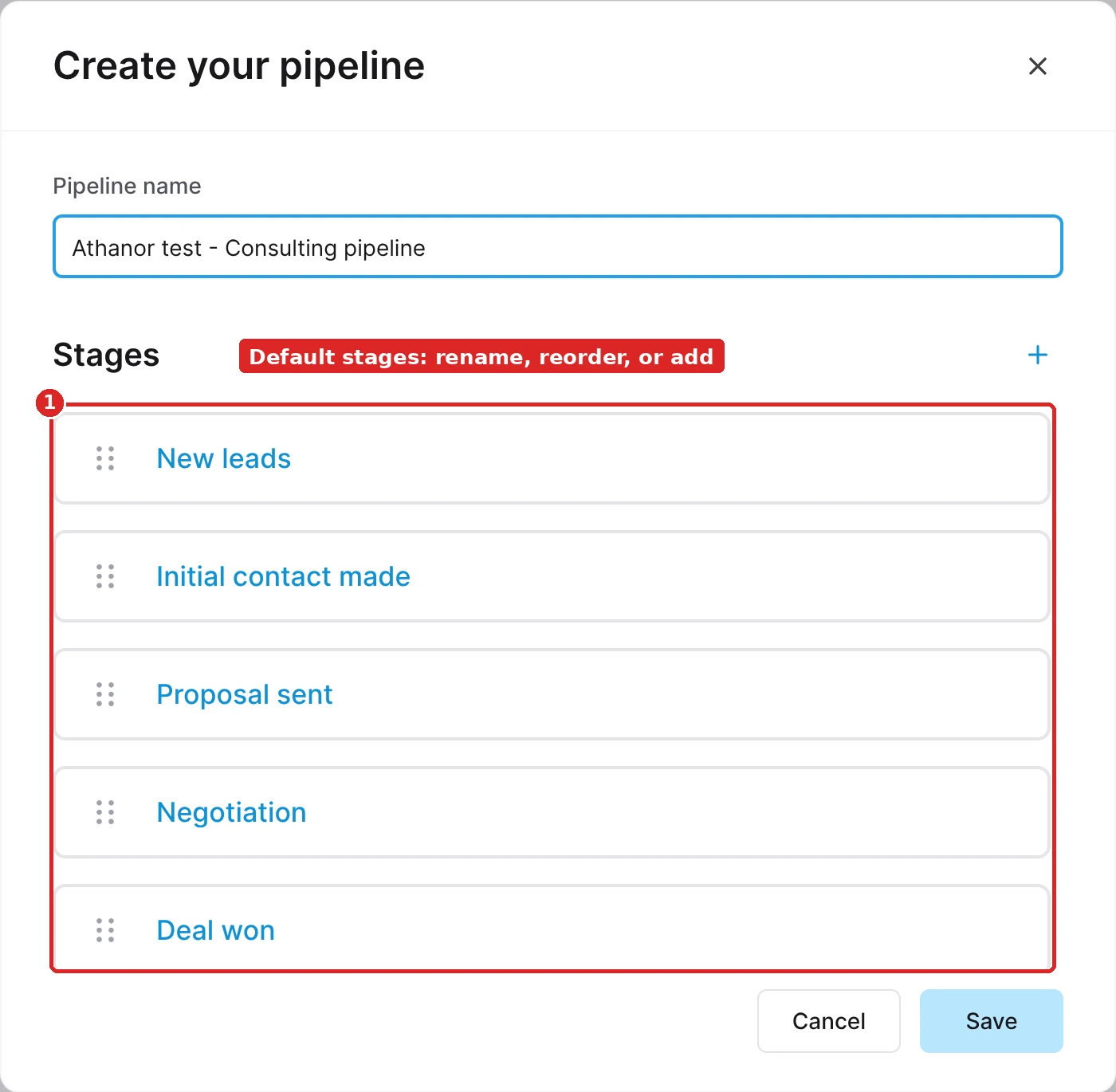
Creating a pipeline in our test account, captured November 20, 2026. The coach mark is ours.
Systeme.io’s pipelines are Kanban boards with custom stages. A new pipeline starts with sensible sales stages (New leads → Initial contact made → Proposal sent → Negotiation → Deal won / Deal lost) that you can rename, reorder, or extend. Automation rules can move a contact to a pipeline stage, add tags, and send emails when something happens. In our test account, the actions available on a rule were:
- Subscribe to or unsubscribe from a campaign; send an email or SMS
- Add or remove a tag; add to a pipeline stage
- Enroll in or revoke a course or community
- Send a webhook to another tool, such as your proposal or invoicing software
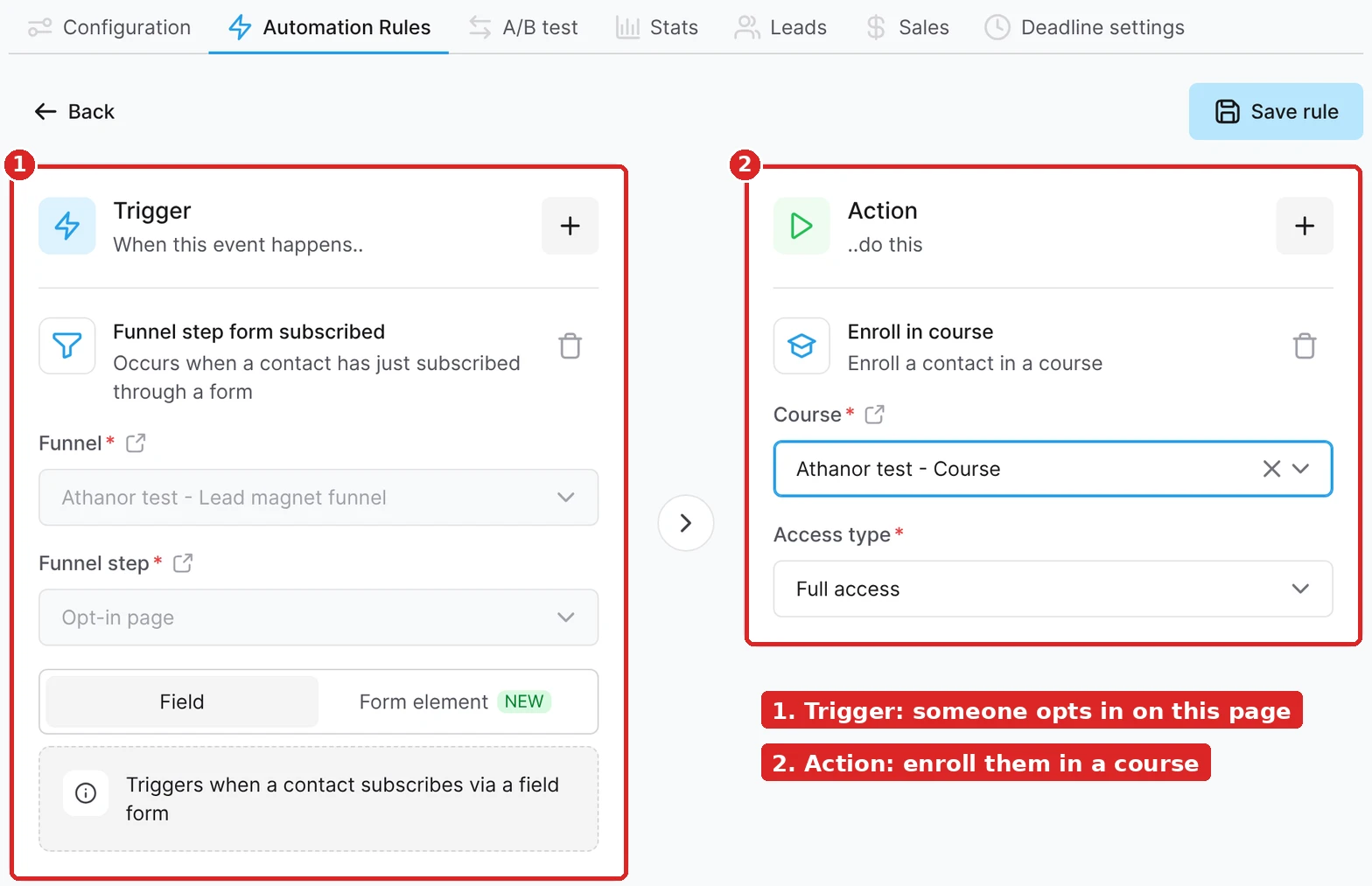
An automation rule on a funnel opt-in page in our test account, captured November 20, 2026. Consultants would typically choose “Add to a pipeline stage” or “Subscribe to campaign” as the action. We did not save it. The coach marks are ours.
Which Systeme.io plan consultants need
| Stage | Plan | Why |
|---|---|---|
| Testing positioning, few prospects | Free | One lead funnel, one sequence, one pipeline, one call type |
| Steady pipeline, free call + paid audit | Startup ($17/mo, $170/yr) | 5 event types, 5 pipelines, 10 rules and sequences |
| Webinar-led lead generation | Webinar ($47/mo) | Evergreen webinars, 20 pipelines, 100 rules |
| Several practice areas or brands | Unlimited ($97/mo) | No limits, 100 pipelines, unlimited API requests |
On Free, the single automation rule and single event type are the first limits a consultant hits, and the in-app plan page caps Free-plan sales at $10,000, which one paid project can exceed. Full limits are in our Systeme.io pricing guide.
Start free on Systeme.io and move to Startup before you take your first paid engagement through it.
Step by step: a consulting client funnel
- Pick one problem you solve and create a lead magnet that diagnoses it, such as a scorecard or checklist.
- Build the opt-in funnel and set its button to “Submit form”; our funnel setup guide shows where.
- Write a short authority sequence: the result, a case study, a framework, and an invitation to a strategy call.
- Create a booking event for strategy calls and connect Zoom or Google Meet. When we created a test event, Systeme.io offered individual or group events, locations of Zoom, Google Meet, in person, phone, or an external link, booking rules (minimum notice, cancellation deadline, daily limit, and buffer time), and two email reminders by default. SMS reminders need your own Twilio account.
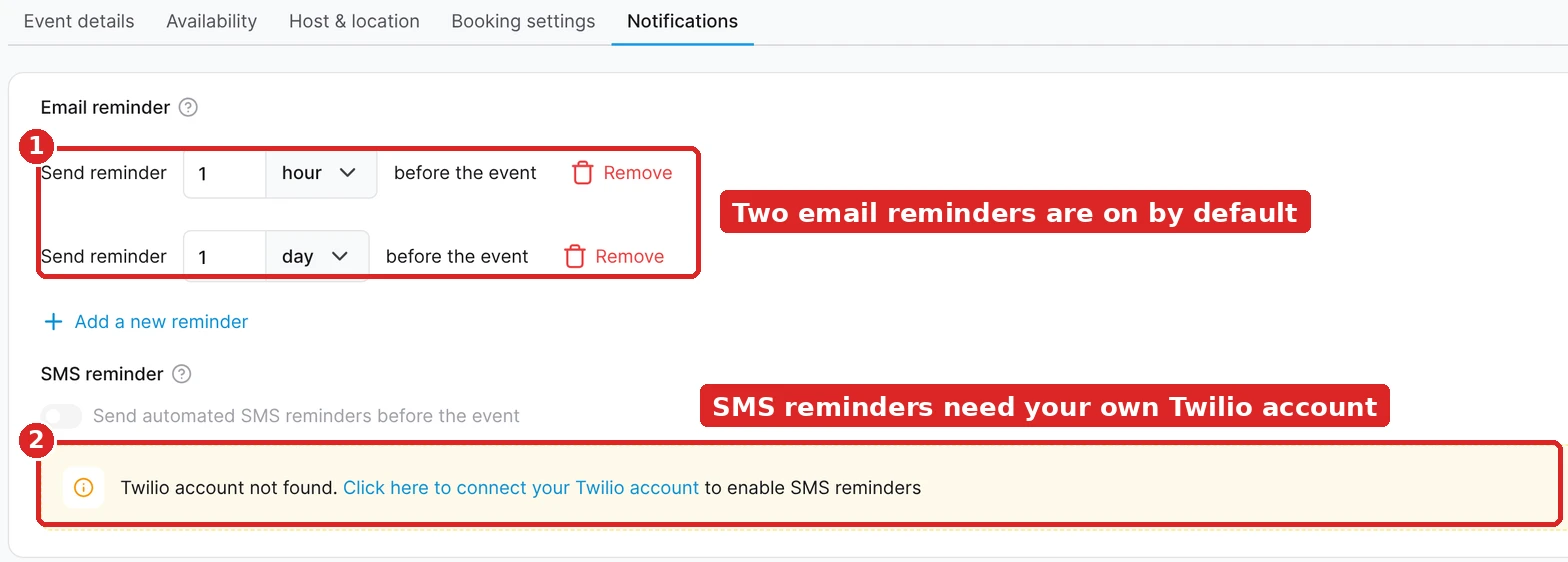
Reminder settings for a test booking event, captured November 20, 2026. The coach marks are ours.
- Set up a pipeline with stages from lead to won, and rules that move contacts when they opt in or book.
- Offer a paid diagnostic through an order form, so serious prospects self-qualify before a proposal.
- Send proposals from your usual tool, triggered by a webhook if you want it automated.
For the strategy behind these steps, read how to build a consulting funnel, how to sell consulting services online, and marketing automation for consultants.
Example: a paid strategy audit funnel
Here is how a solo marketing consultant might run one offer end to end on Startup:
| Step | What happens in Systeme.io |
|---|---|
| A prospect downloads a “Marketing Scorecard” | Opt-in rule subscribes them to a four-email authority sequence and adds them to the Lead stage |
| Email 3 invites them to a free 20-minute call | The booking event connects Zoom; a “Meeting scheduled” rule moves them to Call booked |
| On the call, you recommend a paid audit | They buy the audit through an order form with a templates bundle as an order bump |
| The purchase fires a rule | They move to Audit sold, get an onboarding email, and a webhook notifies your project tool |
Every step uses features in Startup, at $17 a month. On Free, you would run out of automation rules after the first step.
Limits and workarounds for consultants
- No proposals or contracts. Use a dedicated proposal tool and connect it with a webhook.
- No calling or shared inbox. Pipelines track deals, but calls and email threads happen elsewhere.
- One pipeline on Free. Use stages carefully, or upgrade once you separate services from product sales.
- Payments for large projects. High-value invoices may suit your accounting software better than a funnel checkout; use Systeme.io for audits, workshops, and fixed-price packages.
Systeme.io vs alternatives for consultants
| Platform | Best for | Entry price |
|---|---|---|
| Systeme.io | Solo consultants who market with content and funnels | $0, then $17/mo |
| HubSpot CRM | Sales-led firms needing a full CRM | Free CRM, paid tiers above |
| HighLevel | Consulting agencies with SMS, calling, and client accounts | $97/mo |
| ClickFunnels | Funnel-heavy consultants with a larger budget | $97/mo |
See HubSpot vs Systeme.io, HighLevel vs Systeme.io, and our CRM for small businesses guide.
FAQ
Is Systeme.io good for consultants?
Yes, for solo consultants and small firms that win work through content and follow-up. It combines lead funnels, email sequences, a booking calendar, Kanban pipelines, and checkout for paid diagnostics in one account, from $0 or $17 a month. Sales-led firms needing calling and proposals should add or choose a full CRM.
Does Systeme.io have a CRM?
It has a lightweight CRM: contacts with tags, and Kanban pipelines with custom stages that automation rules can update. Free includes one pipeline, Startup five, Webinar twenty, and Unlimited one hundred. It does not include calling, quotes, or forecasting like a dedicated sales CRM.
Can clients book and pay for a consultation in Systeme.io?
Yes. The booking calendar lets clients pick a time and can take a deposit or full payment at booking, with confirmation emails and Zoom or Google Meet links. Free includes one event type, so most consultants use Startup to offer both a free call and a paid session.
Can Systeme.io connect to my proposal or accounting tool?
Yes, through webhooks and the public API. An automation rule can send a webhook when a contact reaches a stage or buys, and native integrations include Google Sheets, Google Calendar, Zoom, and Google Meet. API limits rise from 30 requests a minute on Free to unlimited on Unlimited.
The bottom line
Systeme.io gives an independent consultant a dependable follow-up machine: content to attract, emails to nurture, a calendar to book, and a pipeline that never forgets a prospect. Start on the free plan, move to Startup before your first paid engagement, and pair it with your proposal tool. For the full picture, read our Systeme.io review.
Create your free Systeme.io account and put your next strategy call on autopilot.